

 Joomla hacked?
 Joomla 6 migration
 Security update PHP & YOOtheme
 Blog
 References
 About us
 Prices
 Contact

If you look after ten, fifty or a hundred Joomla sites, you do not want to log into every backend. Site management tools show all sites in one place, install updates, trigger backups and raise the alarm when a site goes down. We looked at nine of them. We installed Akeeba Panopticon ourselves and connected it to a Joomla 6.2 test site. We installed four connectors on Joomla 6.2.0, read their code, measured the load time and uninstalled them again. For everything else we rely on what the vendors publish, always with a source.
Key points
- Akeeba Panopticon is free and runs on your own server. Remote updates worked straight away in our test. Backups and the file scanner, however, need the Pro editions of Akeeba Backup and Admin Tools (€75 together in the first year, unlimited sites).
- mySites.guru costs £19.99 a month, no matter how many sites. The data is stored in London.
- BackupMonkey from Germany checks whether Akeeba backups can actually be restored. The package linked from the Joomla Extensions Directory would not install on Joomla 6; the current connector 4.9.1 did.
- No connector slowed the site down measurably: the home page loaded as fast with each of the four tested connectors as without.
- For none of the services does the US vulnerability database NVD list an entry. Akeeba publishes Panopticon security advisories openly on GitHub: three since 2023, all fixed.
The candidates
All of them work the same way: a small extension, the connector, sits on every Joomla site. A central interface – the dashboard – uses it to read versions and send jobs such as “install update”. The difference is where the dashboard runs: at a vendor on the internet or on your own server.
| Service | Type | Version | Joomla 6 | 10 sites / month | 50 sites / month |
|---|---|---|---|---|---|
| Akeeba Panopticon | self-hosted, open source (AGPLv3) | 2.4.0 of 22 Oct 2026 | connector tested on 6.2.0 | €6.25 | €6.25 |
| mySites.guru | service, Blue Flame Digital Solutions (UK) | – | own connector according to vendor | €23.92 | €23.92 |
| Watchful | service, Watchful LLC | client 3.0.14 of 14 Oct 2026 | tested on 6.2.0 | €16.32 | €81.58 |
| BackupMonkey | service from Germany | connector 4.9.1 of 23 Jul 2026 | tested on 6.2.0 | €6.00 | €16.50 |
| UpdateKing | service, Odenwald-IT-Service UG | 2.3.3, in the JED since May 2026 | JED: J4–J6 | €5.00 | on request |
| CMS Inspect | service, Revibe Digital | agent 1.4.63, in the JED since Aug 2026 | tested on 6.2.0 | €8.92 | €44.58 |
| SiteOps | service, monitoring only | 1.5.1, in the JED since Mar 2026 | JED: J4–J6, description: 4.x/5.x | €35.00 | €79.00 |
| Securitycheck Pro Control Center | Joomla component on your own site | 4.0.5 of 15 Oct 2026 | JED: J3–J6 | €7.50 | €7.50 |
| YourSites | self-hosted, GWE Systems (UK) | – | JED: J3–J6 | €10.97 | €10.97 |
Base prices excl. VAT, without add-ons; dollars and pounds at the European Central Bank rate of 2 Nov 2026 (€1 = $1.1216 = £0.8358). For Panopticon the price of the two Akeeba Pro licences is included, since there are no backups without them. Not tested: the Windows client JManager and the Joomla Toolkit in Plesk. According to Plesk’s forum, the toolkit supports Joomla 6 since version 3.0.10 but still installs new sites with Joomla 5.
Disclosure: we use mySites.guru and Akeeba Backup ourselves for our maintenance clients and pay for them like any other customer. For this comparison we only read data in mySites.guru and changed nothing. Nobody paid to be mentioned.
Setup
Panopticon is a standalone PHP application, not Joomla. It needs PHP 8.3 or later, a MySQL or MariaDB database and a cron job that runs every minute. The installer has 5 steps: requirements, database, first user, cron, done. After the cron step Panopticon spends up to 3 minutes measuring how long a cron run may take on your server. Then you install the connector on each Joomla site, create the API token in the backend and enter address and token in Panopticon.
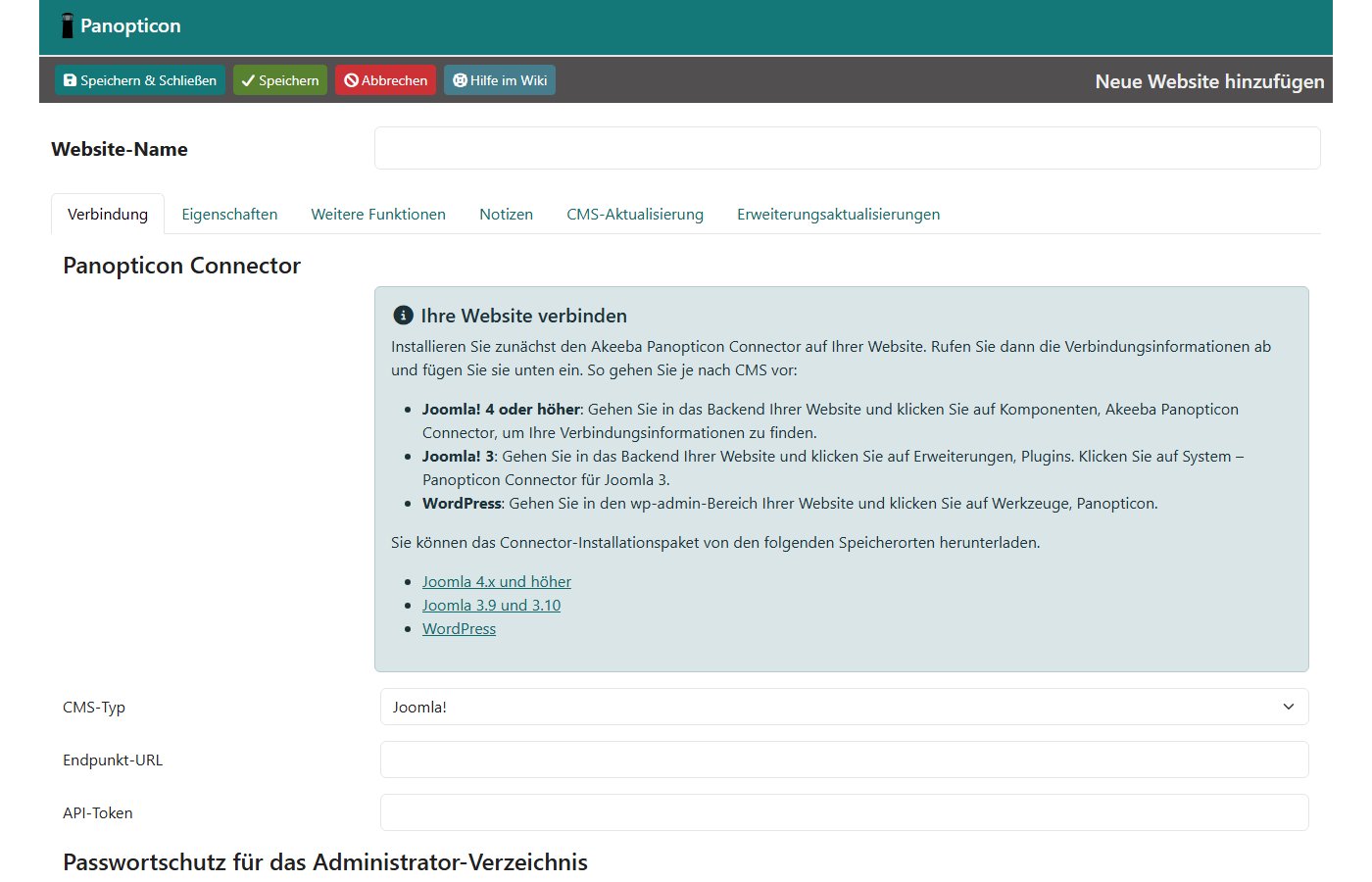
We created a dedicated Super User for Panopticon instead of using a person’s token. We recommend that for every service: if someone leaves the team, the connection stays, and Joomla’s action log shows what the service did.
With the hosted services you create an account, install the connector and store a key. We did not use these dashboards ourselves because we created no test accounts. The connectors of mySites.guru, UpdateKing and SiteOps are only available after signing in, so we did not install them.
The connector: what it may do on your site
The connector is the sensitive part. Whoever controls the dashboard or the key can install software on every connected site. Four connectors could be downloaded without an account. We installed each of them on a fresh Joomla 6.2.0 site, read the code and removed them again.
| Panopticon 1.2.0 | Watchful 3.0.14 | BackupMonkey 4.9.1 | CMS Inspect 1.4.63 | |
|---|---|---|---|---|
| Installs on Joomla 6.2.0 | without problems | without problems | without problems | without problems |
| New files | 117 | 45 | 62 | 28 |
| Parts | component, 3 plugins | component | library, component, plugin | component, system plugin |
| How the service signs in | Joomla API token of a Super User | signature with a secret key | signature with a secret key | connector fetches jobs itself |
| Installs packages from an address named by the dashboard | yes (can be switched off) | yes | no, updates only | only from 5 fixed servers |
| One-click backend login | no | not in the client | no | yes |
| Runs on every page load | system plugin, only acts on errors in API requests | no | no | yes, system plugin |
What we noticed:
- BackupMonkey: the Joomla Extensions Directory links to a package version 1.6.10 from October 2023. On Joomla 6.2 its installer stops and asks for the compatibility plugin; even with the plugin enabled it still stopped, and the package allows Joomla 5.9 at most. The vendor’s public update server lists version 4.9.1 from July 2026, which ran on Joomla 6.2 without problems. According to its code it suppresses Joomla’s own automated core updates while the site is connected to BackupMonkey; updates then come from the service.
- CMS Inspect, unlike the others, relies on a system plugin that runs on every request. Once the site is connected, the code asks the service for jobs every five minutes (configurable between 1 and 60) – during a normal visitor request. Without a connection we measured no difference.
- Panopticon uses Joomla’s own web services API with an API token in the header. Installing packages from the internet is allowed by default and can be switched off in the connector options.
- Watchful sends, according to its code, the list of administrators with name and email address to the dashboard, among other things. This can be switched off in the options.
Known vulnerabilities
On 3 Nov 2026 we searched the US vulnerability database NVD for all nine services and their connectors. There is no entry for any of them. None of them appears in our list of vulnerabilities in Joomla extensions 2026 with 40 CVEs either. That does not mean the connectors are flawless; it only means no vulnerability has been published.
Akeeba publishes Panopticon security advisories openly in its GitHub repository – three so far, all concerning the dashboard, not the connector: critical (October 2023, fixed in 1.0.2), critical (June 2026, login without a second factor for accounts without MFA, fixed in 2.1.0) and high (July 2026, server-side request forgery via the connection doctor and uptime monitor, fixed in 2.3.0). If you run Panopticon yourself, you also install such updates yourself. Panopticon announces new versions in the dashboard and can update itself.
Whatever service you choose: protect the dashboard accounts with a second factor, give the service its own Joomla user and remove connectors from sites you no longer look after.
Remote updates
For the test we set the version of Akeeba Backup in the test site’s database back to 10.4.0. Panopticon then showed the update to 10.5.0. One click scheduled it; on the next cron run it was installed after 6 seconds. The result appears in the site’s report.
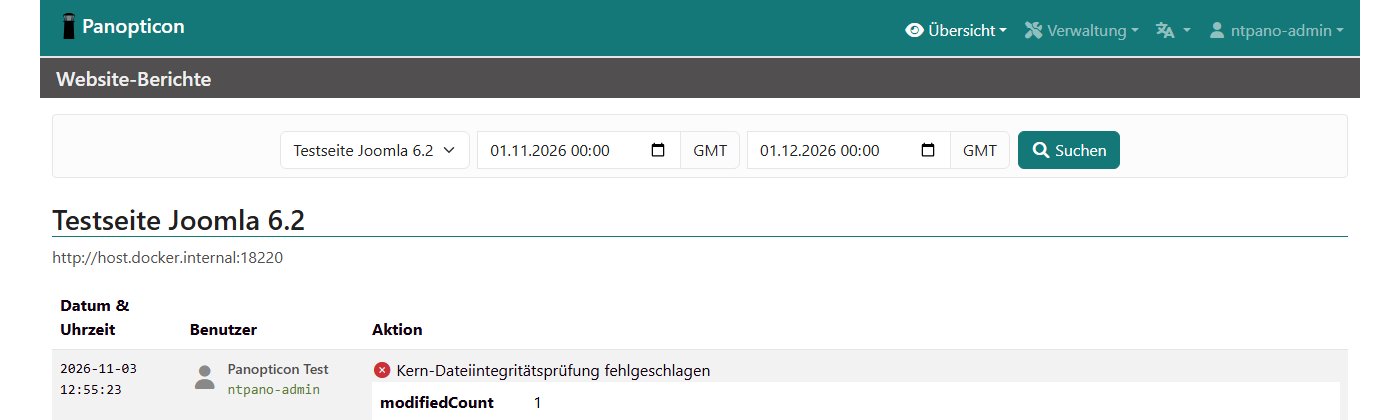
Commercial extensions with a download key are updated by all services through Joomla’s own update servers, so the key must be stored in Joomla. Panopticon shows per extension whether a key is needed and missing, and can filter for it. According to its code, Watchful appends a key stored in Joomla to the download address. BackupMonkey’s documentation says that extensions whose updates bypass the Joomla updater are not supported.
| Service | Joomla core | Extensions | Automatic |
|---|---|---|---|
| Akeeba Panopticon | yes, per site immediately or at a set time | yes (tested) | per site and per extension |
| mySites.guru | yes, major upgrades only on request | yes, also in bulk | per extension with an update site |
| Watchful | yes | yes, also in bulk | Premium only |
| BackupMonkey | yes | yes | not described by the vendor |
| UpdateKing | yes, after a confirmed backup | yes | not described |
| CMS Inspect | yes (according to code) | yes | queue, retry on failure |
Backups
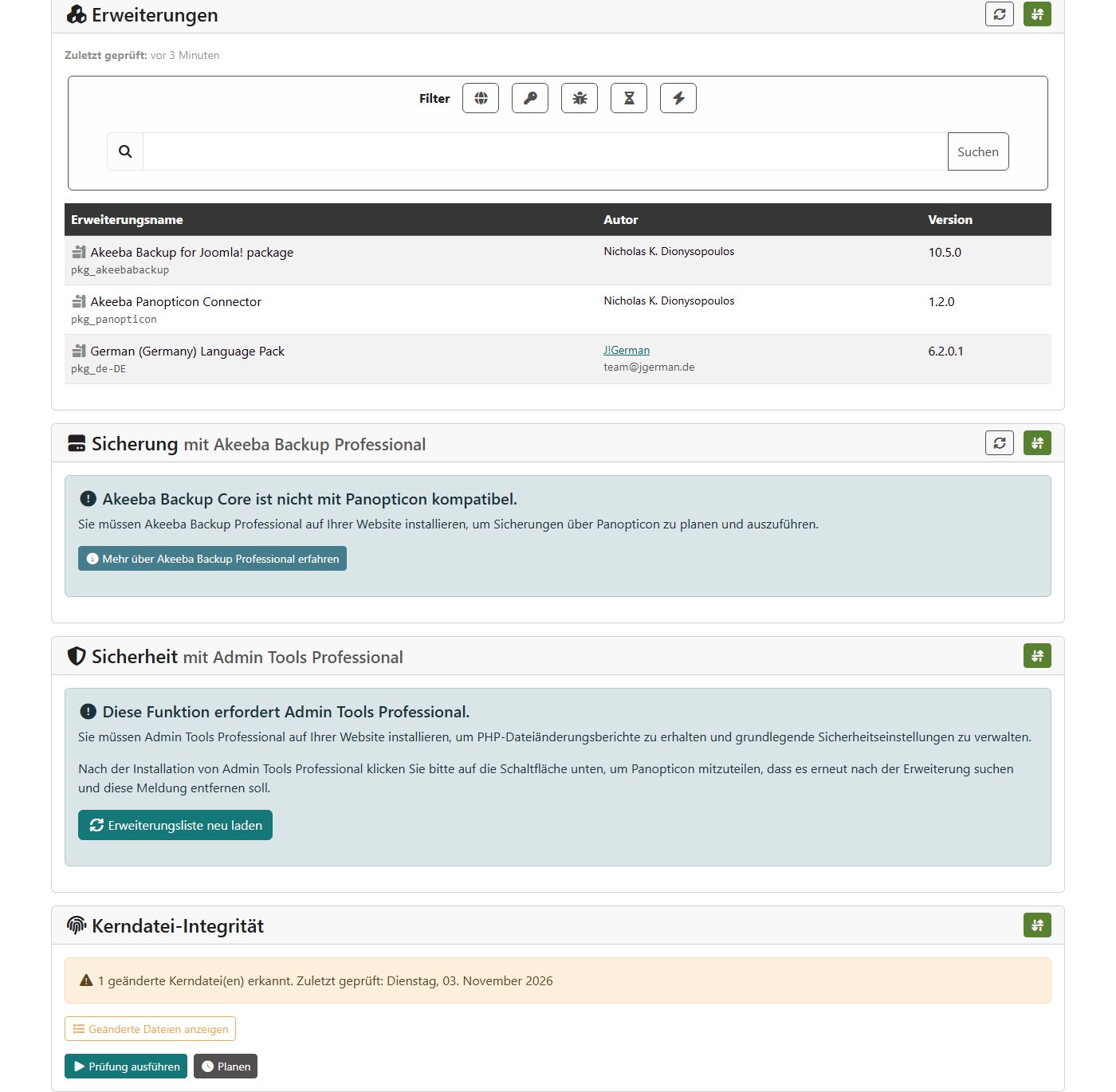
Almost all services drive Akeeba Backup on the site. The edition matters: Panopticon needs Akeeba Backup Professional. With the free Core edition 10.5.0 Panopticon reported “Akeeba Backup Core is not compatible with Panopticon” in our test, and the backup command stopped. BackupMonkey also requires Akeeba Backup Pro according to its documentation.
- BackupMonkey leaves the backups where you store them. For a restore test a copy is transferred to the vendor, unpacked and installed in a Docker container, then deleted. A test costs €0.10 up to 2 GB, the schedule €0.10 per site and month.
- mySites.guru schedules backups via Akeeba Backup and, according to its privacy policy, only receives the status, never the archive.
- Watchful offers scheduled backups; according to its privacy policy they are stored encrypted on servers in the EU, and only you hold the key.
- CMS Inspect backs up by itself: a database dump and a ZIP of selected folders, optionally to Google Drive or Dropbox. According to the code the files are kept in
administrator/cache. - UpdateKing does not back up and asks you to confirm a current backup before every core update.
Which backup extension suits your site is shown in our test of backup extensions for Joomla 6.
Monitoring
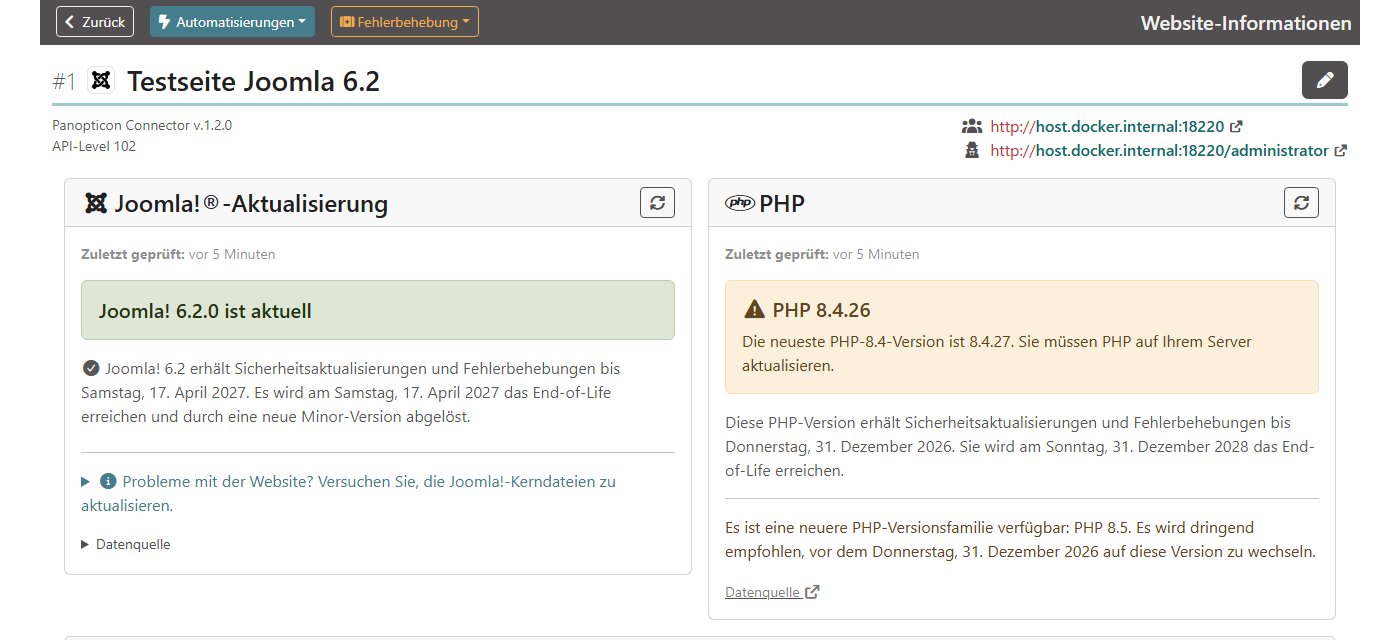
Panopticon also checks the expiry of SSL certificates daily and of domains weekly. For file changes there are two routes, both of which we tested:
- The core file check compares Joomla’s own files with the official checksums. It is free and found the Joomla file we had changed for the test.
- An additional PHP file we had put into
images/– typical for a backdoor after an attack – was not found. For that, Panopticon needs the file scanner of Admin Tools Professional.
The hosted services describe their checks as follows: mySites.guru says it checks every file in the webspace and looks for malware and backdoors. Watchful scans several times a day (Premium: eight, Free: once) and reports vulnerable extensions. BackupMonkey checks for malware and possible hacks. SiteOps also monitors DNS, SEO and performance. We did not verify these statements ourselves.
Reports and notifications
| Service | Client reports | Notifications |
|---|---|---|
| Akeeba Panopticon | action log per site, summaries by email; no PDF with your own logo found | email (editable templates), browser push |
| mySites.guru | reports with your own branding | email, also for changed files and admin logins |
| Watchful | PDF with your own logo; scheduled email reports Premium only | |
| BackupMonkey | monthly maintenance report with logo and colours, text in Markdown | email when a site goes down and comes back |
| UpdateKing | – | daily and weekly update emails |
| CMS Inspect | reports with your own branding | not described |
| SiteOps | PDF from the “Pro” plan | email; Slack, Telegram, SMS, WhatsApp from “Starter” |
Multiple users and roles
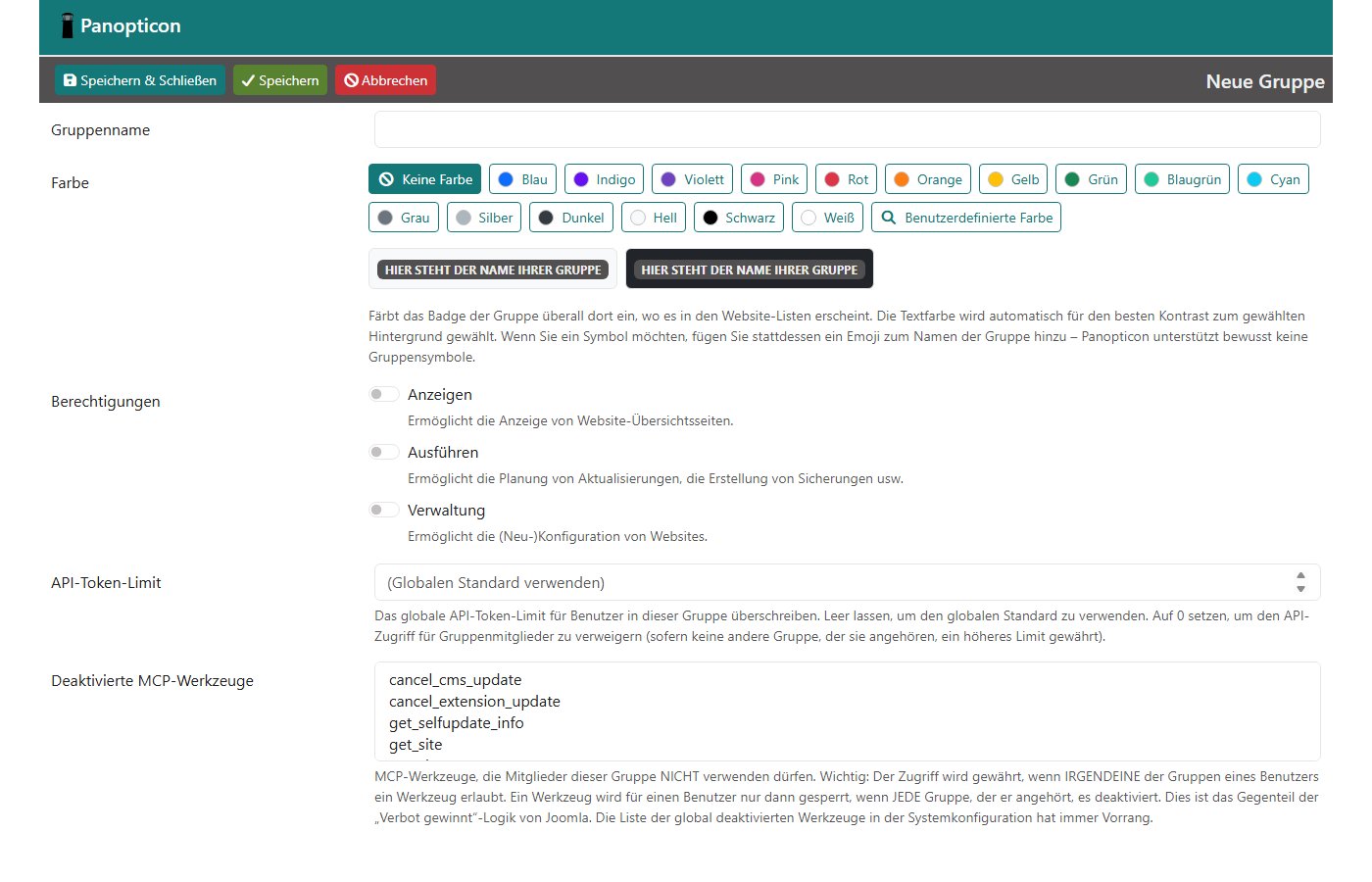
Panopticon has user groups with three levels – view, run (trigger updates and backups) and manage – per site. Clients can see their own site without changing anything. Sign-in supports a second factor (TOTP app) and passkeys. Since version 2.2 Panopticon has its own interface for AI assistants (MCP), switched off by default; per group you decide which tools are allowed.
According to its pricing page, mySites.guru allows unlimited team members with their own login and roles at no extra cost. SiteOps scales with the plan (3, 10 or unlimited). Watchful mentions an agency dashboard and single sign-on for Premium. For BackupMonkey, UpdateKing and CMS Inspect we found no information on this.
One special feature is the one-click login to the Joomla backend: mySites.guru advertises that it also bypasses the two-factor prompt of your own sites. According to its code, CMS Inspect logs in as the first active Super User. Convenient – but it turns the dashboard account into a master key for every backend.
Data protection
| Service | Servers | Data processing agreement | What leaves the site |
|---|---|---|---|
| Akeeba Panopticon | your own server | not needed | nothing to third parties; Panopticon itself regularly sends anonymous version data to Akeeba (can be switched off, on by default) |
| mySites.guru | DigitalOcean, London | applies automatically | metrics and versions; user records only when you search; AI file analysis only if enabled |
| Watchful | AWS in the EU | to be concluded in the account | versions, extensions, admin list with email (can be switched off), encrypted backups |
| BackupMonkey | Germany according to the vendor | not mentioned in the documentation | versions and extensions; a copy of the backup for restore tests |
| UpdateKing | Mittwald, Espelkamp (Germany) | yes | versions and updates |
| CMS Inspect | not stated | not stated | according to code server IP and database name, among others; files on request |
| SiteOps | not stated | not stated | availability, system, security, SEO and content data |
The EU Commission has an adequacy decision for the United Kingdom; mySites.guru mentions it explicitly. Whether you need a data processing agreement for client sites is a question for your data protection adviser – this is a technical overview, not legal advice.
Pricing
With a few sites, every service stays below €40 a month. The differences grow with the number of sites: flat prices such as mySites.guru and Panopticon stay the same, per-site prices rise. With Panopticon, the licence price comes on top of your own server and the time to look after it; from the second year the Akeeba licences cost €45. YourSites sells licences with 3, 6 or 12 months of updates; the 12-month plan is used here.
What is left after uninstalling
| Connector | Leftovers after uninstalling (measured) |
|---|---|
| Akeeba Panopticon | one empty table #__panopticon_coresums; the package contains no command to drop it |
| Watchful | nothing |
| BackupMonkey | the plugin “Extension – remotemonkey” stays installed and enabled (5 files). Without the component it does nothing, but it has to be removed by hand. |
| CMS Inspect | one marker file in the cache; according to the code, backup folders created in administrator/cache stay |
We measured without a connection to the service. What a connector changes in operation – for example Panopticon or BackupMonkey switching on Akeeba’s JSON API – also remains after removal.
Load time
We measured the test site’s home page for each connector in three rounds of 300 requests directly on the server, always alternating with the site without a connector. No connector made the site measurably slower. This is the idle state without a connection; when a service fetches data or installs an update, there is brief extra load.
Which service fits?
- You want to keep the data in-house and already use Akeeba: Panopticon. Updates, core file check and monitoring work without a licence; for backups and the file scanner you need Akeeba’s Pro products. You run a server with a cron job every minute and keep Panopticon up to date yourself.
- Many sites at a flat price: mySites.guru – the price is the same for 5 or 500 sites, the data is stored in the UK.
- You want to know whether backups can be restored: BackupMonkey with its restore test; Akeeba Backup Pro is required, and each test costs extra.
- Only updates for a few sites, servers in Germany: UpdateKing, one site free. The service has been in the JED since May 2026 and has no reviews there yet.
- Securitycheck Pro is already in use: the Control Center adds to it for little money and runs on your own Joomla site.
Rather not do it yourself?
With our Joomla maintenance contract we take care of updates for Joomla and your extensions, backups, security checks and uptime monitoring – you do not have to choose a tool or run a server.
How we tested
Test site: Joomla 6.2.0 with PHP 8.4.26 and MariaDB 10.11 in Docker, German, no content. Akeeba Panopticon 2.4.0 on PHP 8.4 with MariaDB, connector 1.2.0, Akeeba Backup Core 10.5.0. Tested on 3 Nov 2026. All packages come from the vendors’ public download addresses; we created no accounts. Load time: time to first byte of the home page, measured with curl inside the container. Leftovers: file list, tables and extensions compared before installing and after uninstalling. Prices and statements of the hosted services: vendor websites and privacy policies, retrieved on 3 Nov 2026.
More comparisons from our test lab: YOOtheme Pro or SP Page Builder, download managers for Joomla and backup extensions.
Sources: Akeeba Panopticon (releases) · Panopticon security advisories · Akeeba prices · mySites.guru pricing · mySites.guru privacy · mySites.guru features · Watchful pricing · Watchful privacy · BackupMonkey pricing · BackupMonkey documentation · UpdateKing · CMS Inspect · SiteOps pricing · Securitycheck pricing · YourSites pricing · Plesk forum on Joomla 6 · ECB reference rates


