

 Joomla hacked?
 Joomla 6 migration
 Security update PHP & YOOtheme
 Blog
 References
 About us
 Prices
 Contact

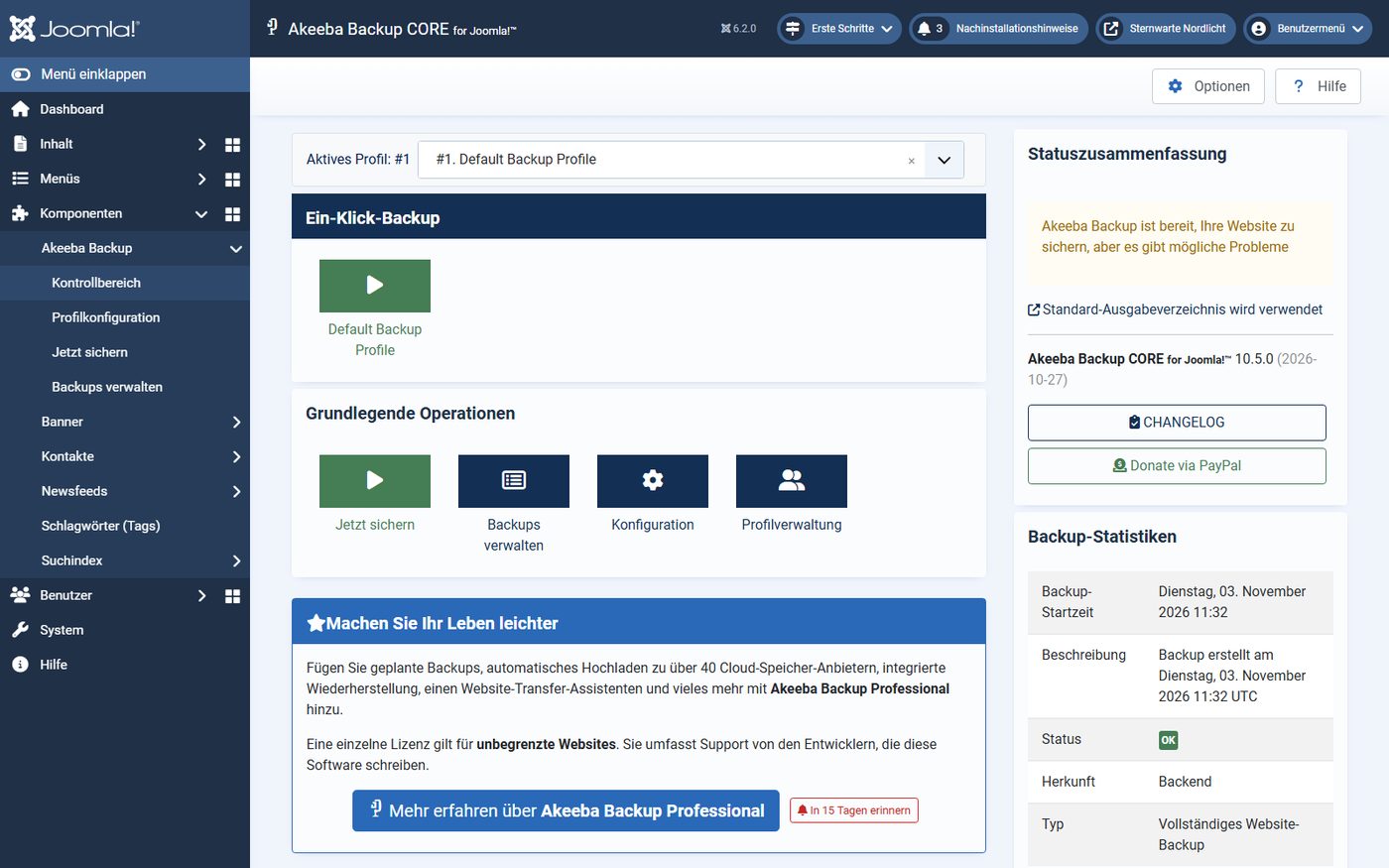
Joomla 6 has no backup function of its own. Before an update, Joomla only shows a checkbox by default: “I’m aware that a backup before any update is highly recommended.” The backup itself is the job of an extension. We tested the three backup extensions that exist for Joomla 6 today and that we could test without registering with the vendor: Akeeba Backup 10.5.0, Easy Joomla Backup 6.2.1.0 and FM Backup 1.2.0. Each backed up the same website, and each had to restore that website on an empty server – a backup is only as good as its restore. As of 3 November 2026.
The result in brief
- Restore: All three brought the test site back completely. Easiest with Easy Joomla Backup Pro: 5.0 seconds, one click. Akeeba Backup needs the free helper Kickstart and nine clicks, and afterwards you have to rebuild Smart Search. FM Backup needs a freshly installed Joomla first and ends with an error message although everything is back.
- Speed: Akeeba and EJB back up the 375 MB test site in seven to eight seconds, FM Backup takes 68 seconds in the browser.
- Automatic and off-site: Only FM Backup (via Joomla’s Scheduled Tasks) and EJB (via the command line) schedule backups free of charge. Only the paid versions of Akeeba and EJB back up to the cloud and encrypt archives.
- Careful when uninstalling: All three delete their stored backups.
Our recommendation: Akeeba Backup for most websites – the free Core edition for the backup before an update, Pro for automatic backups away from the server. Easy Joomla Backup Pro is the lean alternative with the simplest restore. We cannot recommend FM Backup in version 1.2.0.
What is available for Joomla 6
In the Joomla Extensions Directory (JED), 14 entries carry the tag “backup”. Many of them do not back up the whole website: Watchful, YourSites, BackupMonkey, CMS Inspect and SiteOps connect the site to an external management service, Params Backup and ConfigPort only save settings, SnugStage creates a staging copy, and DataSafe PRO was last released in 2015 for Joomla 3. For Joomla 6 these extensions remain that back up files and database completely:
| Extension | Version | Licence | Tested |
|---|---|---|---|
| Akeeba Backup | 10.5.0 (27 Oct 2026) | Core free, Pro from €50/year | yes, Core |
| Easy Joomla Backup (EJB) | 6.2.1.0 (17 Jul 2026) | FREE free, Pro €59/year | yes, Pro with restore script |
| FM Backup | 1.2.0 (6 Oct 2026) | free | yes |
| QC Backup Manager | 1.5.13 | BASIC free, PRO US$39.99/year | no: download only with a vendor account |
| P4J – Site Backup | 1.1.0 | €9 | no: in the JED only since 30 Oct 2026, no automatic restore |
The JED still lists Easy Joomla Backup for Joomla 3 as of 2021, but the vendor offers the Joomla 6 version on kubik-rubik.de. The free FREE edition is generated automatically from the Pro version, with fewer features. We tested the Pro version because only it comes with the restore script; what FREE lacks is listed below. Of Akeeba Backup we tested the free Core edition.
The test site
All three backed up the same website: Joomla 6.2.0 with PHP 8.4 and MariaDB 10.11, 1,000 articles in four categories, 360 photos and a filled search index. Altogether 10,446 files with 375 MB and 76 tables. As on a typical hosting plan, PHP had 256 MB of memory and 60 seconds per request. Before each test we reset the website to the same state and installed only the extension under test.
The backup: size and duration
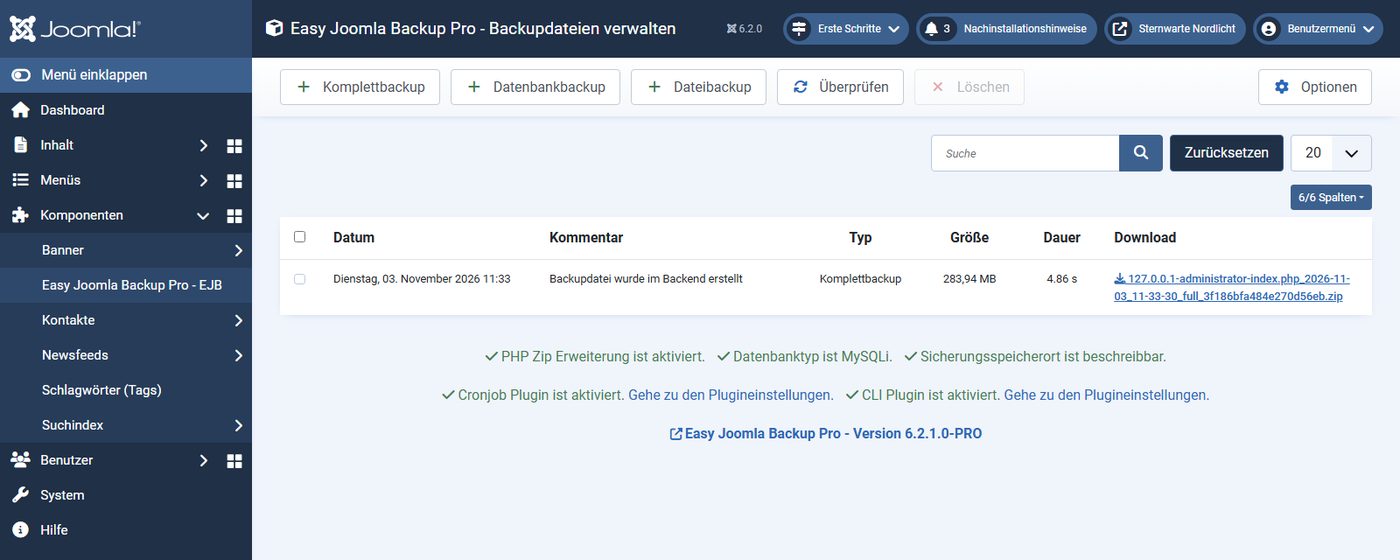
The archives are almost the same size: 292 MB with Akeeba (its own JPA format), 284 MB with EJB and 283 MB with FM Backup (both ZIP). Photos hardly compress any further, so the archive is only somewhat smaller than the website. In duration, Akeeba and EJB are level, while FM Backup falls far behind in the browser:
In the browser, FM Backup works in many small steps that the page triggers one after another. That is gentle on weak servers but costs time: the same backup via Joomla’s Scheduled Tasks was done after 17.5 seconds. EJB backed up via the command line in four seconds.
The most important test: restoring to an empty server
A backup only helps if it can be restored – often exactly when the old website no longer runs, for instance after an attack or a server failure. So we took every archive to a second environment with an empty web folder and an empty database and restored it from there. Afterwards we opened the home page, a category, an article, the backend and the search, and compared all files and tables with the source.
Akeeba Backup: Kickstart and wizard
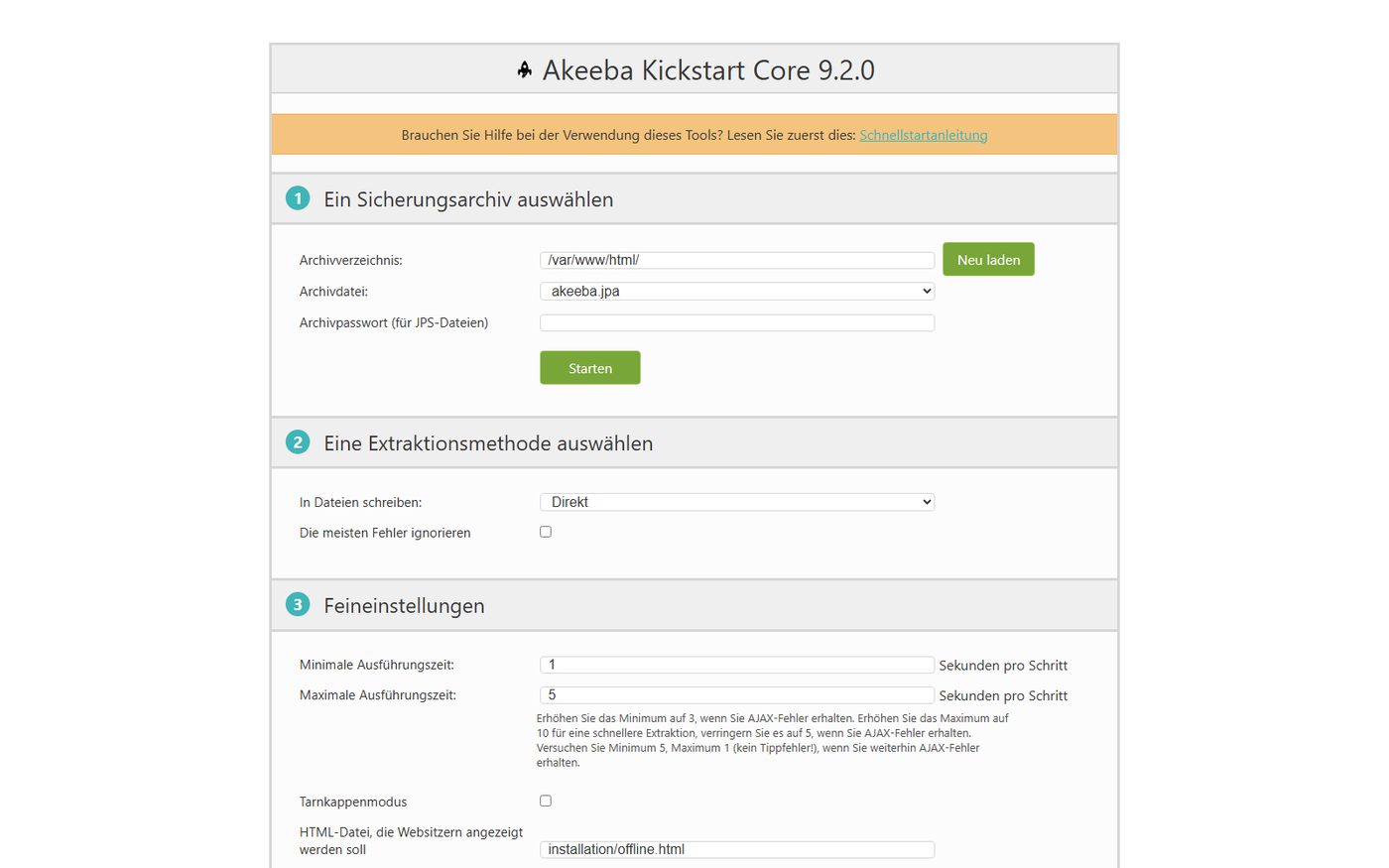
For an empty server Akeeba needs the free helper Kickstart. You upload the archive and Kickstart, open Kickstart in the browser and let it extract the archive. For security reasons Kickstart does not start under its well-known file name: you have to rename the file or set a password. Then a wizard leads through checks, database and settings; you enter the access details of the new database, pre-filled with those from the backup. Finally Kickstart cleans up: the archive, Kickstart and the installation folder disappear, the .htaccess file comes back.
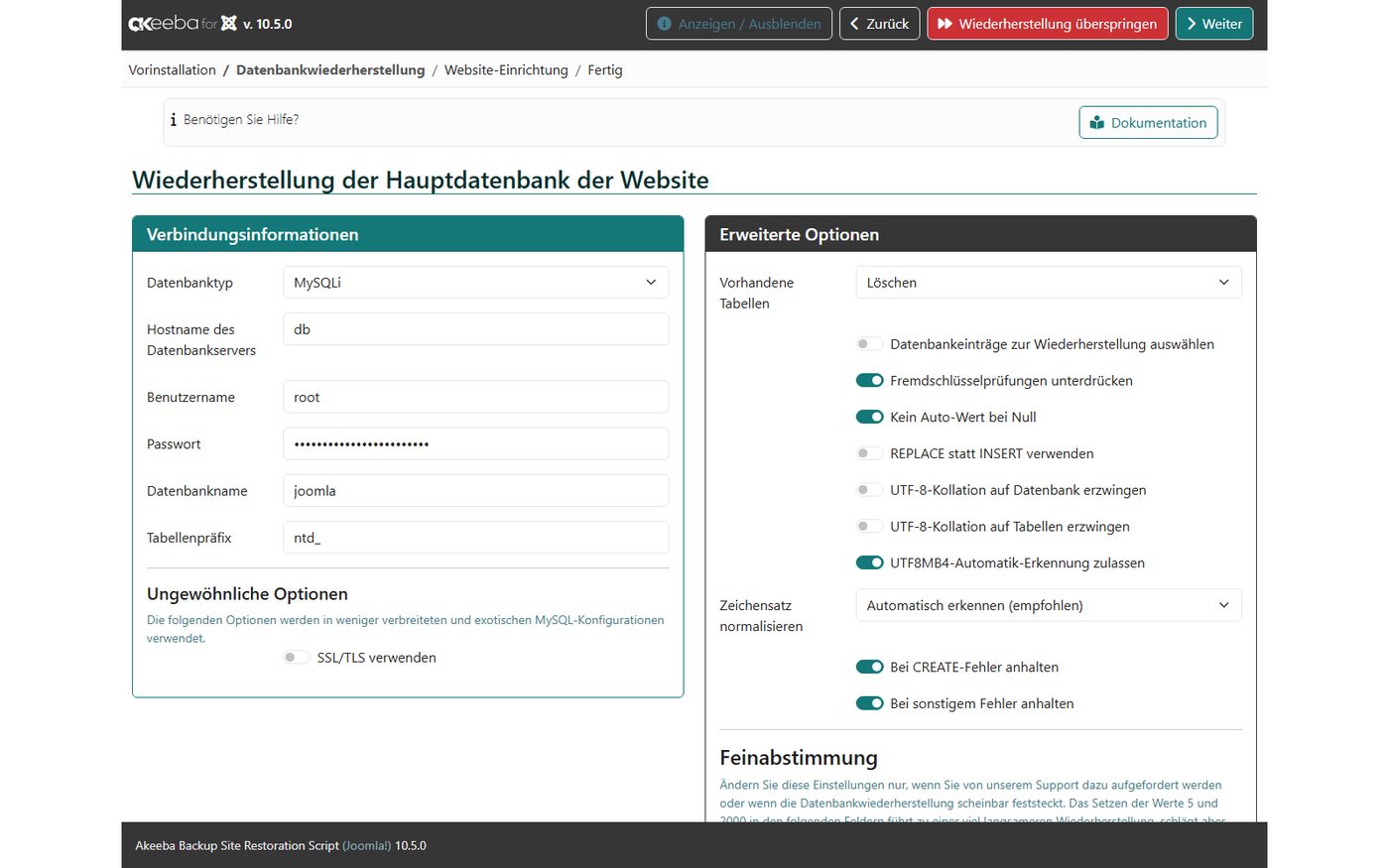
Afterwards all files and tables matched the source and the pages delivered the same as before. With one exception: Smart Search found nothing. By default Akeeba leaves the contents of the search index, the sessions and the action log out of the backup. After a restore you therefore have to click “Index” once under Components → Smart Search. A copy of the old configuration also stays in the web folder as configuration.bak.php; it outputs nothing in the browser, but you can delete it.
Easy Joomla Backup: one form, one click
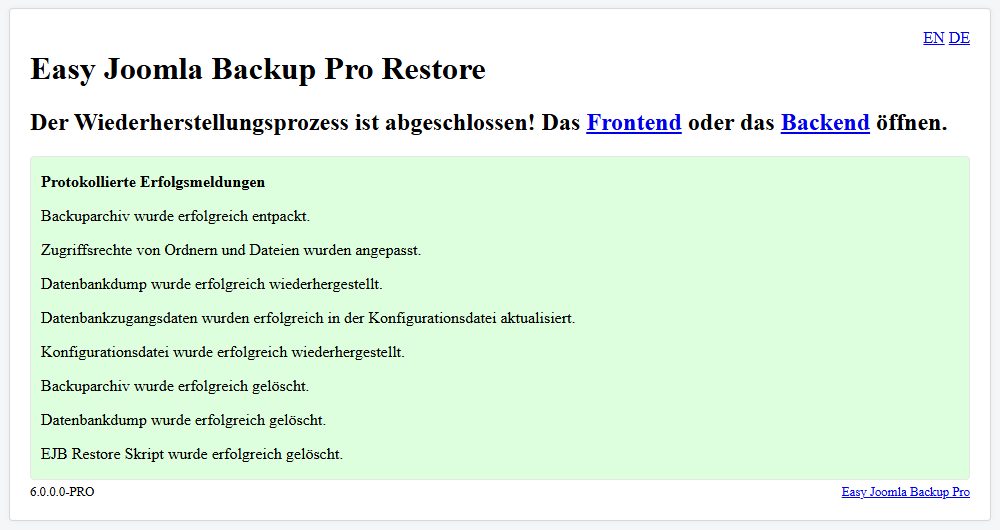
EJB Pro comes with its own restore script. Archive and script go into the empty folder, you open the script, enter database server, name, user and password and click “Restore Now”. After five seconds the website was back, with working search. The script then deletes the archive, the database dump and itself. Only the small licence file ProSecurityToken.php remains. Unlike Kickstart, the script has no access protection of its own – so it should not stay on the server longer than necessary.
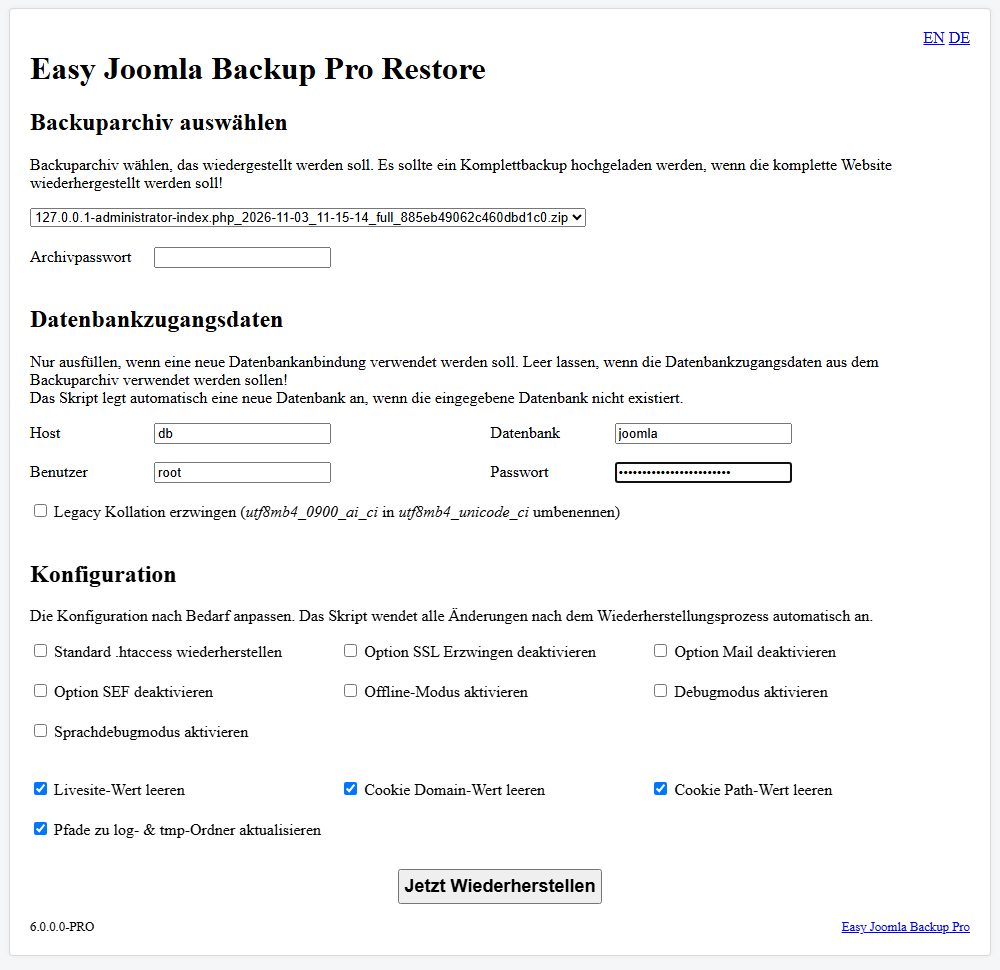
With the free FREE edition you restore by hand: extract the archive, import the SQL file into the database, for example with phpMyAdmin, and adjust the database password in configuration.php. That worked in our test too, but it requires experience with server and database.
FM Backup: Joomla first, then the backup
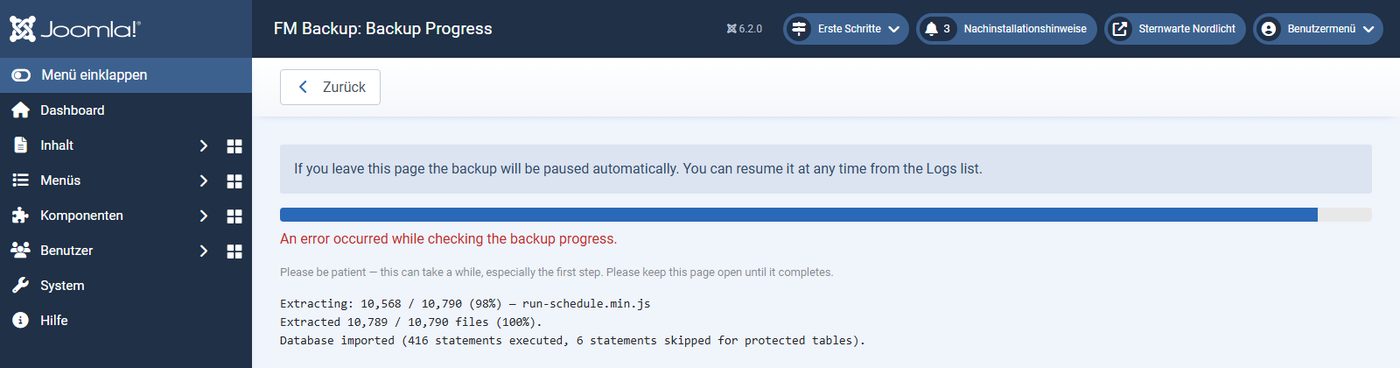
FM Backup has no standalone restore script. According to its manual you first install Joomla and then FM Backup on the new server, put the archive into its storage folder and start the restore in the backend. The restore itself then took 41 seconds. At the end the page reported “An error occurred while checking the backup progress”, probably because the imported database also replaces the login; the final clean-up step did not run any more. The website was nevertheless complete and search worked.
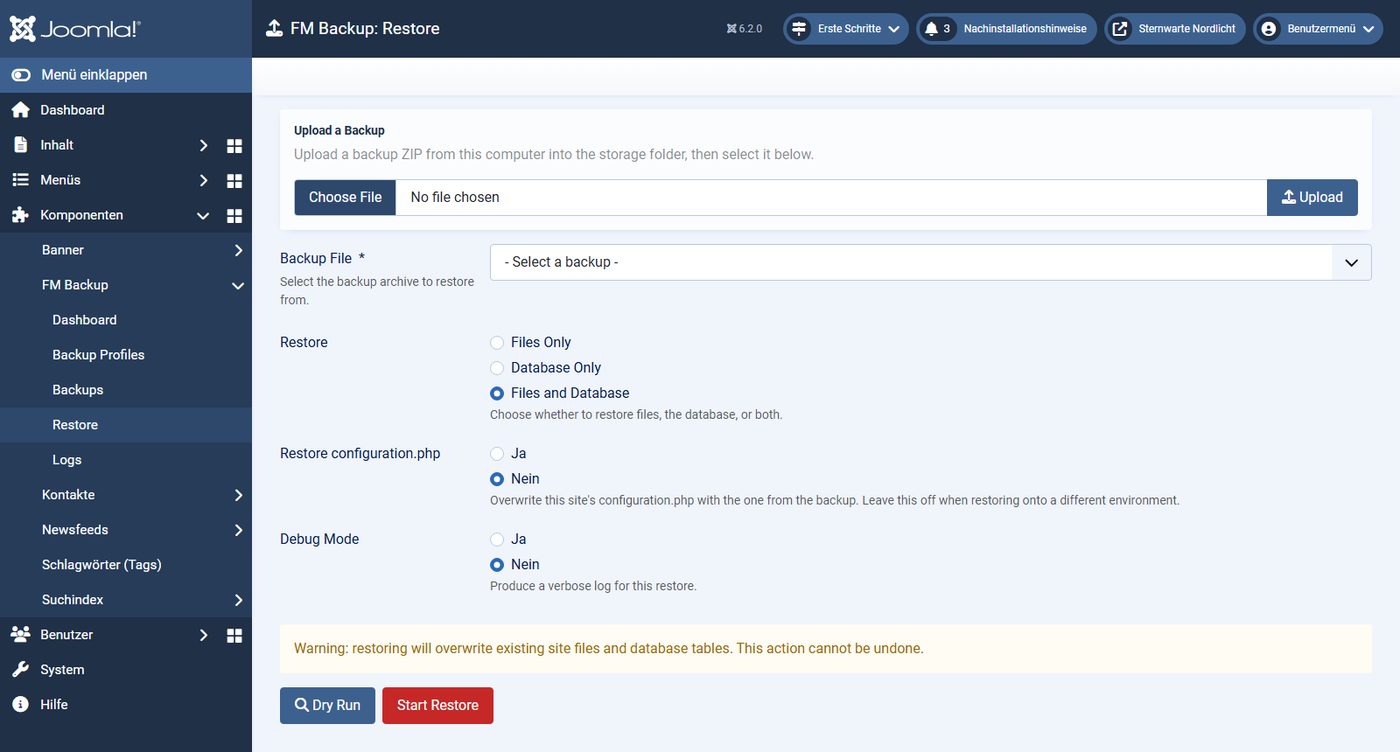
You have to clean up yourself: the 76 tables of the freshly installed Joomla remain in the database with the prefix bak_, and the working files of the restore, including a complete database dump, stay in the storage folder. Delete both by hand.
Backing up automatically
A backup you have to remember is missing when you need it. The three extensions handle this differently:
- Akeeba Backup Core only backs up by hand. Schedules via Joomla’s Scheduled Tasks, the command line and starting a backup via a secret URL are Pro features.
- Easy Joomla Backup adds commands to Joomla’s command line (
php cli/joomla.php backup:full) that a server cron job can call, and a plugin that starts a backup via a URL with a secret key. There is no task for Joomla’s Scheduled Tasks. - FM Backup provides a task for Joomla’s Scheduled Tasks, plus a second one that deletes old backups. Both plugins are disabled after installation; the dashboard explains the setup step by step.
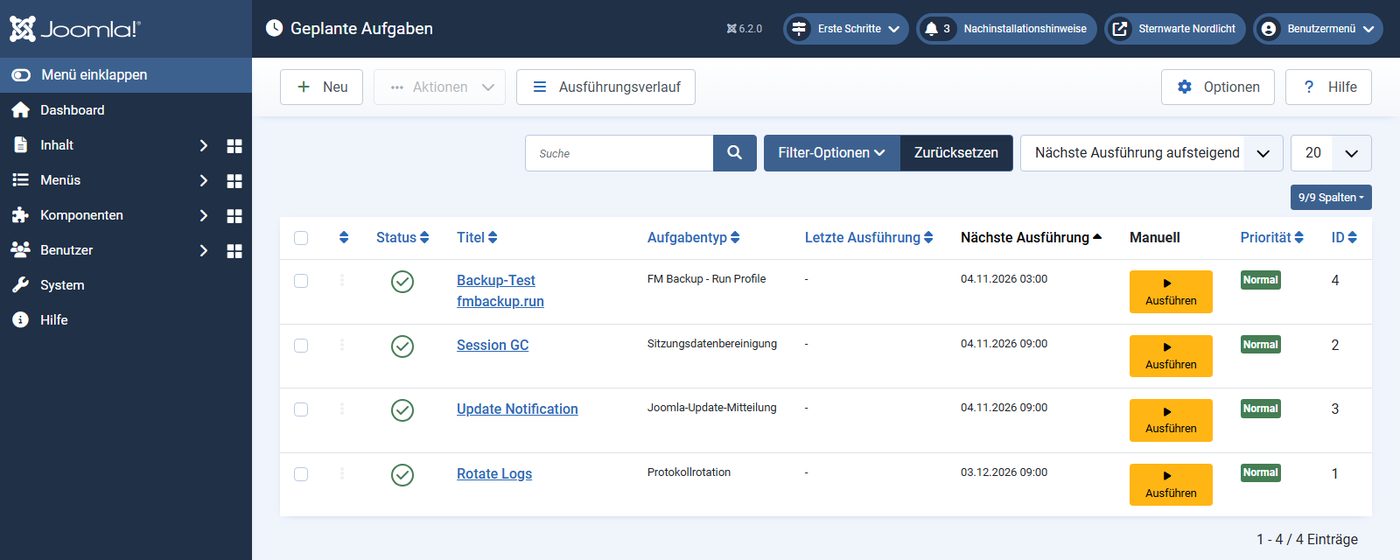
Important for all tasks in Joomla: by default Joomla only starts them when visitors open the website, and checks at most every five minutes. For backups a real cron job on the server is more reliable, calling php cli/joomla.php scheduler:run --all. Most hosting plans offer a setting for this.
Where the backups are stored
A full backup contains everything an attacker looks for: configuration.php with the database password and the user table with the password hashes. By default all three store their archives in a folder inside the website. What matters is whether they can be fetched from outside:
- Akeeba locks the folder with an .htaccess file, adds a random part to the file name and checks in its control panel whether the folder is reachable from outside. In our test: access denied.
- EJB also locks the folder with an .htaccess file and adds 20 random characters. Access denied.
- FM Backup does not create a protective file in version 1.2.0. Set the storage location in the options to a folder outside the web folder; the manual recommends this too.
A backup on the same server is also not a real backup: if the server fails or the website is encrypted, the backup is gone too. Download archives regularly or have them uploaded automatically to other storage. Only the paid versions can do that: Akeeba Backup Pro, according to the vendor, to more than 40 cloud services, EJB Pro to Dropbox, Google Drive and via SFTP. The storage credentials then sit on the web server; a separate storage account per website limits the damage if the website is attacked.
Features compared
| Akeeba Backup Core | Easy Joomla Backup | FM Backup | |
|---|---|---|---|
| Tested | Core 10.5.0 | Pro 6.2.1.0 | 1.2.0 |
| Backup types | whole site, database only | whole site, database only, files only | whole site, database only, files only (profiles) |
| Restore to an empty server | Kickstart (free) + wizard | Pro: script; FREE: by hand | only via a fresh Joomla + FM Backup |
| Schedule | Pro only | command line, URL with key | Joomla’s Scheduled Tasks |
| Off-site storage | Pro only (40+ services) | Pro: Dropbox, Google Drive, SFTP | no |
| Encrypted archives | Pro only (JPS) | Pro: ZIP with AES up to 256 bit | no |
| Exclusions | files, folders, table contents | files, folders | patterns for files, folders, tables |
| Deleting old backups | by number or size | Pro: maximum number, FREE: 3 | by number, task by age |
| Language of the backend | German, English and more | German, English | English only |
Two defaults are worth knowing. FM Backup leaves out all ZIP files, including those visitors download from your website; check the profile if you offer downloads. Akeeba Backup sends anonymous version data (a random ID and the versions of PHP, database and Joomla) to a statistics server of the vendor by default; you can switch this off in the options.
What EJB FREE lacks compared with Pro can be read in the code: encryption, uploads to Dropbox, Google Drive and SFTP, the e-mail after a backup, additional database tables and a configurable number of retained backups (FREE keeps three). The restore script is a separate download for Pro customers.
What happens when you uninstall
All three delete their storage folder when uninstalled – and with it all backups inside. In our test that was four archives with more than 1 GB in total for FM Backup. Download your backups before you remove or replace the extension. Otherwise little is left:
| Extension | What remains |
|---|---|
| Akeeba Backup | the table #__akeeba_common with three entries (ID for the version statistics) |
| Easy Joomla Backup | the table #__easyjoomlabackup (list of backups); component and two plugins have to be uninstalled separately |
| FM Backup | the scheduled task stays orphaned in Joomla’s Scheduled Tasks |
Vulnerabilities
The database of the US agency NIST (NVD) lists one vulnerability for Akeeba Backup from 2014, which affected the restore script of that time, and one for Easy Joomla Backup from 2017: version 3.2.4 put a copy of the backup with an easily guessable name into the web folder. Both were fixed years ago. There are no entries for FM Backup, QC Backup Manager or Kickstart. An overview of current vulnerabilities in Joomla extensions is in our post Joomla extension vulnerabilities 2026.
Prices and licences
All three are licensed under the GPL. Prices according to the vendors’ websites on 3 November 2026:
| Edition | Price | What you get |
|---|---|---|
| Akeeba Backup Core | free | manual backups, restore with Kickstart |
| Akeeba Backup Pro | €50 in the first year, then €30, plus VAT | any number of websites, schedule, cloud storage, encryption, support |
| Easy Joomla Backup FREE | free | manual backups, CLI, at most three backups, restore by hand |
| Easy Joomla Backup Pro | €59 for one year, incl. German VAT | updates and support for one year, use unlimited afterwards, no automatic renewal, any number of websites |
| FM Backup | free | all features |
Kubik-Rubik also offers a subscription for all of its more than 50 Pro extensions for €149.
Conclusion: which backup extension fits?
Akeeba Backup is the safe choice for most Joomla websites. The free Core edition is enough for the backup before an update and for moving a site. If you want automatic backups away from the server, you need Pro. Rebuild the search index after a restore.
Easy Joomla Backup Pro is lean and had the simplest restore in our test. At €59 without automatic renewal it is a good alternative for single websites. The FREE edition only suits you if you can restore by hand.
FM Backup is free and the only one that uses Joomla’s Scheduled Tasks. In version 1.2.0, however, the unprotected storage location, the restore only via a fresh Joomla and the leftover working files speak against it.
Whichever extension you use: test the restore once before you need it. How to handle backups during a website project is described in our post Backups in the project phase.
Backups that work when it matters. In the Joomla maintenance contract we back up files and database monthly on your server (Starter) or weekly to external storage with 12 or 24 versions (Business, Premium). If something breaks, we restore the latest backup – this is included in the contract. From €30 a month.
See Joomla maintenance Website already hacked? Start hereHow we tested
- Two Docker environments with Joomla 6.2.0 from the official package, PHP 8.4.26, MariaDB 10.11 and Apache 2.4, German language, clean URLs, PHP with 256 MB of memory and 60 seconds per request.
- Source: 1,000 articles, 360 photos, Smart Search index, 10,446 files with 375 MB. Reset to the same state before each extension.
- Packages: Akeeba Backup Core 10.5.0 and Kickstart Core 9.2.0 from akeeba.com, Easy Joomla Backup Pro 6.2.1.0 and restore script 6.0.0.0 from kubik-rubik.de, FM Backup 1.2.0 from freemarkit.co.za; each with its defaults, Akeeba after its configuration wizard.
- Backups in the backend via Chromium with Playwright, three runs per extension, median. Additionally via Joomla’s command line where possible.
- Restore to a second environment with an empty web folder and an empty database (for FM Backup with a fresh Joomla 6.2 and FM Backup, as described in its manual). Then comparison of all files and of the rows of every table with the source.
- Uninstall via Joomla, then comparison with the state before installation.
- Vulnerabilities: NVD database, as of 3 November 2026. Prices: vendors’ websites, as of 3 November 2026.
- Everything ran locally. On a hosting plan the times are longer.


