★★★ newtastic Extensions · exclusive to our clients ★★★
newtastic Content Types

Content with a system.

Events, team, products: every kind of content gets its own input form – and Google the matching details.
Structured content in Joomla – clear, fast, native.

newtastic Content Types: Structured content in Joomla – clear, fast, native.
01 / In short

In short.

The problem

Joomla spreads categories, fields, menus and editor over many places – and the editor shows everything.

The solution

A content type bundles category, fields, menu and editor in one place – everything stays genuine Joomla.

Suitable for

Websites with recurring content such as events, products, properties, courses or team profiles.

02 / Your benefits

Why Content Types?

Its own input form

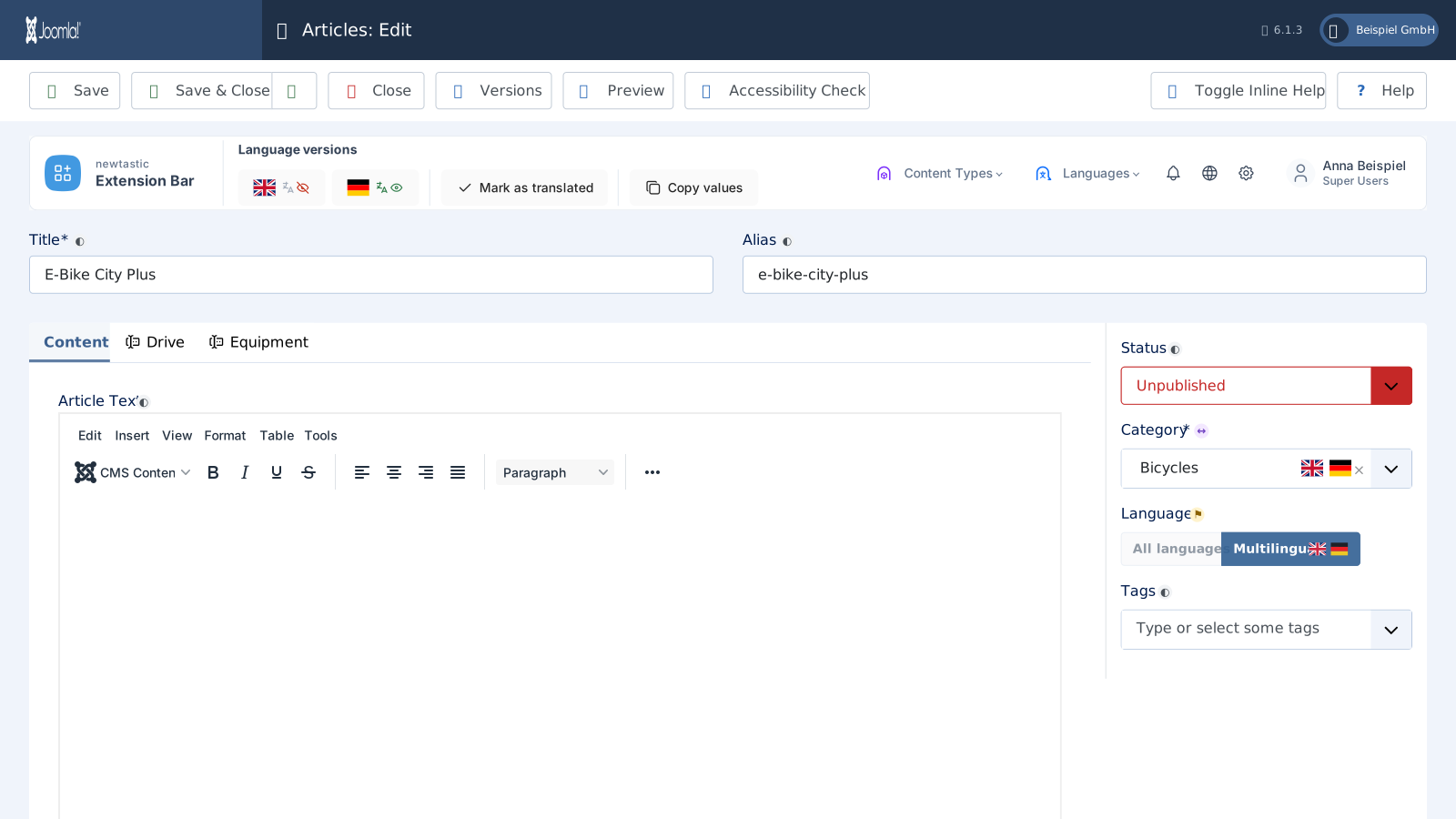
Only the tabs your editors need – Joomla's full editor stays just one click away.

Details for Google

Events, jobs, recipes: the structured data for Google fills itself from your fields.

Ready-made templates

Gallery, downloads or FAQ: a short questionnaire, and the new section with menu item is ready.

Own menu

On request a menu item per content type – every subcategory with “New” right in the menu.

On every website

Move a proven model to other websites as a file – with a preview before the import.

Excel and AI

A ready AI prompt and Excel template matching your fields – for many entries at once.

For all extensions: No changes to the core Removable again Joomla updates as usual German and English

03 / The templates

The templates.

01

Gallery

Photos in albums – one article per image or per album, with details such as photographer or licence.

  • One article per image – Only Joomla's own image fields; albums are subcategories you create.
  • One article per album – All images of an album in a subform, each with media field and text.
  • Comfort: album with multiple upload – Upload many images at once – with Media Upload from newtastic Custom Fields.
02

Downloads

Forms, price lists and manuals to download – with details such as a version or the file format.

  • One article per file – With Joomla's own link field, sections as subcategories.
  • Comfort: file lists with protection and counter – Download field: several files per article, protected by Joomla's permissions.
03

FAQ

Frequently asked questions with answers – with details such as a short answer or last checked.

  • One article per question – Topics as subcategories, every question with its own page.
  • One FAQ list – Question and answer in a subform, all questions in one article.
04 / How you work with it

How you work with it.

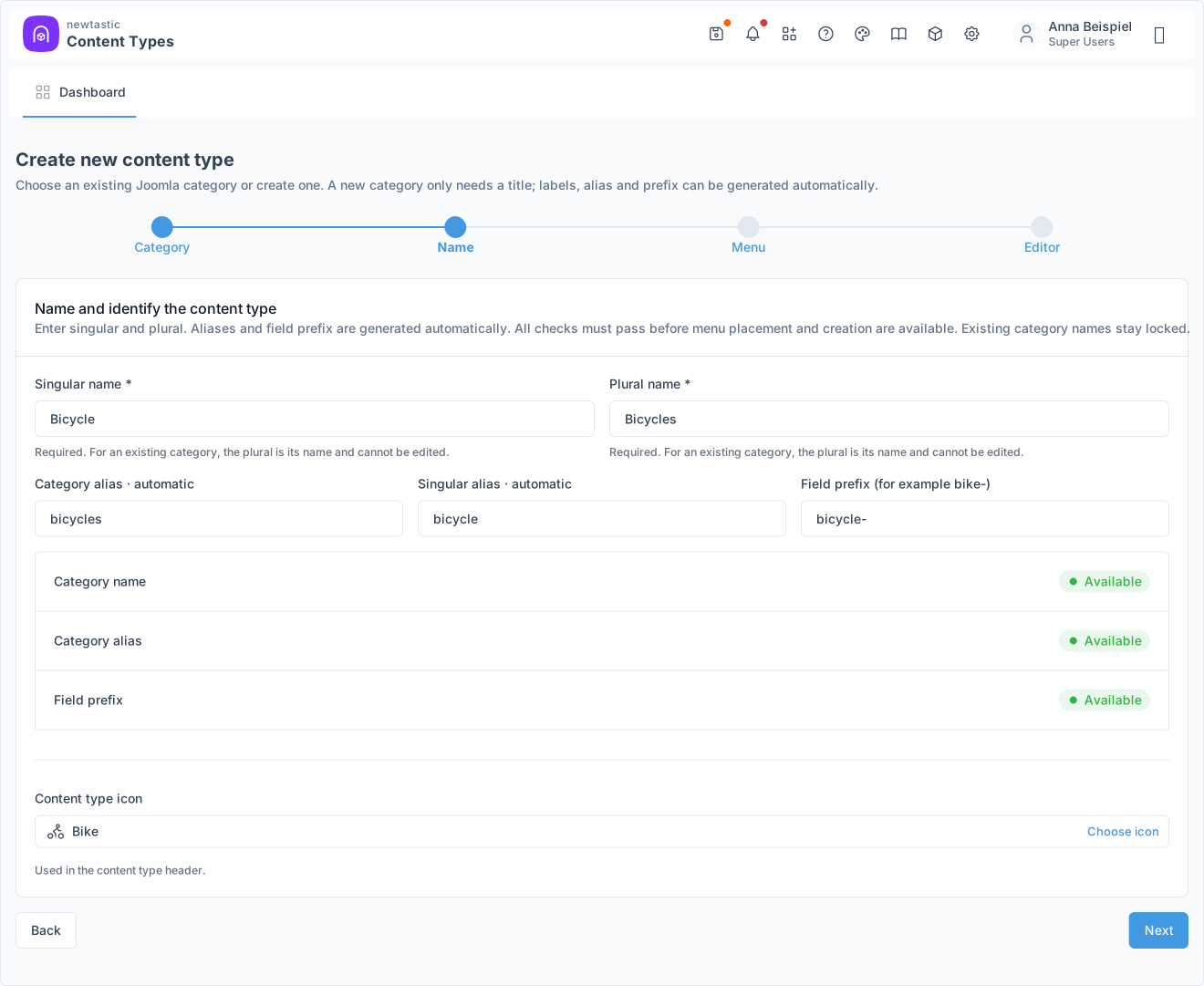
newtastic Content Types: Enter singular and plural – the checks show “Available”.

Enter singular and plural – the checks show “Available”.

Step 1

Create a content type

Enter the singular and plural name, for example “Bicycle” and “Bicycles”, and choose an icon. Category, aliases and field prefix are created automatically, and a check shows beforehand that everything is available.

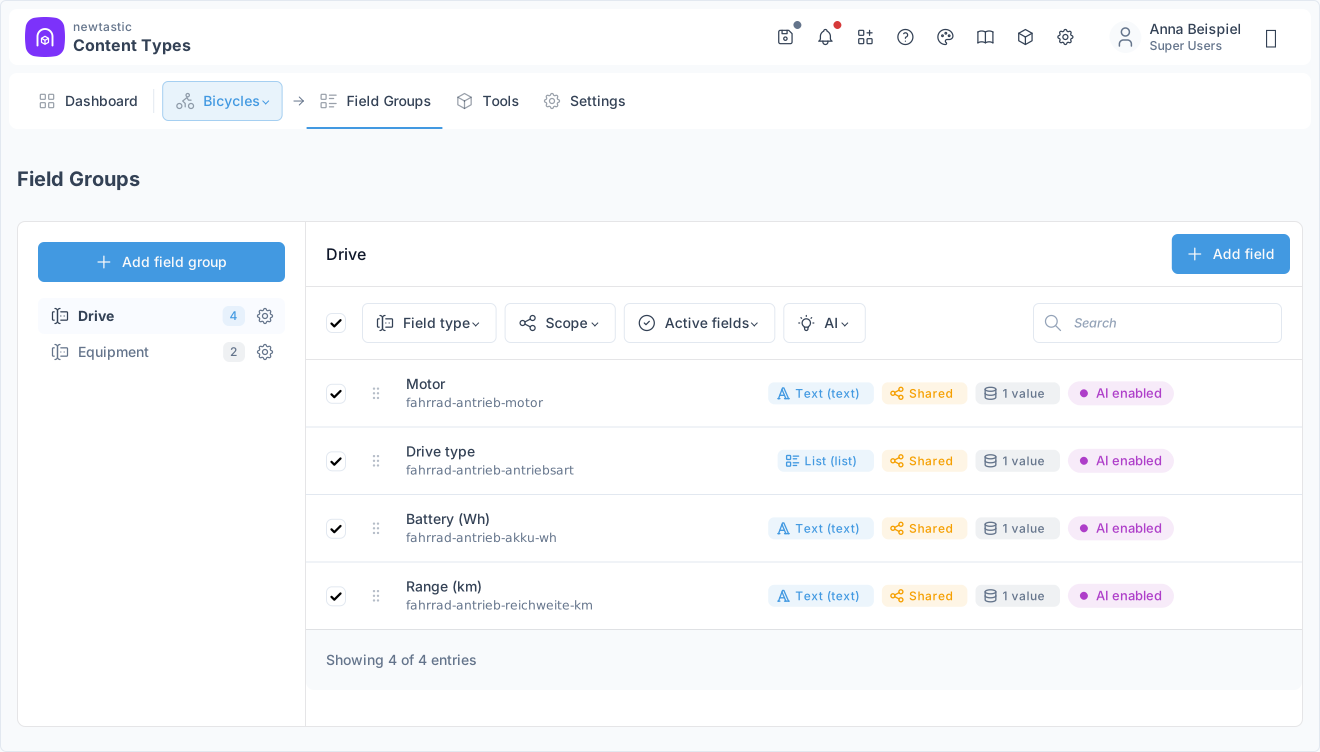
newtastic Content Types: A field group with its fields and technical names.

A field group with its fields and technical names.

Step 2

Organise fields

Create field groups or attach existing ones, then add fields with a title and field type. Every row shows the field type, its scope and how many values are already stored.

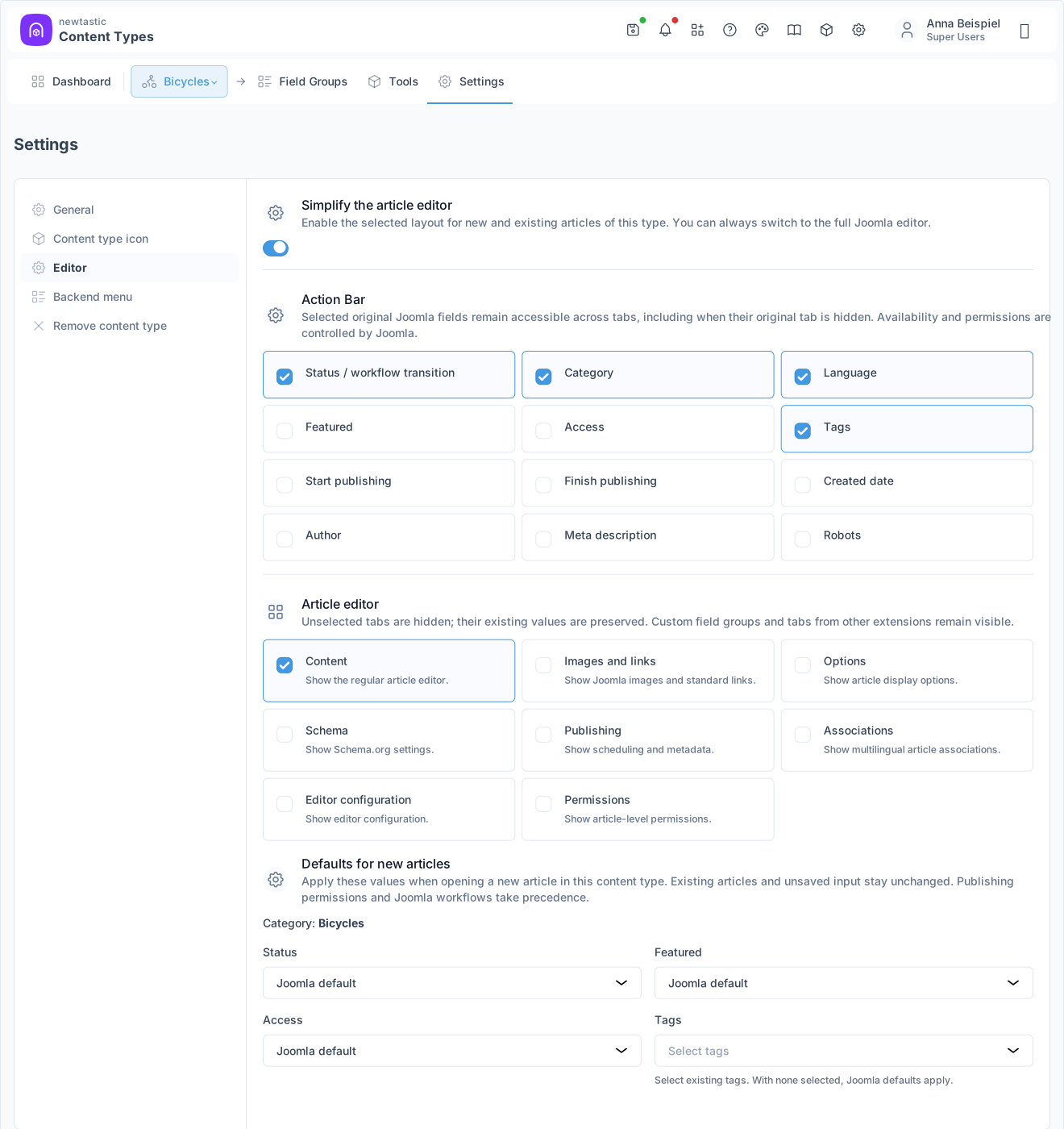
newtastic Content Types: Choose the visible tabs and the fields of the action bar.

Choose the visible tabs and the fields of the action bar.

Step 3

Tidy up the editor

Choose which tabs stay visible in the article editor and which fields – such as status, category or tags – sit in the action bar. Title, alias and your field groups always stay within reach.

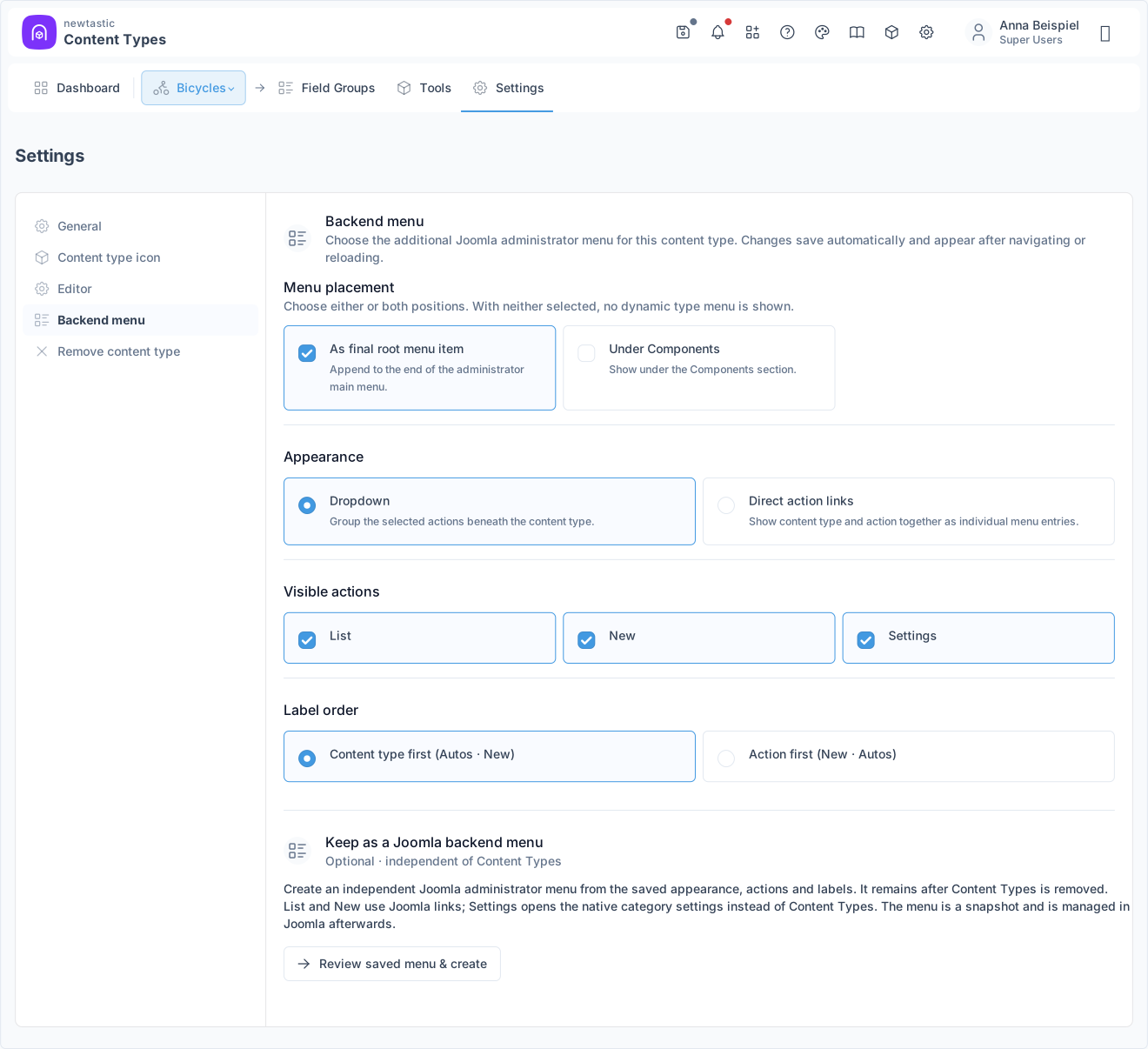
newtastic Content Types: Menu placement, display and actions of a content type.

Menu placement, display and actions of a content type.

Step 4

Work and reuse

Through its own entry in the Joomla menu (if you like), the editorial team opens the list, new articles and the settings of the type. The structure can be transferred to other websites as JSON.

05 / More insights

More insights.

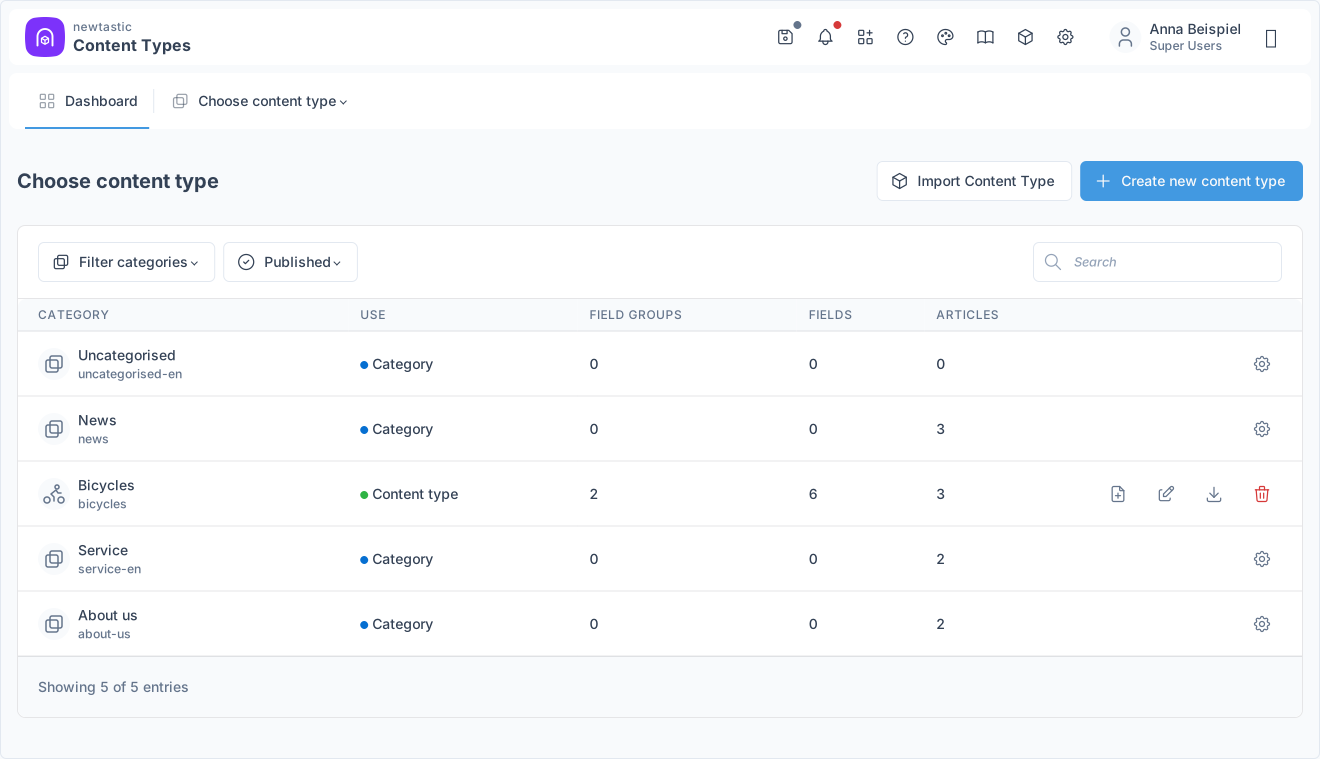
newtastic Content Types: The dashboard with all categories and the “Create new content type” button.

The dashboard with all categories and the “Create new content type” button.

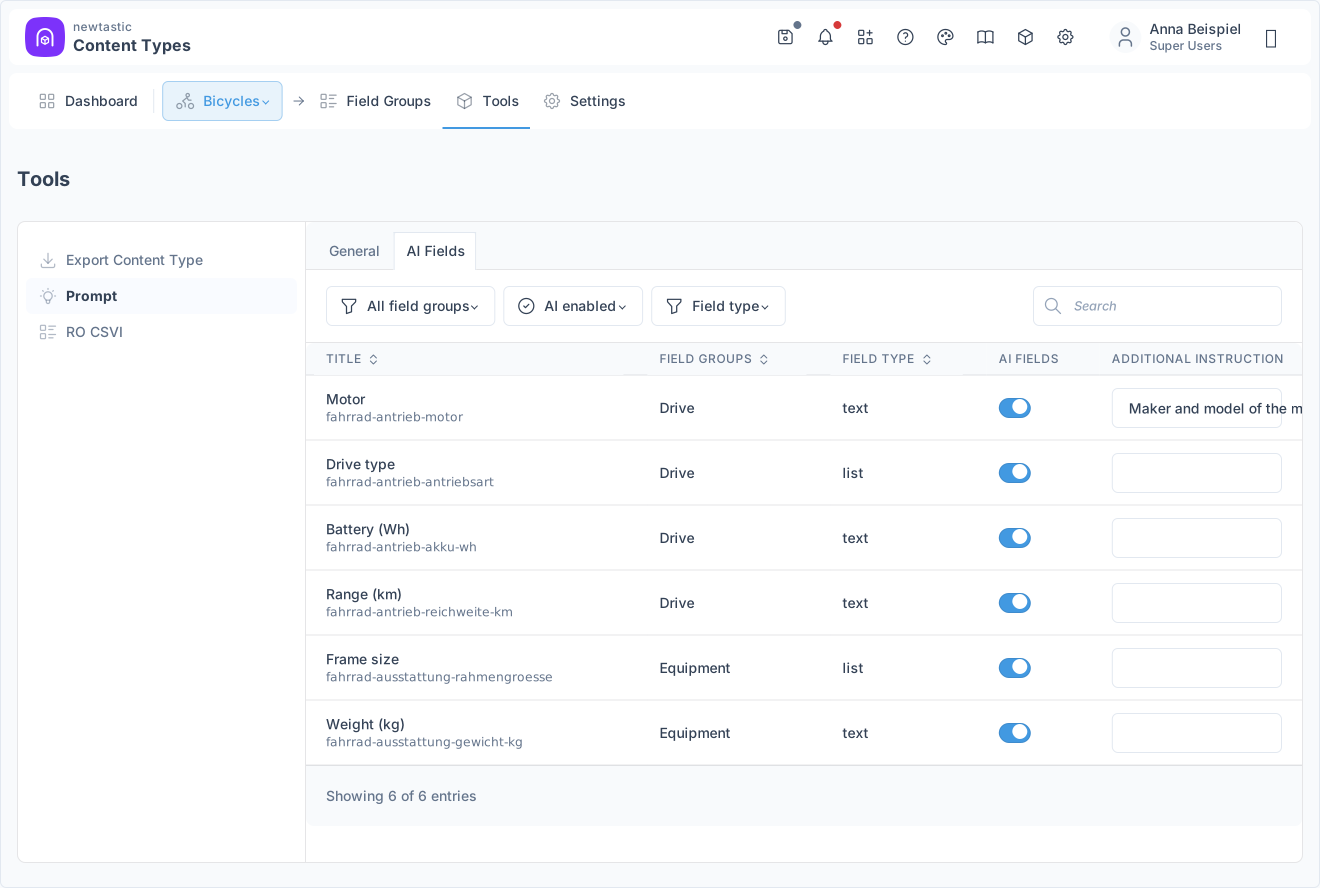
newtastic Content Types: The AI fields with a switch and an instruction per field.

The AI fields with a switch and an instruction per field.

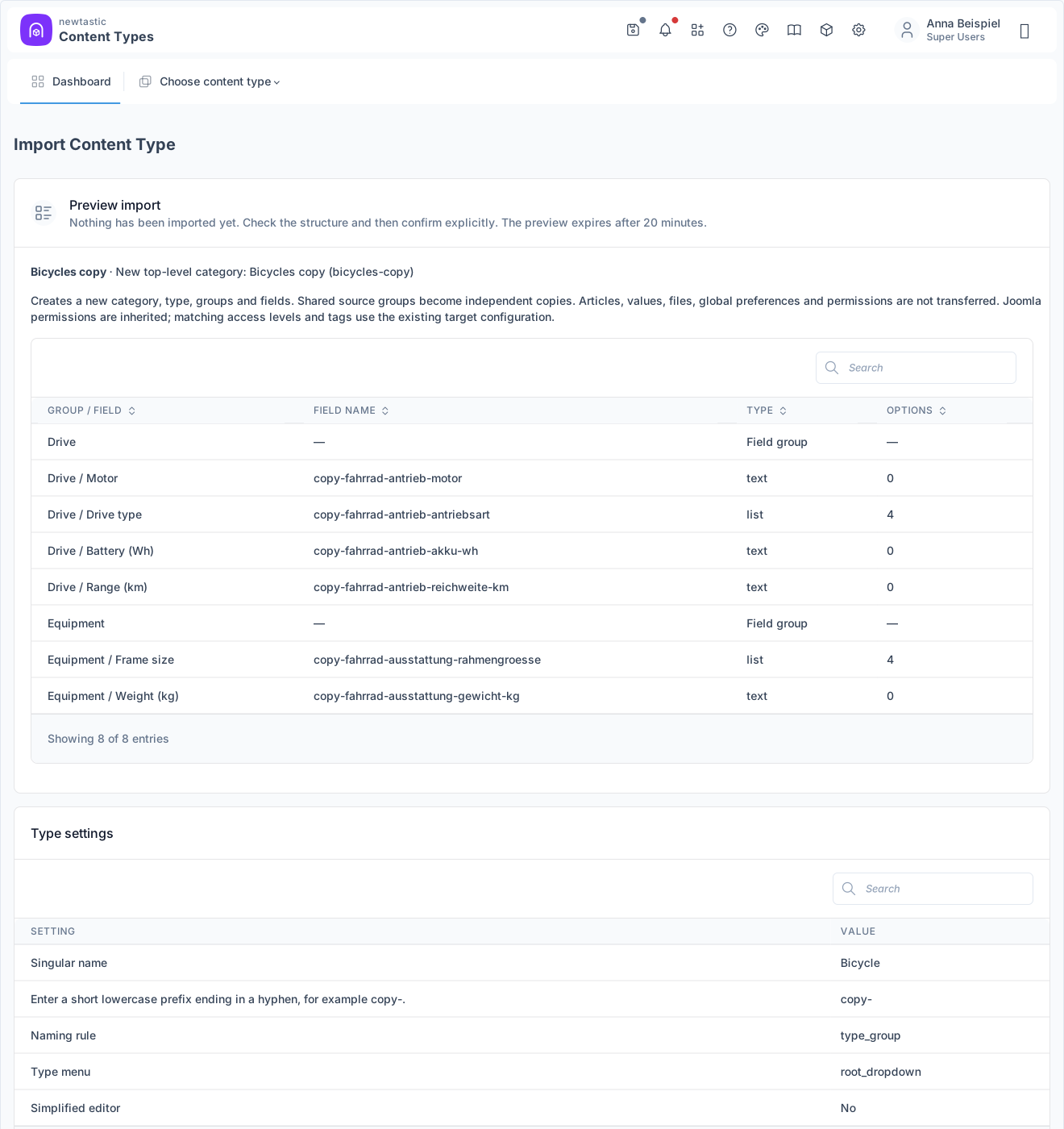
newtastic Content Types: The import preview before confirming.

The import preview before confirming.

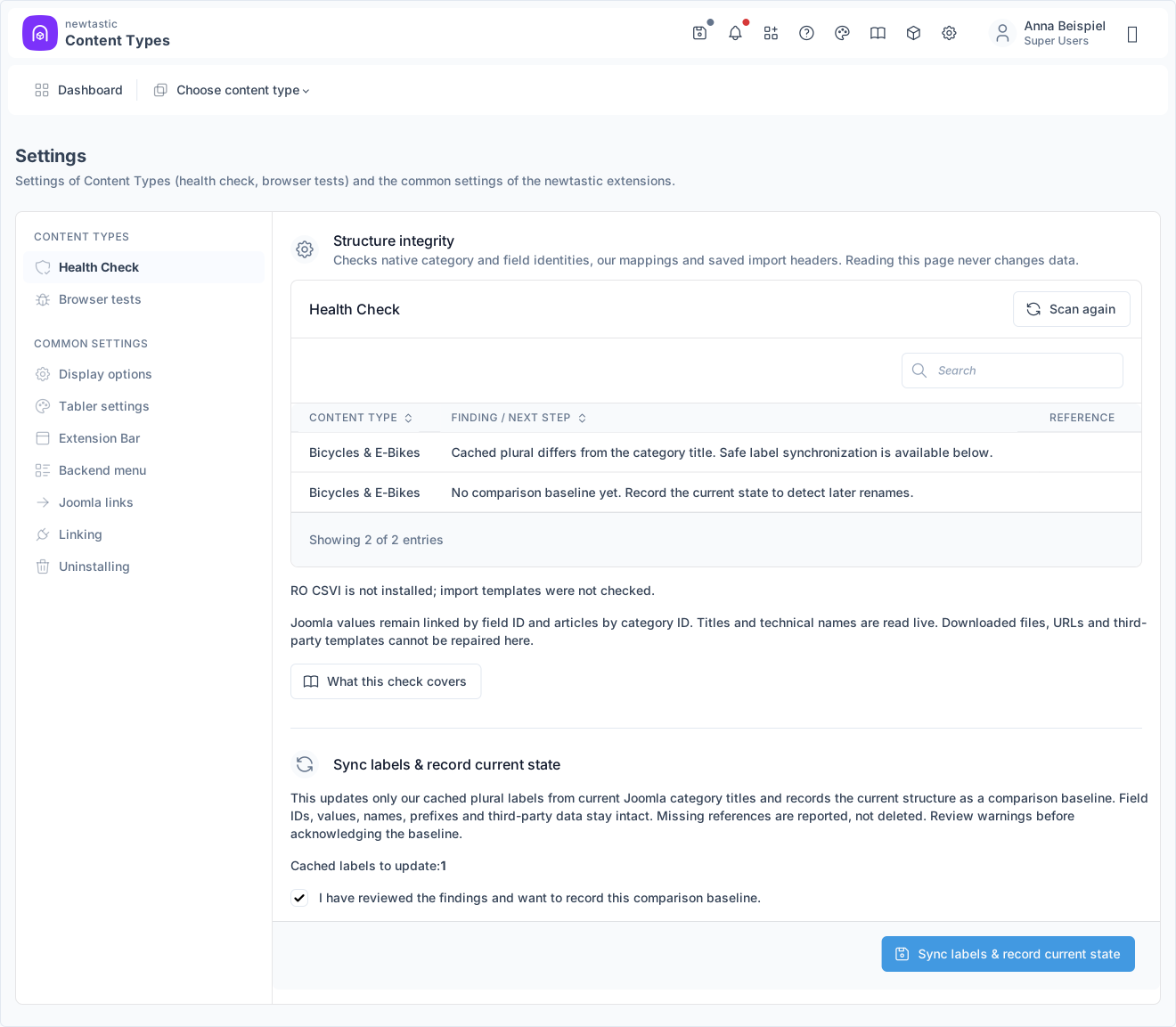
newtastic Content Types: Findings of the health check.

Findings of the health check.

06 / All functions

All functions.

Creating content types

  • Guided four-step wizard with live preview of menu and editor
  • New category or an existing one whose articles stay unchanged
  • Singular, plural and icon; alias and field prefix are created for you
  • Checks while you type and says plainly what blocks a name
  • Overview of all categories with counts, filters and quick actions
  • “New” opens Joomla's editor with the category already set

Streamlined editor

  • Simplified editor per type: only the Joomla tabs you need
  • “Simple / Full” switch, hidden values are kept
  • Right-hand bar with status, category, access, tags, dates …
  • Safe fallback: everything visible again on errors or category change
  • Defaults for new articles: status, featured, access, tags
  • Field group icons on the editor tabs

Ready-made templates

  • Start from a template or blank: gallery, downloads, FAQ by questionnaire
  • 7 variants, e.g. album with subform or file list with download field
  • Recommended variant preselected, comfort variants with Custom Fields
  • Tick extra details: photographer, licence, version, contact person …
  • Live preview and name check before anything is created
  • One click creates category, content type, menu item and needed fields

Data for Google

  • Entries as event, job posting, recipe, book, person …
  • Each property from a field, article, site or fixed value, with hints
  • Check shows what Google requires or recommends and what is missing
  • Live preview of the code in the page head using a sample article
  • Applied on save, and to existing articles with one click
  • Events with end, status and attendance mode; times are kept
  • Notice if Joomla's Schema.org plugin is off or not set up

Menus & subcategories

  • Own menu item per type: main menu, under “Components” or both
  • Dropdown or links with list, new and settings, by permission
  • Every subcategory in the menu with its own list and “+” for new articles
  • Type applies to subcategories: same editor, defaults and Google data
  • Optional permanent Joomla menu that stays even without Content Types

Fields & groups

  • Create, edit or attach existing field groups, with icon
  • Create fields of every Joomla field type, assigned right away
  • Choice options as plain text, one line per option
  • Field list with type, usage, value count, search, filters, Joomla link
  • Rename with warnings; detach from the type, field and values stay
  • Sort groups and fields by drag and drop (not shared ones)
  • Consistent names “type–group–field” with preview, numbered if taken

AI & spreadsheets

  • AI rules per field and for the whole type, also for many fields at once
  • Ready-made prompt with format rules and allowed values to copy
  • AI kit as ZIP plus CSV and Excel template explaining each column
  • No AI service needed: Content Types sends nothing to any provider
  • RO CSVI: check requirements, create import and export templates
  • Articles to Excel and back, updated via their alias

Transfer & health check

  • Export a content type with fields and settings as a file
  • Import by upload or paste, with a searchable preview
  • Resolve conflicts, confirm by typing the name, clean-up on errors
  • Language-neutral file: translations are exported as readable text
  • Health check: missing categories and groups, duplicate prefixes …
  • Reports renames since a snapshot, also as a notice in Joomla
  • Sync names and remove orphans, only after confirmation

Languages, safety & help

  • One type for all language versions, translated group titles readable
  • New categories in the right language, only matching field groups
  • Saved automatically, with conflict protection and a leave warning
  • Double clicks or requests never create duplicates
  • Remove a type: category, fields, articles and Google data stay
  • Guide right inside Joomla: 15 topics, help in Joomla's views too
07 / Frequently asked questions

Frequently asked questions.

Can we use existing categories and fields?

Yes. When creating a type, choose “Use existing category”; its articles stay as they are. Existing Joomla field groups can simply be attached to a content type; fields already assigned to the category appear at once.

Do I need newtastic Custom Fields for the templates?

No. Every kind exists with Joomla's own field types. Comfort variants such as the album with multiple upload or protected downloads with a counter also use newtastic Custom Fields.

Does the AI write articles by itself?

No. newtastic Content Types prepares the prompt, field schema and spreadsheet templates, but sends nothing to an AI provider and creates no articles automatically. You check the result before importing it.

What happens if someone renames something directly in Joomla?

Joomla links values by ID, so no data is lost. The health check compares the structure with a saved state and points out places that may affect templates, import templates or AI rules – it only changes something when you confirm, and never Joomla data.

What stays if we remove newtastic Content Types?

Everything that belongs to Joomla: categories, field groups, fields and their values, all articles and menus you created as a stand-alone Joomla menu. Only handling them as a content type goes away; you keep working in Joomla's article list and full editor.

Exclusive to our clients.

newtastic Content Types is not for sale. Have us build your website or migrate it to Joomla – and we set up newtastic Content Types for you.