★★★ newtastic Extensions · exclusive to our clients ★★★
newtastic Site Setup

Joomla, set up right.

More than 60 Joomla settings from 18 places in one spot – with a score, recommendations and one-click undo.
Set up Joomla by topic instead of by menu item.

newtastic Site Setup: Set up Joomla by topic instead of by menu item.
01 / In short

In short.

The problem

Joomla spreads more than 60 important settings over 18 places – and nobody tells you whether a value is right.

The solution

Site Setup sorts them into 16 topics, recommends with a reason and shows before every change what will happen.

Suitable for

New websites before going live, and existing ones where you want to know what is still to be done.

02 / Your benefits

Why Site Setup?

Score and to-do list

A score from 0 to 100 plus the list of open points – problems first, each with the way to fix it.

See first, then save

Live previews of search result, e-mail, forms and offline page – before anything changes.

Everything undoable

Every change is logged with before and after – every run can be undone with one click.

Short addresses, safely

Addresses without index.php: tested in a test folder first, switched back at once on an error.

Lean, not overloaded

Finds unused Joomla features and only switches off what nothing refers to any more.

Find forgotten backups

Reports backup archives, Kickstart and copies of the configuration lying open in the site folder.

For all extensions: No changes to the core Removable again Joomla updates as usual German and English

03 / How you work with it

How you work with it.

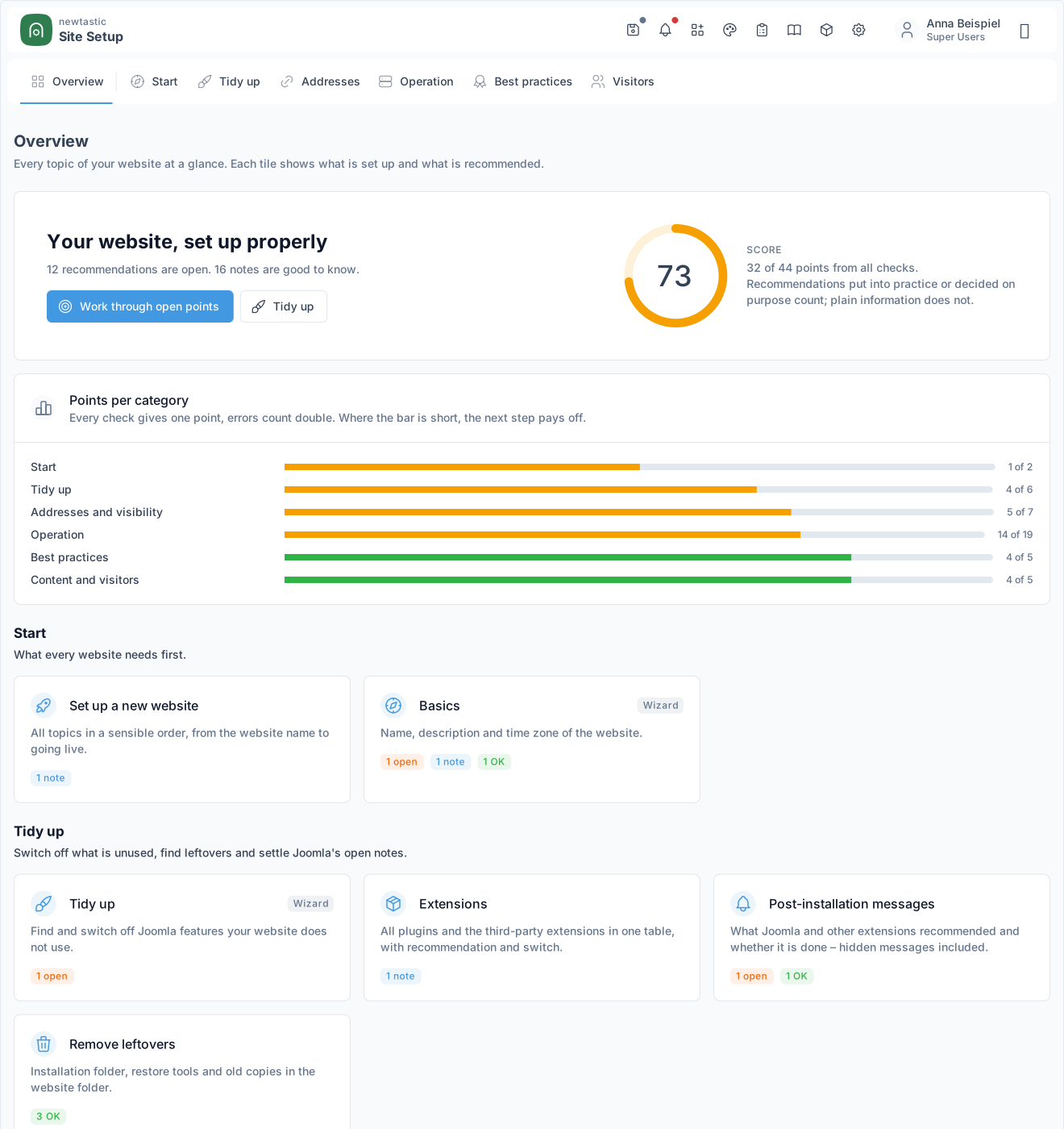
newtastic Site Setup: The overview with the score, points per category and the topics as tiles.

The overview with the score, points per category and the topics as tiles.

Step 1

Look at the overview

The score and the points per category show where your website stands. Where a bar is short, the next step pays off.

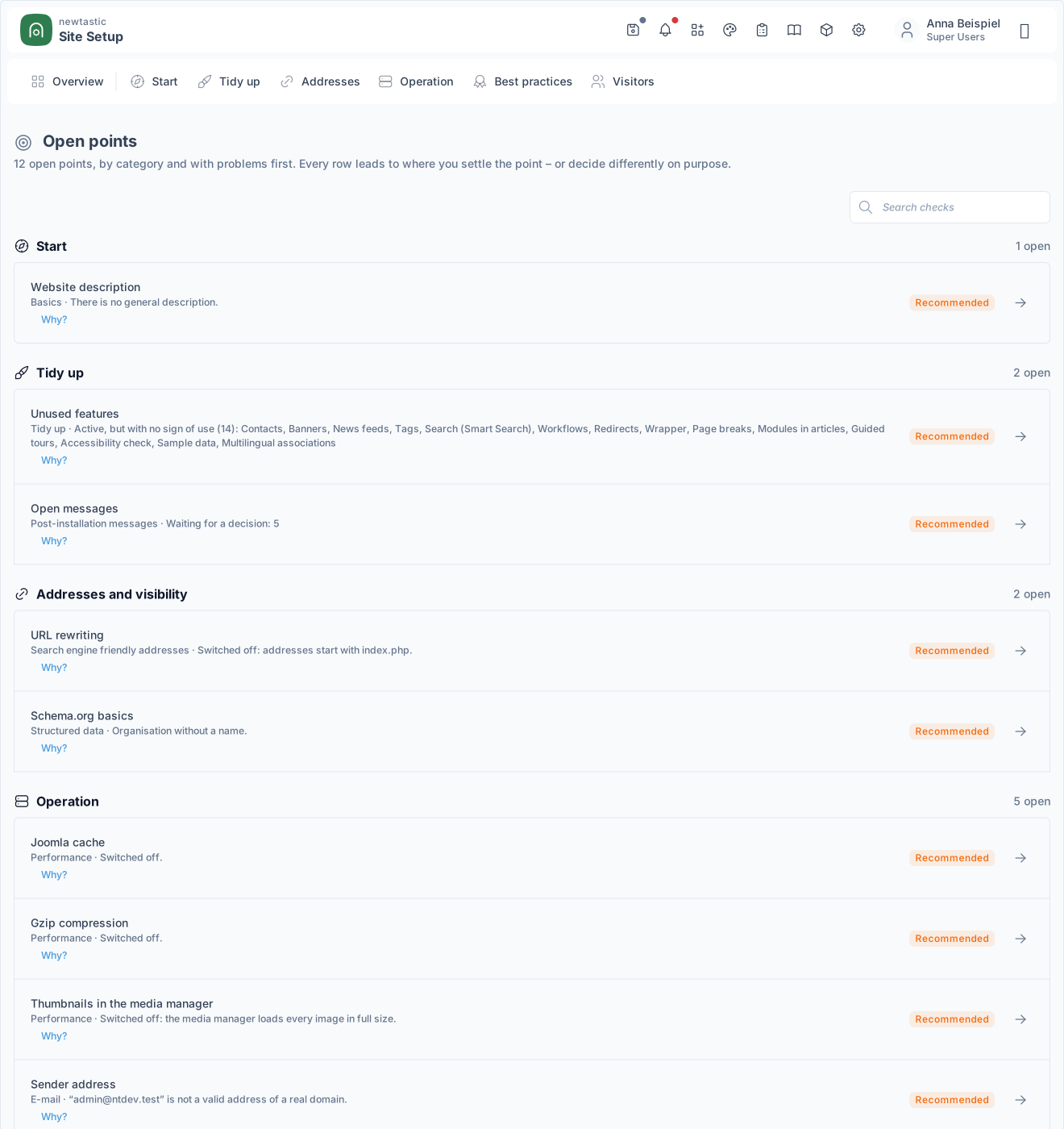
newtastic Site Setup: Open points: only what does not fit yet, ordered by category.

Open points: only what does not fit yet, ordered by category.

Step 2

Work through the open points

The list holds only what there is to do, problems first. Every row leads to where you settle the point – or decide differently on purpose.

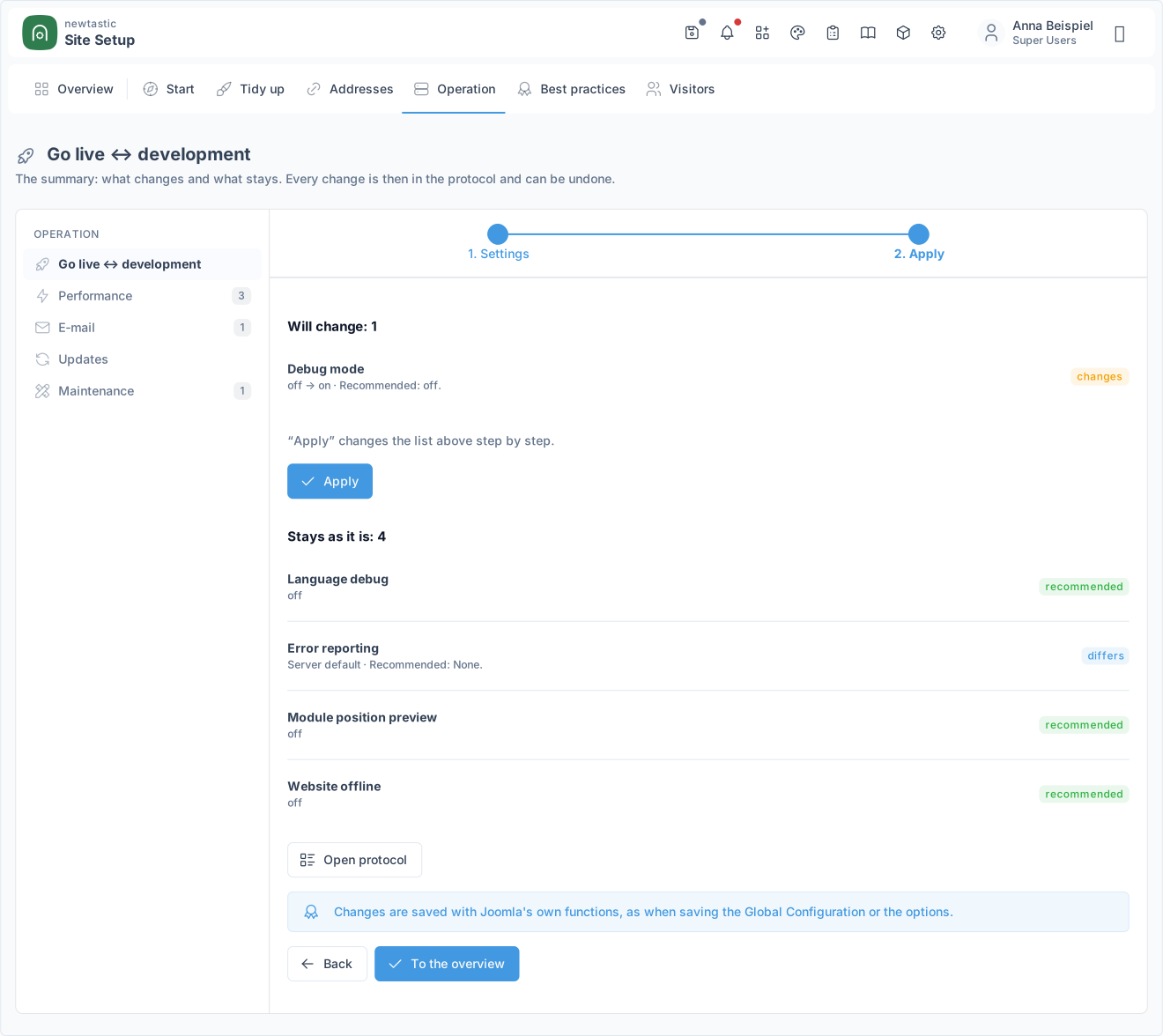
newtastic Site Setup: The summary before applying: what changes and what stays.

The summary before applying: what changes and what stays.

Step 3

Set up and apply

Take the recommendation or decide differently on purpose, look at the preview, check the summary. Nothing changes in Joomla until you click “Apply” – then step by step, with a log entry for each change.

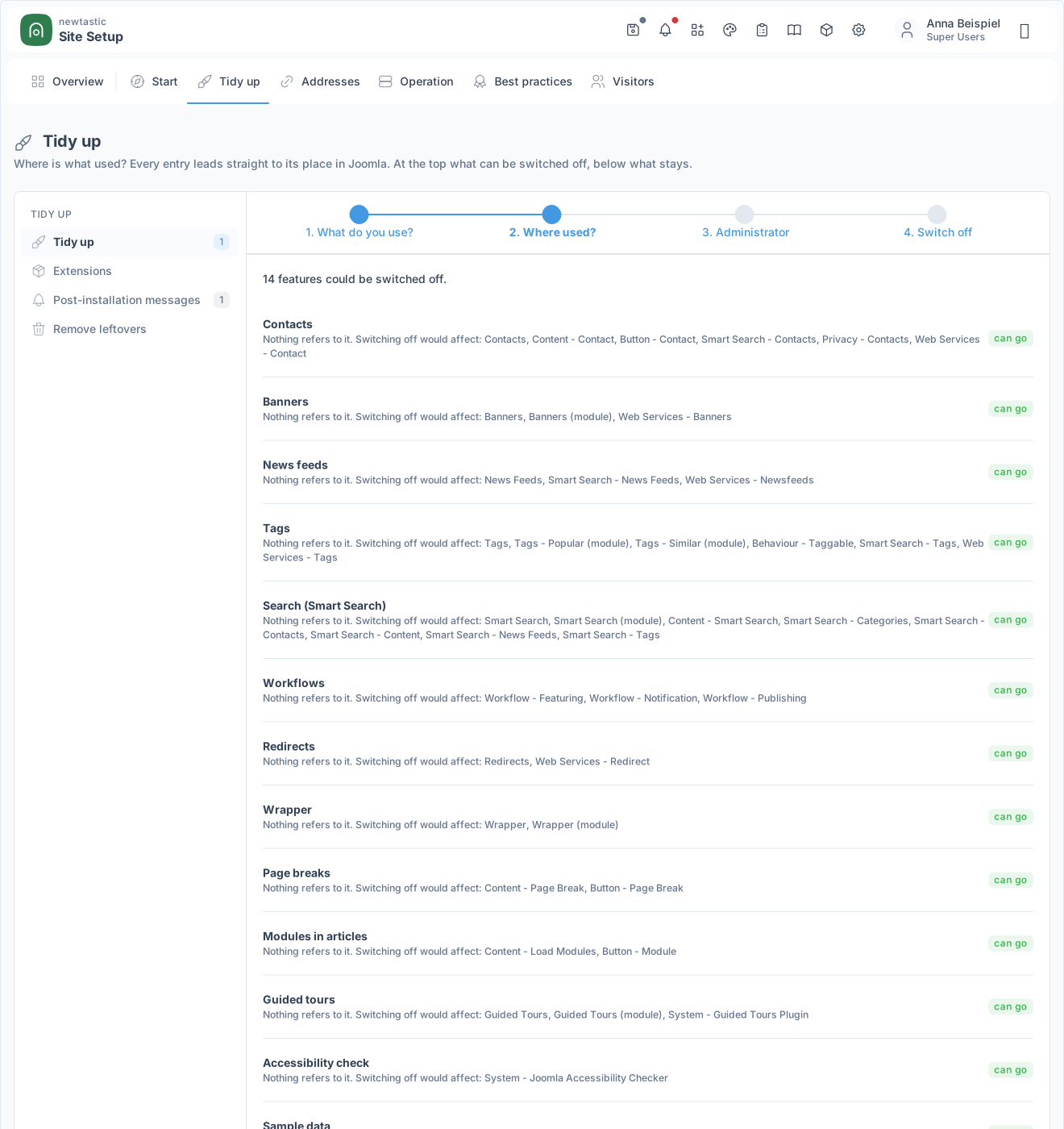
newtastic Site Setup: Tidy up: what can be switched off and where something is in use.

Tidy up: what can be switched off and where something is in use.

Step 4

Tidy up

Switch off unused Joomla features and extensions. You see beforehand where something is still in use, and every use links straight to its place in Joomla.

04 / More insights

More insights.

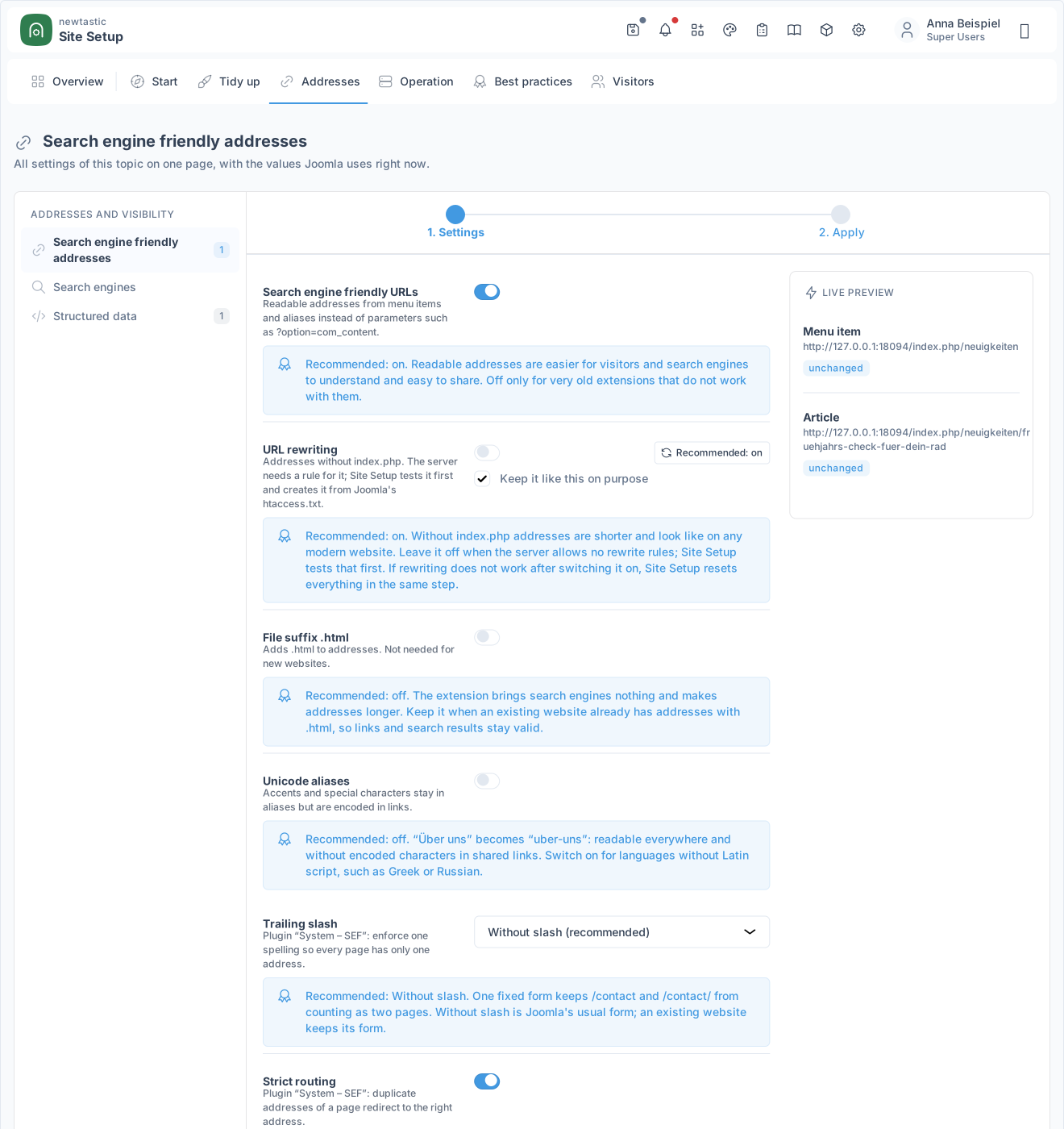
newtastic Site Setup: Search engine friendly addresses with the live preview before and after.

Search engine friendly addresses with the live preview before and after.

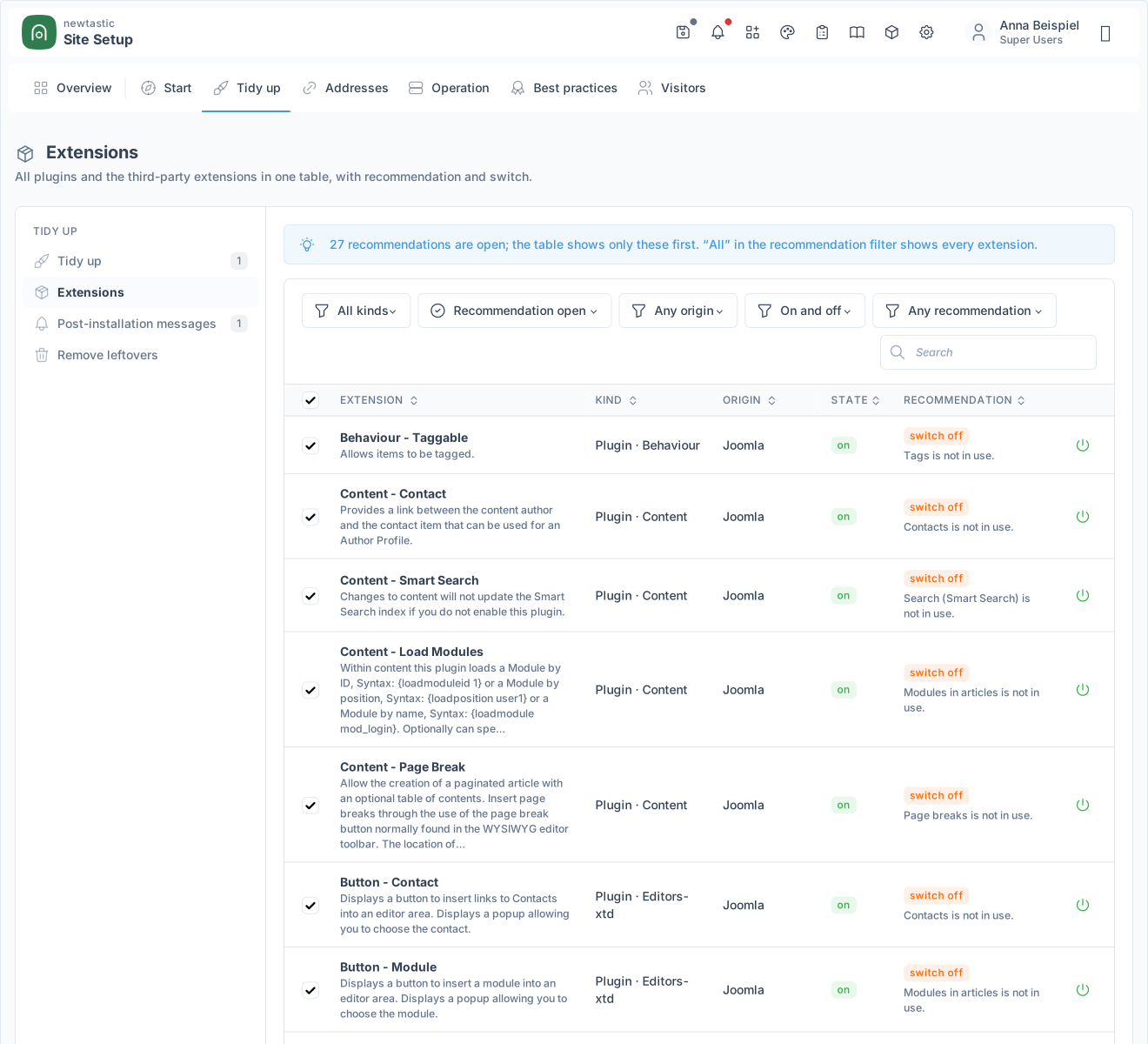
newtastic Site Setup: All extensions in one table with filters, search and recommendations.

All extensions in one table with filters, search and recommendations.

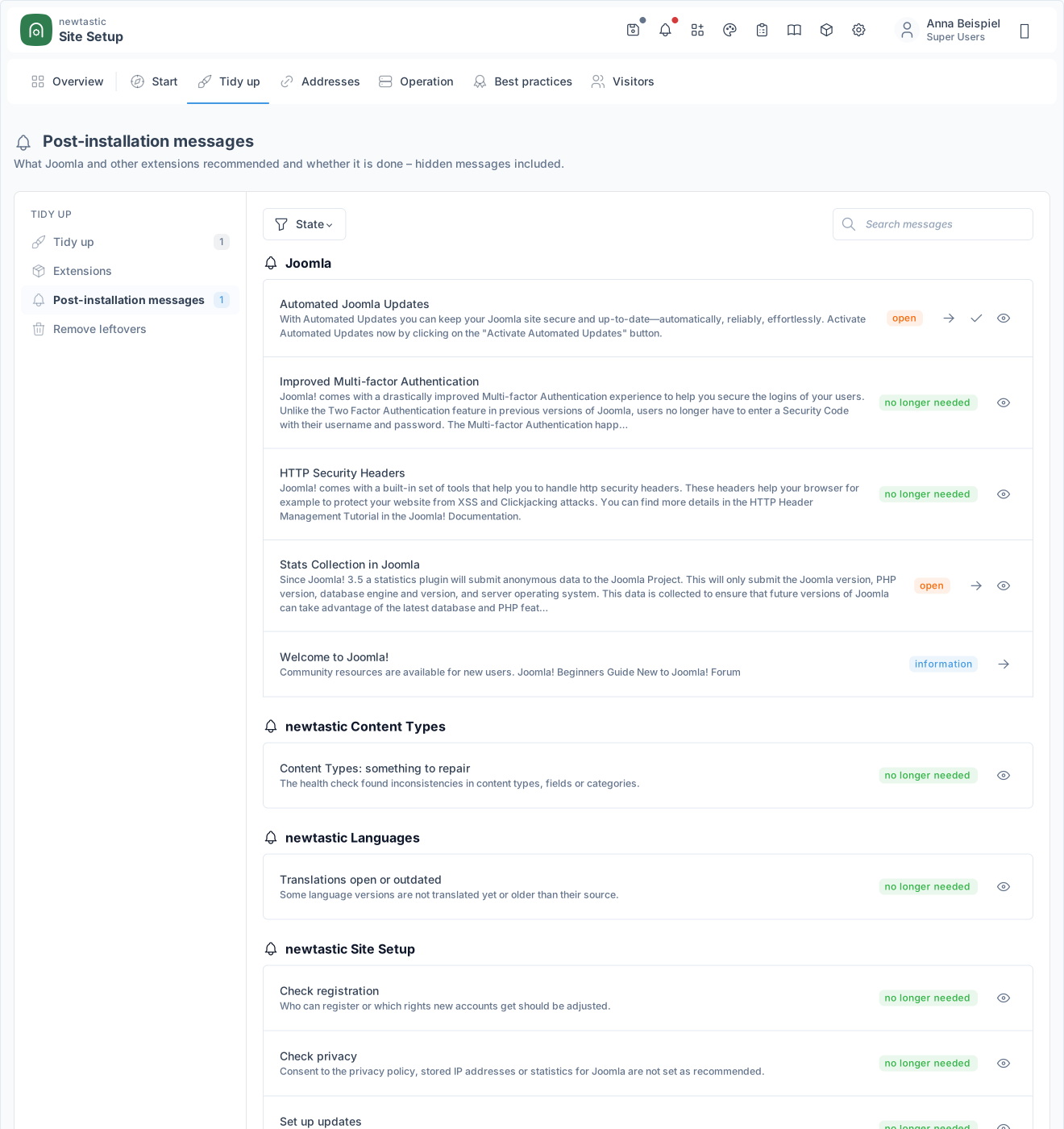
newtastic Site Setup: Post-installation messages ordered by extension, with state and tools.

Post-installation messages ordered by extension, with state and tools.

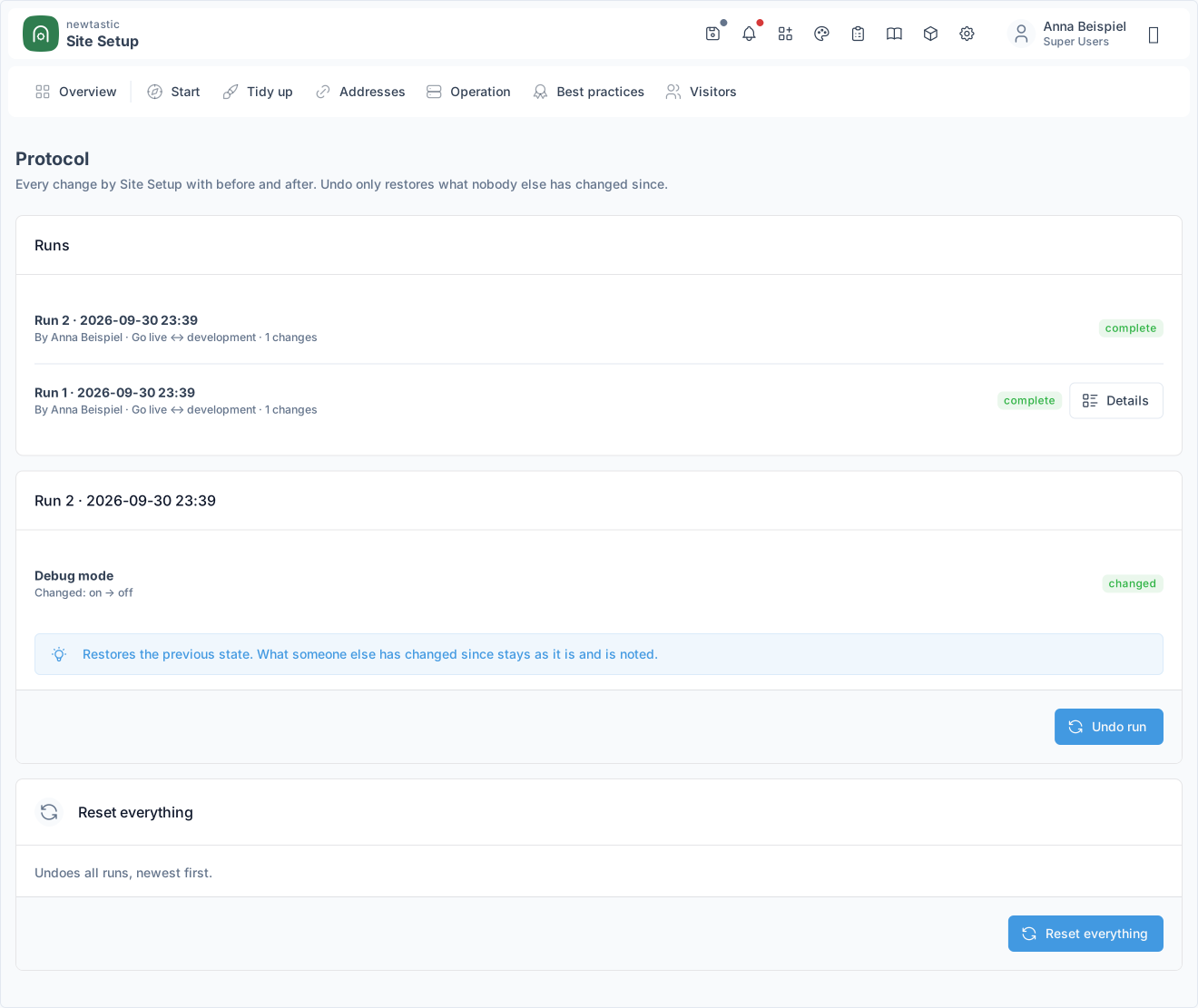
newtastic Site Setup: The log with the runs and the changes of the chosen run.

The log with the runs and the changes of the chosen run.

05 / All functions

All functions.

Score & to-do list

  • Score from 0 to 100 with bars per category and tiles per topic
  • Open points as a to-do list, problems first, each with “Fix”
  • Checklist of up to 64 checks with search and “Why?” on every line
  • “Set up a new website”: 15 topics in order with progress
  • Environment: PHP, Joomla, database, web server, warning without HTTPS

Wizards with preview

  • 16 wizards bundle up to 67 settings from 18 places in Joomla
  • Every setting shows the value Joomla actually uses right now
  • Recommendation with reasons for 43 settings, applied with one button
  • “Intended this way”: deliberate deviations count as done
  • Live preview while typing in 9 topics, without saving anything
  • Summary old → new, then applied step by step
  • Warning about a read-only configuration and two open tabs

URLs & search engines

  • Site name, description, time zone with tab and search result preview
  • Readable URLs: without index.php and IDs, .html, umlauts, trailing slash
  • Before/after on two real URLs of your own website
  • Without index.php: tested safely first, undone at once on error
  • .htaccess created from Joomla's template if needed, yours never touched
  • nginx and IIS: server rule or hint, switched on by hand
  • Robots setting with preview, robots.txt check including sitemap
  • Create robots.txt or unblock media and images, reversible
  • Structured data for organisation or person with source code preview

Operations & maintenance

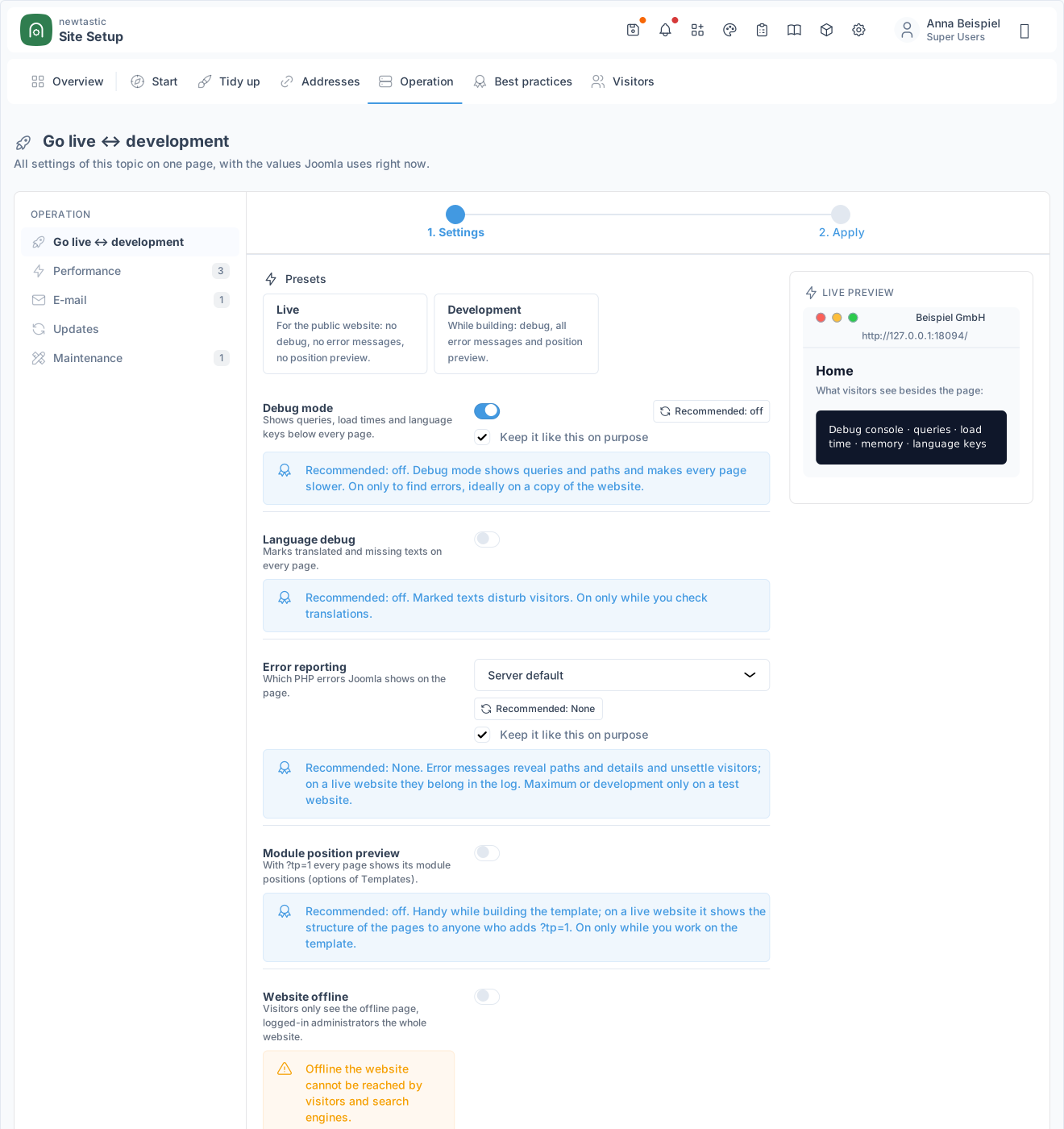
  • Live or development: debug, error reporting, offline in one click
  • Preview of what visitors see: offline page, error message, positions
  • Performance: Joomla cache, Gzip, page cache and small thumbnails
  • Email: sender and SMTP with preview, warning about spam risk
  • Update channel and daily update email; auto-updates display only
  • Fix log and temp folders, 404 collection with warning above 1,000
  • Scheduled tasks by switch: logs, sessions, old user actions

Editors & visitors

  • Default editor and buttons, warning if the editor is disabled
  • Captcha without puzzles or third parties, alert for unprotected forms
  • Article versions with a limit, warning if the plugin is missing
  • Fine-tuning: site name in title, frontend editing, list length
  • Upload size to match the server, restrict allowed file types
  • Registration with preview; groups with backend access never offered
  • Privacy: consent with expiry, IP logging, statistics to Joomla

Clean-up & extensions

  • Checks 19 Joomla features: what does the website really use?
  • Every use linked: menu items, modules, articles, API tokens
  • Disable only, never uninstall; used and essential features stay on
  • Switch off single API endpoints, keep the rest
  • Declutter the backend: hide modules on dashboards and in the header
  • All plugins and third-party extensions in one table, with reasons
  • Filter, search and toggle with one click, several at once too

Notices & leftovers

  • All post-installation notices with status, search and filter
  • Hidden notices that still apply stay visible and open
  • Resolve in the matching wizard or with Joomla's own action
  • 7 messages in Joomla's post-installation notices while something is open
  • Finds a forgotten installation folder and Kickstart (report only)
  • Finds backup archives and config copies such as .bak (report only)

Log & transfer

  • Log of every change with time, person, topic and before/after
  • Undo any run with one click or reset everything at once
  • Changes made by others since then are kept when undoing
  • Export your standard setup as a file for the next website
  • Name, sender, SMTP server and folders stay out, passwords too
  • Import by pasting (up to 1 MB), applied topic by topic

Guide & permissions

  • Guide right inside Joomla: 10 topics, matched to the current page
  • Only Super Users change settings, anyone with access can view
06 / Frequently asked questions

Frequently asked questions.

Does Site Setup change anything without me?

No. Only what you start yourself is changed – settings through Joomla's own save functions. Every change is logged and can be undone.

Does every recommendation fit every website?

Not necessarily – that is why every recommendation comes with reasons. With “Keep it like this on purpose” you decide differently, and the deviation counts as done in the check list and the score as long as Joomla has exactly that value.

Does tidying up delete extensions?

No. Site Setup only switches off and never uninstalls; everything can be switched on again at any time. Right before switching off it checks the use once more and skips anything that is in use by then.

What stays when I uninstall Site Setup?

Everything you set up: Site Setup only changes Joomla's own configuration, and those settings stay. Only the component and system plugin are removed, plus the set-up log.

Exclusive to our clients.

newtastic Site Setup is not for sale. Have us build your website or migrate it to Joomla – and we set up newtastic Site Setup for you.