

 Joomla hacked?
 Joomla 6 migration
 Security update PHP & YOOtheme
 Blog
 References
 About us
 Prices
 Contact

Which page builder suits Joomla 6? We put YOOtheme Pro 5.0.53 up against SP Page Builder Pro 6.10.0, the latter together with Helix Ultimate 2.2.11, JoomShaper’s free template. Both ran in two identical Joomla 6.2 installations, both got the same page. We measured load time and page weight, the design options for the whole website, the editors, the code, how well each works with Joomla, what you get and what is left after uninstalling. As of 2 November 2026.
The result in brief
- Speed: Out of the box, the same page weighs 942 KB in 18 requests with YOOtheme and 4,716 KB in 50 requests with SP Page Builder and Helix. On a phone the largest content appears after 1.5 instead of 14.8 seconds. The main reason: YOOtheme resizes images automatically.
- Design: YOOtheme designs the website and its pages in one tool with a live preview. With JoomShaper this is split across two products with two interfaces: Helix for header, colours and fonts, SP Page Builder for the content.
- Joomla: YOOtheme pages are ordinary Joomla articles. Versions, workflows, associations for multilingual sites, Smart Search and content plugins work as usual. SP Page Builder stores pages in 20 tables of its own and misses out on several of these features.
- Building blocks: SP Page Builder ships more ready-made blocks, such as forms and pricing tables.
- Price: Helix is free, SP Page Builder Pro costs from 59 US dollars a year for one website. YOOtheme Pro from 129 euros a year for updates on three websites, template included.
Our recommendation: YOOtheme Pro for new Joomla websites. SP Page Builder where it is already in use and a rebuild does not pay off – but then keep it updated and optimise the images yourself.
One tool or two
YOOtheme Pro is a Joomla template with a built-in builder. One package, one interface: in the customizer you set up header, menu, colours and fonts, build pages and, with “Templates”, also design Joomla’s own views such as article, category, search or the error page. A builder page is an ordinary Joomla article: the layout is stored as data in the full text, the finished HTML in the intro text.
JoomShaper splits the tasks. Helix Ultimate is a free template framework with its own settings for header, menu, colours, fonts and blog. SP Page Builder is a component that fills the content area, with its own editor and database tables. Both can be used independently; SP Page Builder also runs with other templates. We first tested it with Joomla’s default template Cassiopeia. For this comparison we use the pairing JoomShaper itself intends.
| YOOtheme Pro 5.0.53 | Helix Ultimate 2.2.11 + SP Page Builder Pro 6.10.0 | |
|---|---|---|
| Packages | 1 | 2 (template installer with framework plugin, builder component) |
| Interfaces | customizer with live preview for everything | Helix settings with live preview, plus SP’s own editor for pages |
| Where a page is stored | Joomla article (com_content) | its own page (com_sppagebuilder) |
| Own database tables | 0 | 20 (SP Page Builder) |
| Interface languages | 40 languages included | English; other languages for SP Page Builder to download from JoomShaper’s server |
| Installing with Joomla’s command line | works | SP Page Builder aborts and leaves a half installation (error 500) |
| Joomla 6 without the compatibility plugin | runs | runs |
The test page: the same page twice
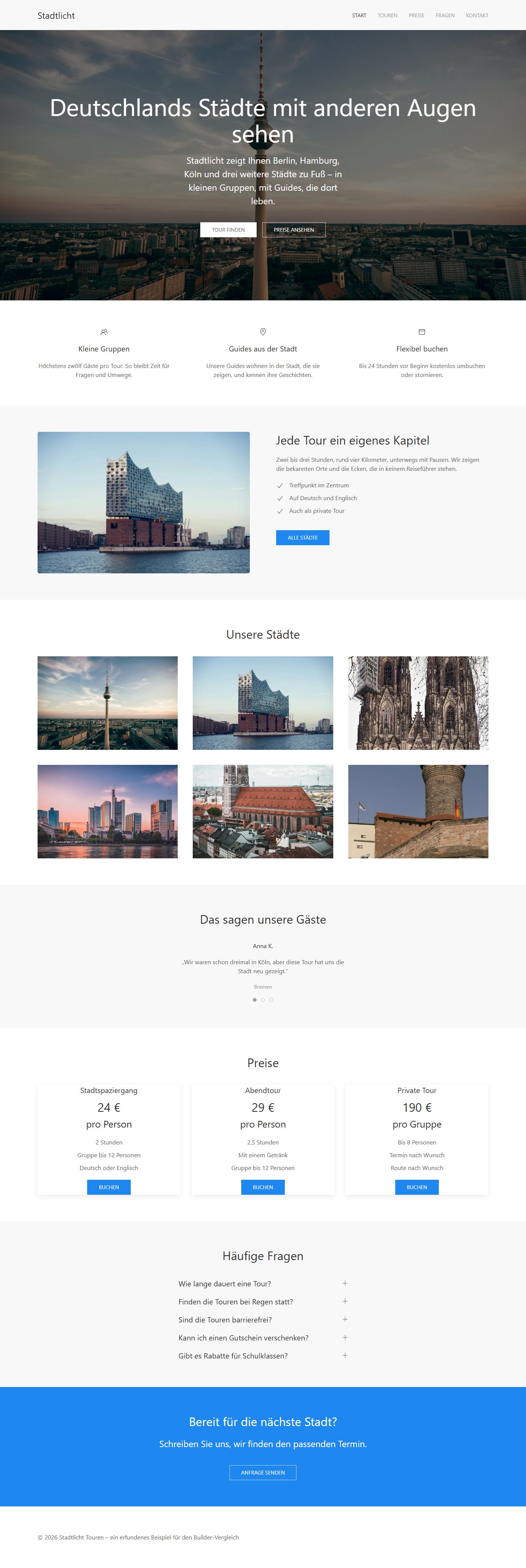
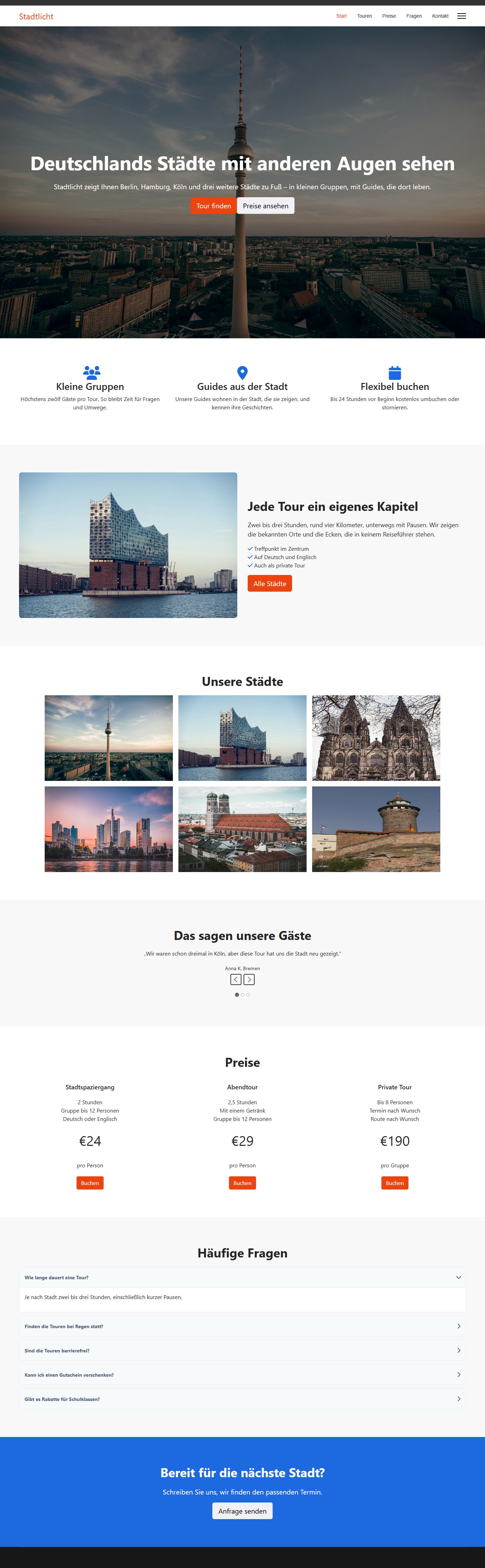
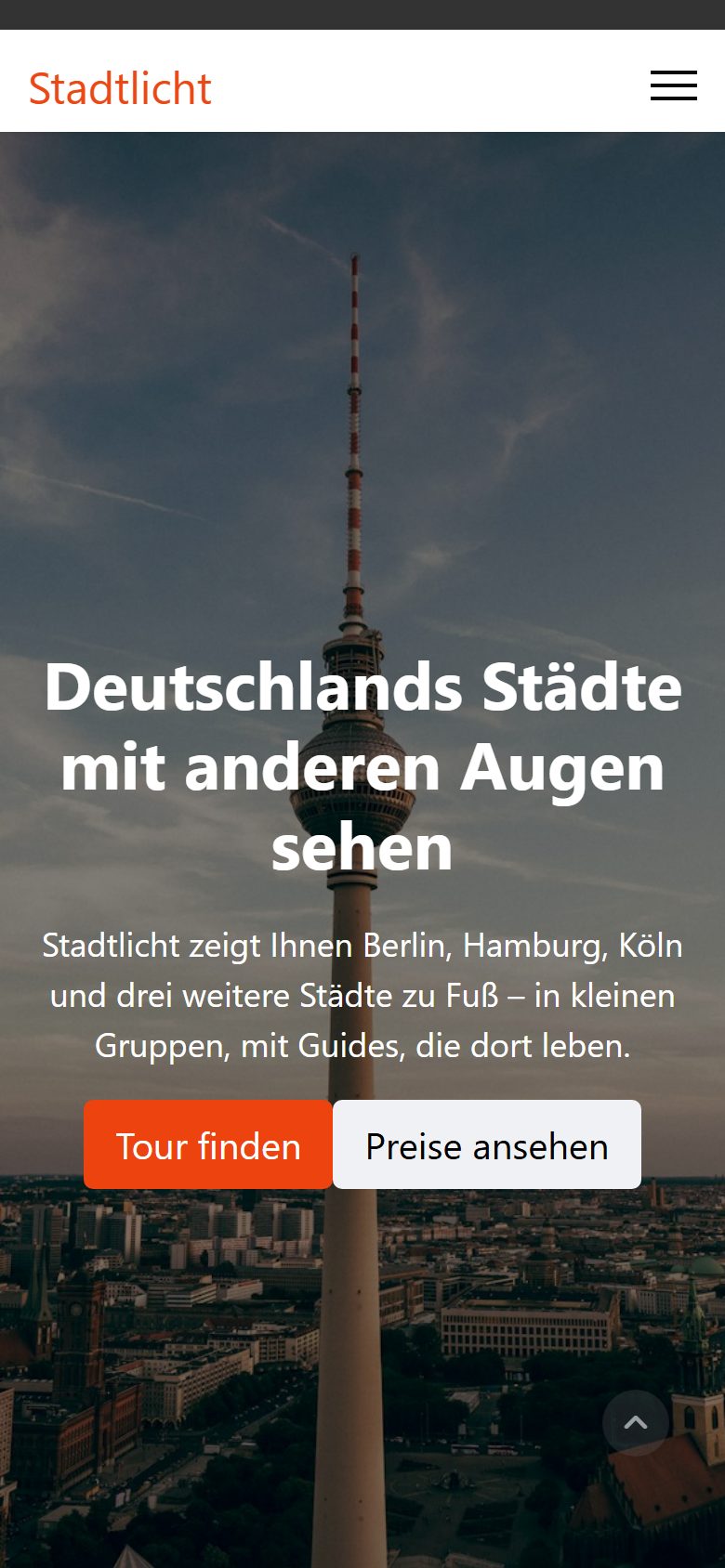
For the comparison we built a made-up website: “Stadtlicht Touren”, a provider of city walks. The page has eight sections found in almost every project: a large hero image with two buttons, three benefits with icons, image and text, a gallery with lightbox, testimonials as a slider, three prices, frequently asked questions as an accordion and a closing section with a contact button. Texts, order and anchors are the same in both versions. The six photos come from Unsplash, are 1,920 pixels wide and between 330 KB and 1.3 MB, the way clients often upload them. The page itself is in German.
For YOOtheme we chose the plain “UIkit” style and set the logo as text. For Helix we set the logo as text and switched off the sample content Helix shows in the header out of the box (phone numbers, social icons, search, login); everything else stayed on the defaults. Only SP Page Builder has a pricing table; in YOOtheme the prices are cards in the grid element. Only SP Page Builder comes with a contact form; we left it out so both pages stay the same.

Designing the whole website
Both can build pages. The bigger difference is everything around them: header, menu, colours, fonts and the pages Joomla generates itself. With YOOtheme this happens in the same customizer as page building, with the real website as preview. Helix has its own interface for this, also with a live preview, with 197 settings in 8 groups; the pages themselves are built in the SP editor.
| YOOtheme Pro | Helix Ultimate | |
|---|---|---|
| Colours and style | 283 styles in 48 style families, every component adjustable | 8 colour presets, colours per area |
| Header | 12 layouts, transparent header, separate header for phones | 9 header styles, mega menu |
| Menu on phones | as offcanvas, modal or dropbar | 3 offcanvas styles |
| Joomla’s views (article, category, search, 404 …) | freely designed with the builder (“Templates”) | fixed overrides for 18 areas, blog settings |
| Fonts | stores Google Fonts on your own server automatically | loads Google Fonts straight from Google, all 18 styles |
| Layout around the content | builder modules and positions in the customizer | layout grid for module positions in the Helix settings |
| Legacy | – | overrides for the old search (com_search, mod_search), which no longer exists since Joomla 4 |
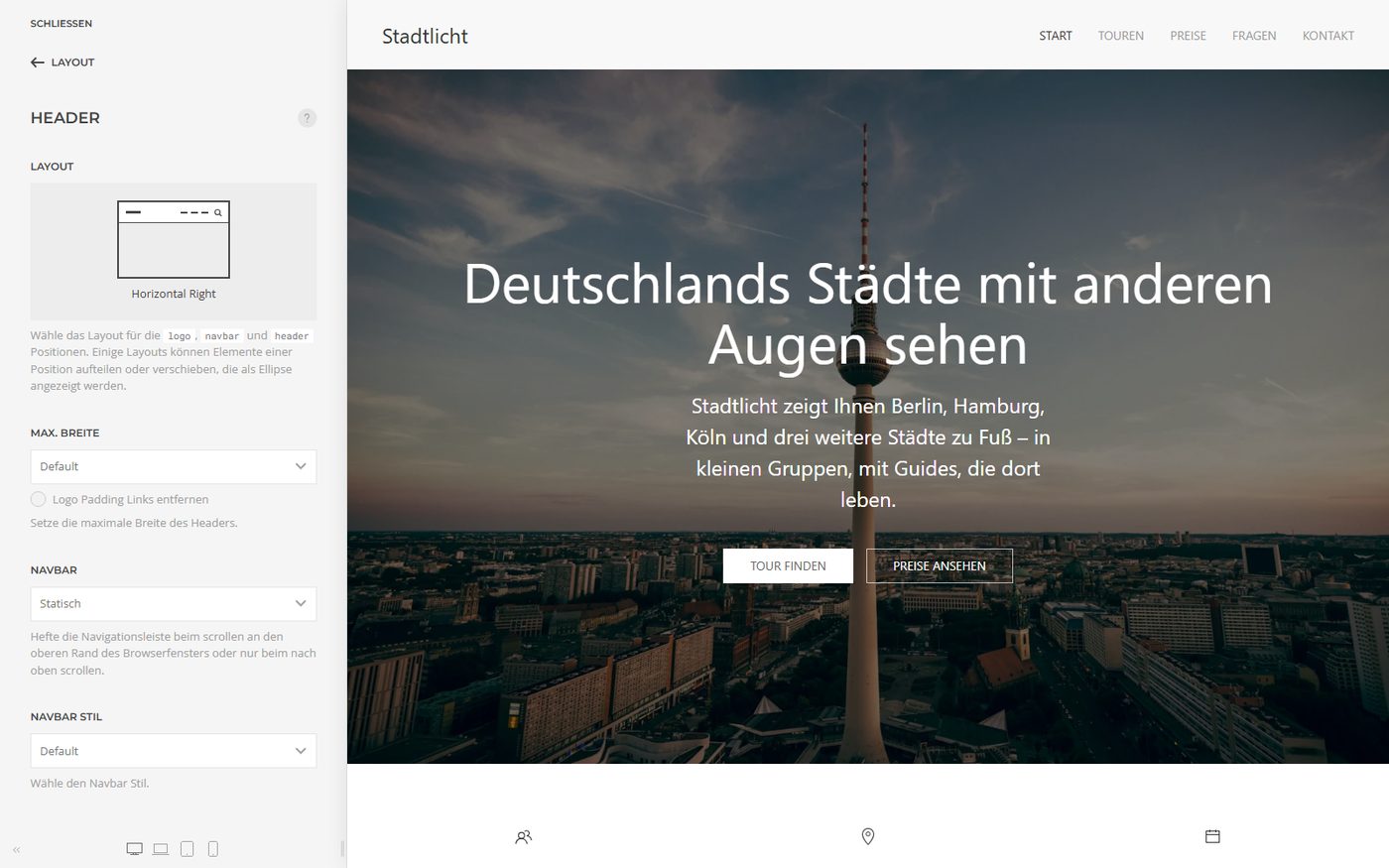
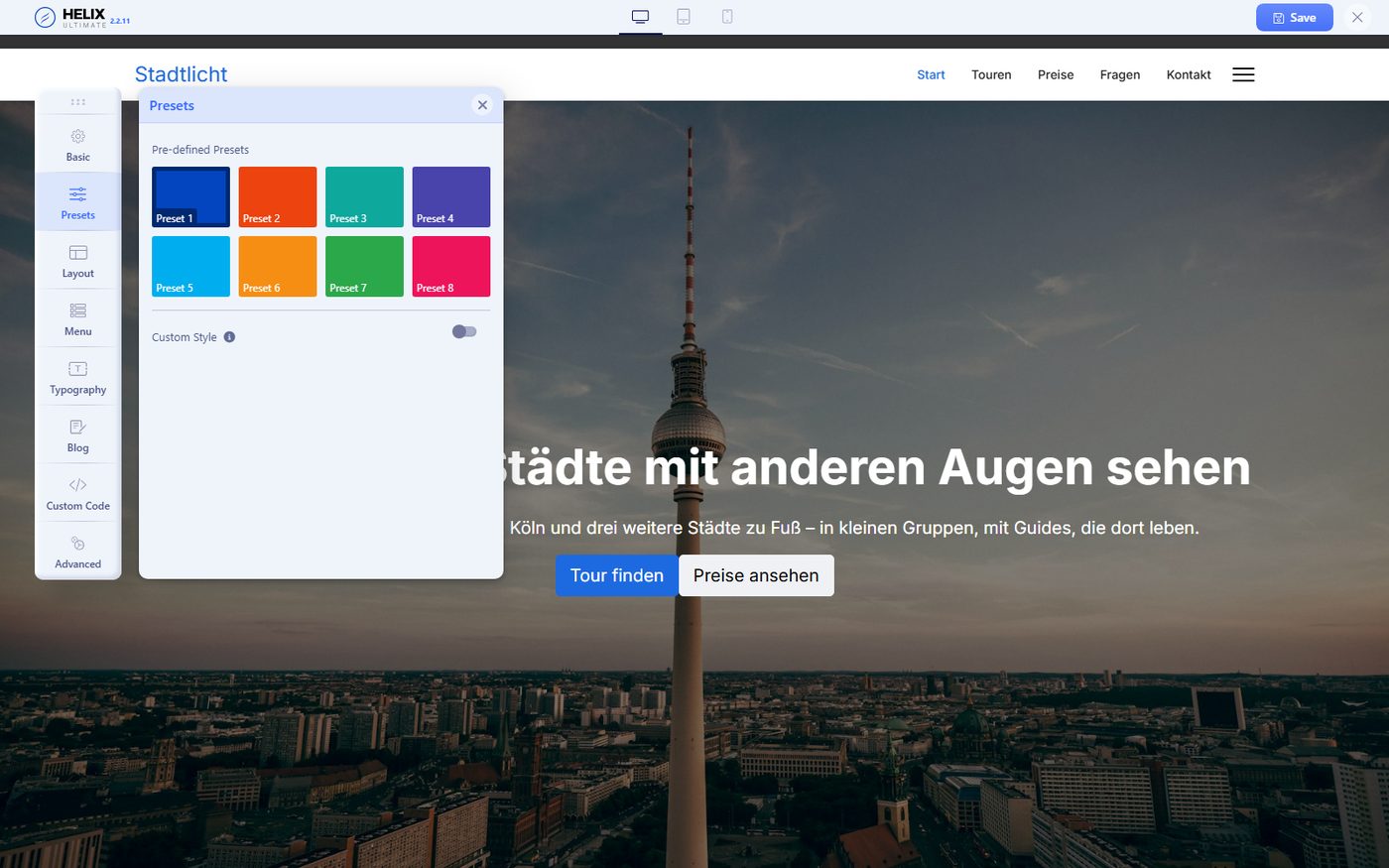
The practical difference shows in everything that is not a builder page. With YOOtheme you design a category overview, an article page or the search results with the same elements as the home page. With Helix they stay as the overrides define them, adjusted through settings and your own CSS. SP Page Builder can edit Joomla articles with the builder, but it does not design category or search pages.
Load time and page weight
This is where the biggest difference lies. On the first request YOOtheme creates smaller copies of every image in WebP format, offers several sizes for different screens, sets width and height and loads images only when they come into view. SP Page Builder serves the originals: the gallery shows thumbnails 370 pixels wide but loads the 1,920-pixel photos for them, the Cologne Cathedral photo alone with 1.3 MB. Helix does not change that.
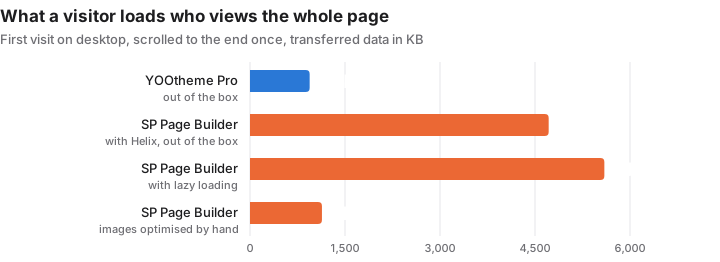
SP Page Builder can load images lazily, but this Pro option is off by default. Switched on, the weight on opening drops to 874 KB. A visitor who scrolls to the end then loads 5,595 KB. Only after we resized the images by hand and saved them as WebP did SP Page Builder reach 1,136 KB. That is work which comes back with every new image and which YOOtheme does automatically.
Even without images the JoomShaper page loads much more: 44 files compared with 9 for YOOtheme. Helix includes Bootstrap, with its JavaScript split into twelve separate files, plus jQuery, a jQuery plugin for select boxes and Joomla’s Font Awesome. SP Page Builder adds its own Font Awesome, more jQuery plugins and the animate.css library. For the three benefit icons the page loads an icon font of 155 KB. YOOtheme relies on UIkit and draws icons as inline SVG.
| Origin of the files (without images) | YOOtheme Pro | Helix + SP Page Builder |
|---|---|---|
| HTML of the page | 1 · 8 KB | 1 · 13 KB |
| Joomla (scripts, Bootstrap, jQuery, Font Awesome …) | 4 · 34 KB | 22 · 260 KB |
| Template | 4 · 132 KB | 8 · 64 KB |
| Builder | – (part of the template) | 13 · 104 KB |
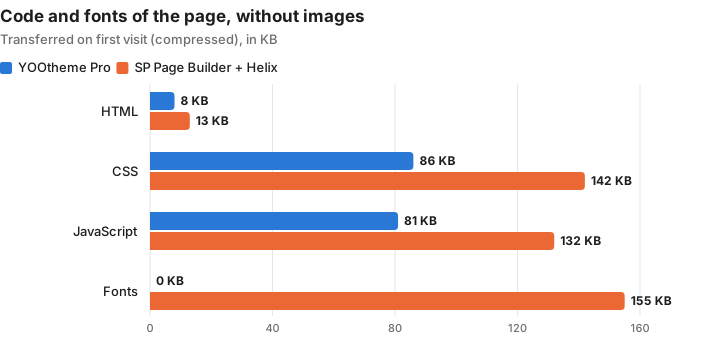
Both load a lot of CSS the page never applies: YOOtheme’s stylesheet contains the whole UIkit framework, with JoomShaper Bootstrap, the Helix template, the builder CSS and Font Awesome twice add up. For JavaScript, YOOtheme uses about 56 percent of what it loads, the JoomShaper page about 24 percent.
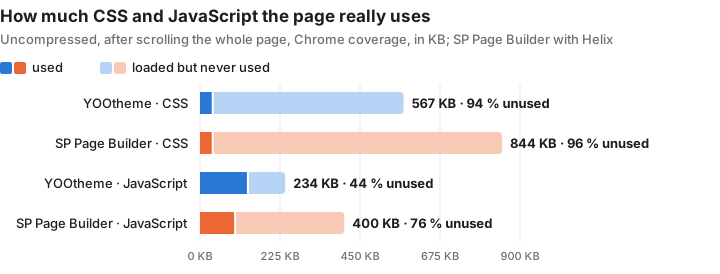
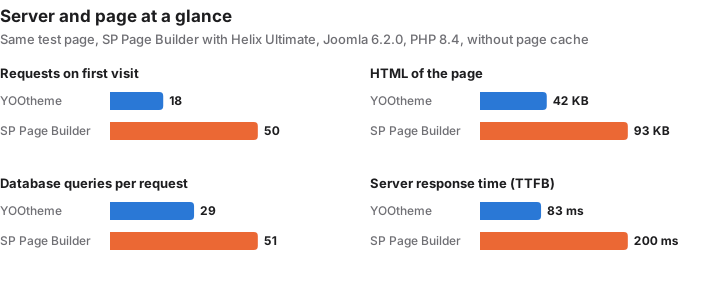
Without page cache, Joomla answered after 83 ms with YOOtheme and after 200 ms with SP Page Builder and Helix. The JoomShaper page runs 51 instead of 29 database queries and delivers 93 instead of 42 KB of HTML, because SP Page Builder writes about 54 KB of CSS straight into the HTML of every page. With Joomla’s page cache both are at about 57 ms.
Most of the longer server time comes from a single Helix setting: “Compile SCSS to CSS” was switched on after installation, so Helix checks and compiles its stylesheets on every request. Switched off, the server answered after about 80 ms, as fast as with YOOtheme. Helix itself recommends turning the option off on live websites.
| Measurement (median) | YOOtheme Pro | Helix + SP Page Builder |
|---|---|---|
| Page weight on first visit, desktop | 942 KB | 4,716 KB |
| Requests | 18 | 50 |
| First Contentful Paint, mobile | 1.54 s | 2.23 s |
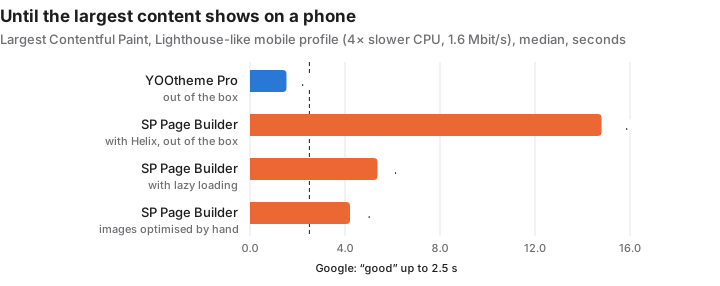
| Largest Contentful Paint, mobile | 1.54 s | 14.80 s |
| Page fully loaded, mobile | 1.5 s | 24.9 s |
| Cumulative Layout Shift | 0.00 | 0.00 |
| Total Blocking Time, mobile | 0 ms | 0 ms |
| Server response without / with page cache | 83 / 57 ms | 200 / 53 ms |
| Database queries per request | 29 | 51 |
| HTML, uncompressed / compressed | 42 / 7.2 KB | 93 / 12.5 KB |
There is no difference in layout shifts or blocking JavaScript: neither page jumps and both stay responsive. With Joomla’s Cassiopeia instead of Helix, SP Page Builder loaded somewhat less (33 requests, 4,654 KB, phone 12.8 s) – so the template is not the cause, the images are.
Working with them: two very different editors
In the YOOtheme customizer the structure of the page is on the left and the real website on the right as a live preview. A click into the preview opens the element, every change shows at once. The element library offers 39 elements, plus your own and supplied presets.
The SP Page Builder editor is an application of its own in the backend: sections and add-ons as boxes, the settings on the right, the preview opens at the push of a button. The frontend editor runs on the website itself and needs a separate login there. For header, colours and fonts you switch to the Helix settings. Both JoomShaper interfaces are English unless you download a language pack. The add-on list is long and sorted by area.
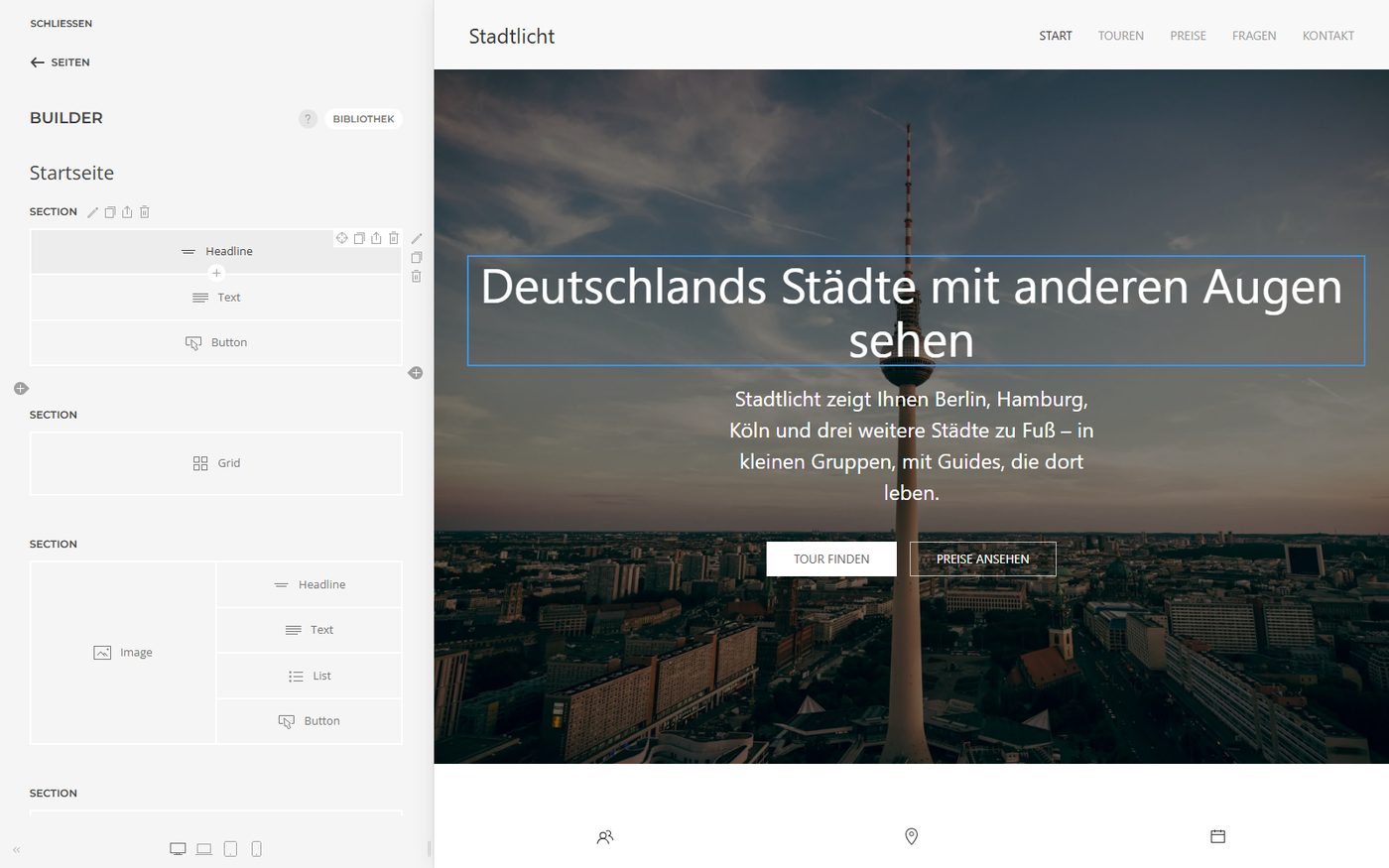
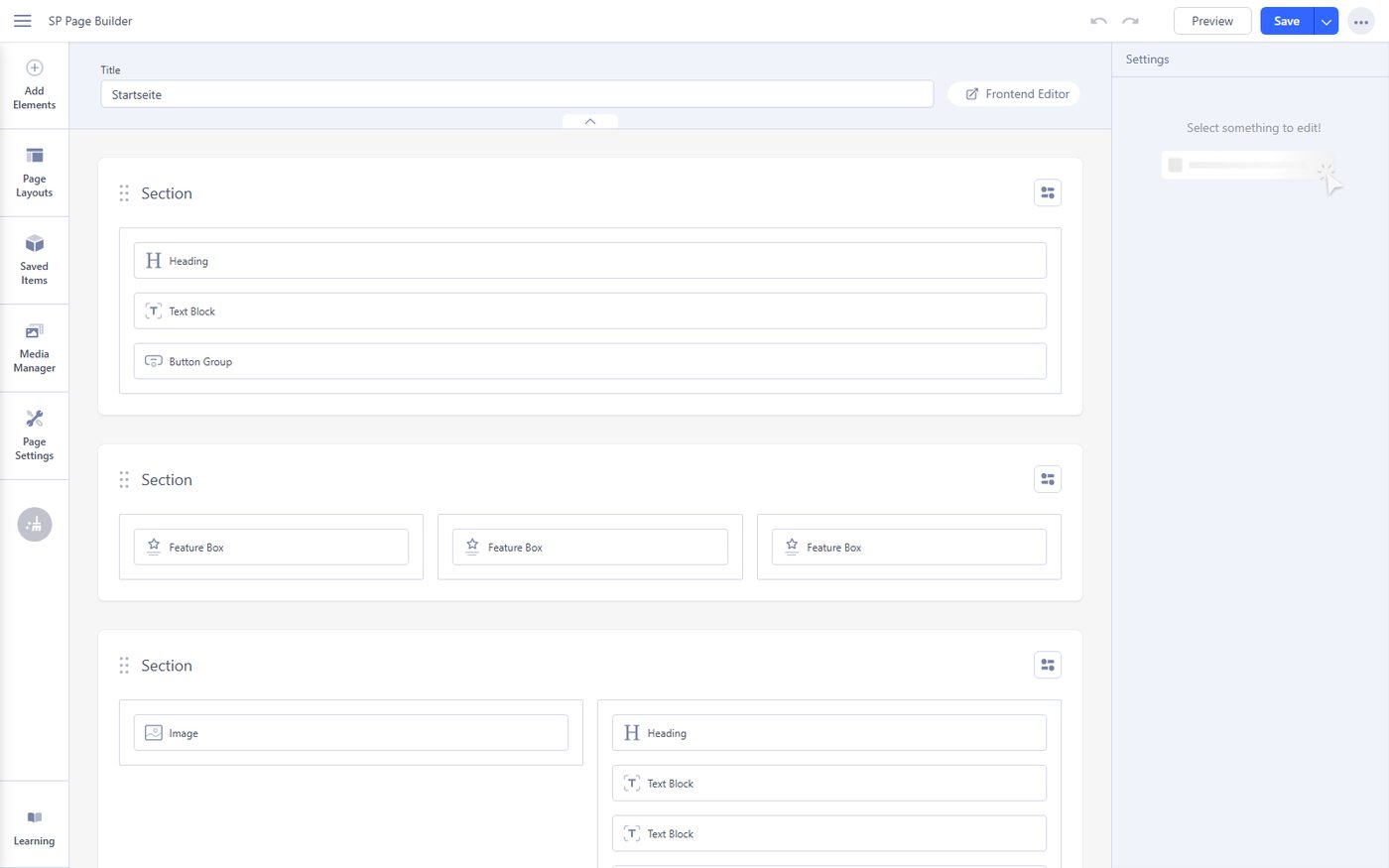
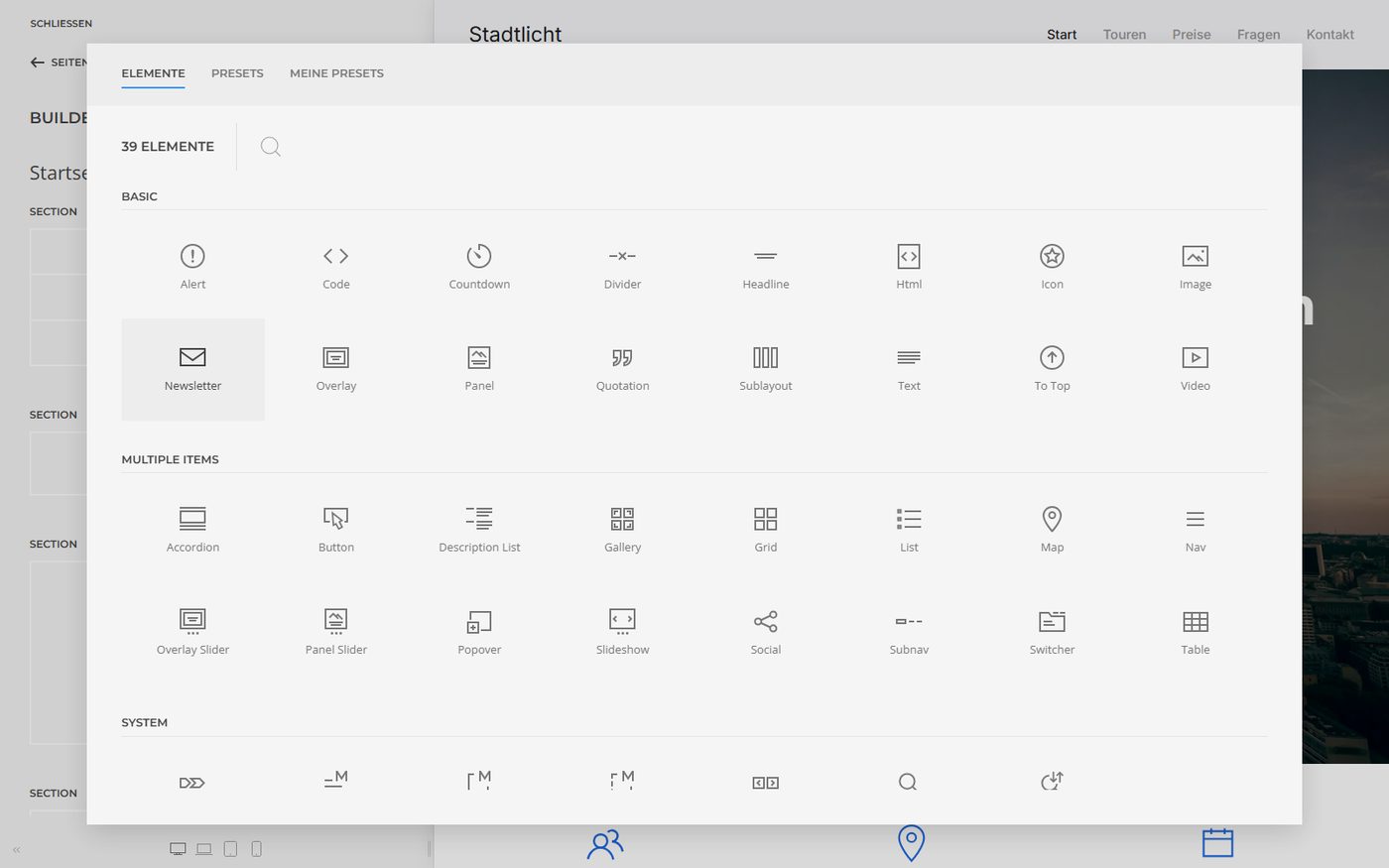
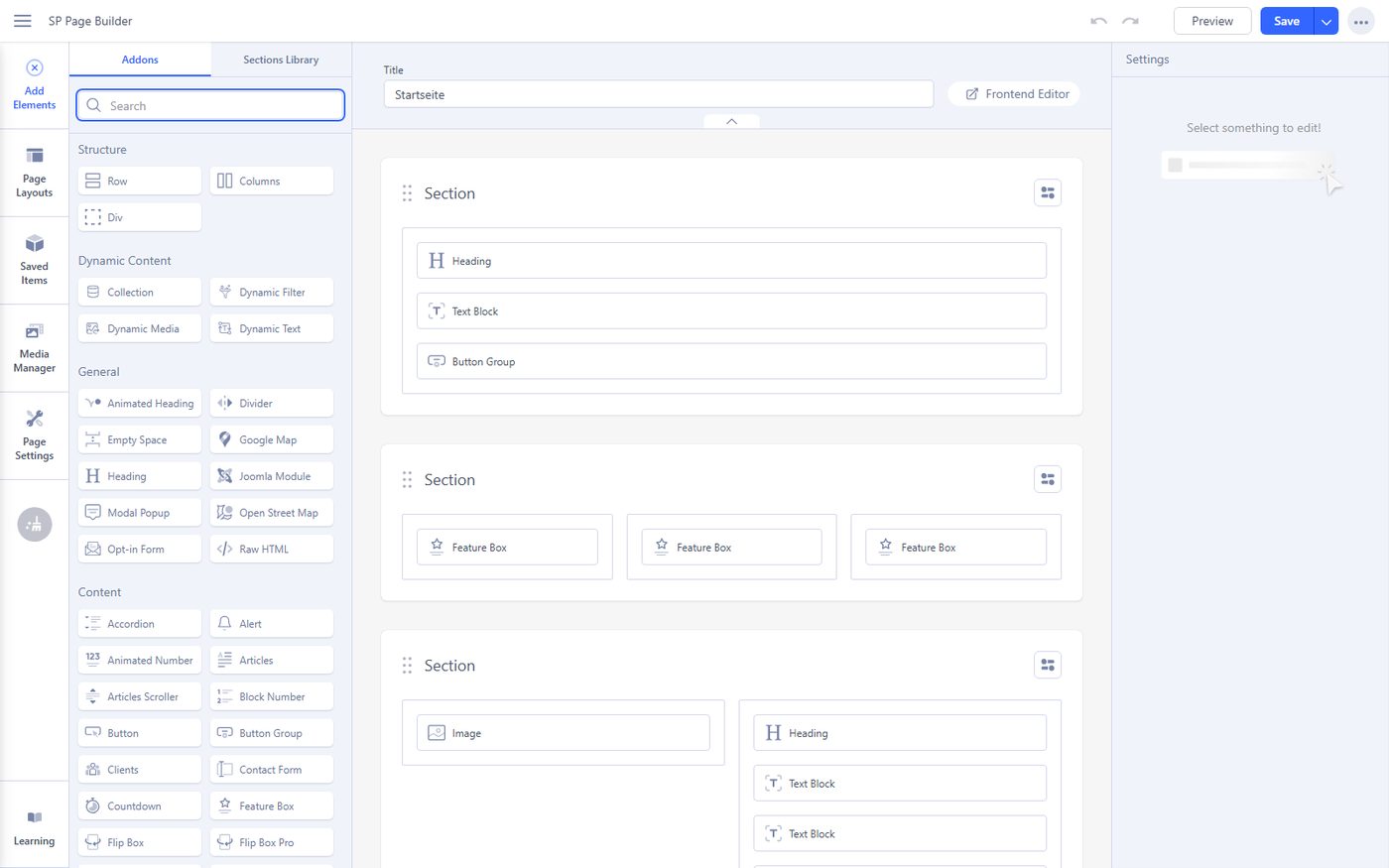
Both editors load a little over 3 MB when first opened (3.1 MB for YOOtheme including the preview, 3.4 MB for SP Page Builder) and were usable within two seconds locally. If clients maintain their own site, think about the language: YOOtheme speaks German and 39 other languages out of the box, JoomShaper English.
Technology and code
| YOOtheme Pro | SP Page Builder | Helix Ultimate | |
|---|---|---|---|
| Files in the package | 3,146 | 878 | 1,365 |
| PHP files / lines of code | 1,091 / 102,606 | 505 / 128,289 | – |
| Frontend | UIkit 3, icons as SVG | jQuery, Magnific Popup, Font Awesome 6, animate.css and more | Bootstrap 5, jQuery, Font Awesome |
| Editor | Vue | React | its own interface with jQuery |
| Deprecated Joomla functions (removal announced for Joomla 7) | none found | getDbo() 315×, getUser() 206×, getDocument() 55× | getDbo() 25×, getUser() 13×, getDocument() 79× |
| PHP 8.4 with all notices (website, editor) | no message | no message | no message |
YOOtheme brings a small framework of its own: its own container, its own routes via Joomla’s Ajax interface and GraphQL for dynamic content. It is built in a modern way, with namespaces and strict typing in many files, but it is a second architecture inside Joomla. It does not use Joomla’s deprecated functions.
SP Page Builder and Helix follow the classic Joomla structure more closely, partly still in Joomla 3 style, and often call functions that Joomla has marked as deprecated since version 4.3 and plans to remove with Joomla 7. For Joomla 6, SP Page Builder defines replacement names for three removed Joomla classes itself. That works, but it postpones the adjustment to the next major Joomla update.
One practical difference showed up during installation: YOOtheme can be installed with Joomla’s own command-line command. With SP Page Builder the same command aborted and left an active plugin without its files; after that the website and backend only showed error 500. Installing through the backend works for all three.
Working with Joomla
This is where it shows what it means that YOOtheme pages are Joomla articles. We tried every feature in both installations:
| Joomla feature | YOOtheme Pro | SP Page Builder |
|---|---|---|
| Version history | Joomla’s article versions | its own versions in the editor |
| Workflows and approval | like any article | not provided |
| Multilingual sites | language per article, linked through Joomla’s “Associations” component | language per page; Joomla associations only through menu items, the pages themselves are missing from “Associations” |
| hreflang for search engines | works | works if every language version has an associated menu item |
| Smart Search (Joomla’s search) | in the index right away | plugin off by default; indexes only in the backend, not from the command line or Joomla’s task scheduler |
| Content plugins, e.g. email cloaking, {loadmoduleid} | run like in any article | only its own module plugin; Joomla’s email cloaking does not apply |
| Joomla modules in the layout | “Module” and “Position” elements | “Joomla Module” add-on, its own module for builder content |
| Custom fields | as a source for dynamic content | in the “Articles” add-on; its own collections for dynamic content |
| Joomla’s Web Services API | content as HTML in the article | pages not available through the API |
| Editing rights | article rights plus “edit templates” for the builder | the component’s own rights per page |
For multilingual websites this is the key point. With YOOtheme you create one article per language and associate the versions like any other article – also with tools built on Joomla’s associations. With SP Page Builder the link depends on the menu items alone. Pages without a menu item of their own cannot find their translation.
Both go their own way when it comes to other content. With “dynamic content”, YOOtheme reads Joomla’s articles, categories, contacts, tags, users, menu items, search results and custom fields, plus files from folders and the Regular Labs articles field. SP Page Builder brings “Dynamic Content”, a small CMS of its own with collections, fields and filters, can show Joomla articles through an add-on and, if you like, edit them with the builder. For shops it works with EasyStore, a separate JoomShaper product.
What you get
| YOOtheme Pro | Helix + SP Page Builder Pro | |
|---|---|---|
| Building blocks | 39 elements plus presets | about 65 add-ons |
| Ready-made layouts | starter websites and layout library (with licence key) | layout bundles (with licence) |
| Forms | newsletter sign-up only | contact form, form builder, opt-in |
| Pricing table, counter, timeline, team | no, can be built with grid and cards | yes, as separate add-ons |
| Icons | UIkit icons as SVG | Font Awesome 6, own icon packs can be uploaded |
| Google Fonts | stores them on your own server automatically | Helix and SP Page Builder link them straight from Google; SP Page Builder can save fonts locally in its “Font Book” first |
| Consent for external content | built-in consent manager for maps, videos, analytics | not available |
| AI texts | not available | connection to OpenAI and Google Gemini |
| Coming soon page | Joomla’s offline page in the site’s style | its own coming soon page in Helix |
In terms of features SP Page Builder is ahead: if you want forms, pricing tables and counters without another extension, you find them ready-made there. YOOtheme has fewer blocks but designs the whole website in one piece. YOOtheme websites usually use a form extension such as RSForm Pro.
For websites in Germany and the EU the handling of Google Fonts matters: loading them straight from Google’s servers has already been the subject of court rulings and waves of warning letters in Germany. YOOtheme takes care of it. With Helix and SP Page Builder you need to know and include fonts locally yourself.
Accessibility and search engines
Both nearly passed the automatic test with axe-core 4.13 (WCAG 2.2 AA). For YOOtheme it reported insufficient contrast (10 places) – the grey menu items of the “UIkit” style. For SP Page Builder with Helix: insufficient contrast (6 places). Both can be fixed in the settings. Both pages have exactly one H1 and a sensible structure, the language is set.
For search engines, besides speed, the handling of images counts most. YOOtheme gives every image width and height, several sizes (srcset) and lazy loading. With SP Page Builder the gallery lacks width and height, and there is no srcset. And because the YOOtheme page is an article, its text is also in Joomla’s search and in the Web Services API.
Security
Since June 2026 the Joomla Project, as a CVE numbering authority, has published considerably more vulnerabilities in extensions. For 2026 we count 5 CVEs for YOOtheme Pro, 17 for SP Page Builder and 9 for Helix Ultimate. All are fixed in the versions we tested. Whichever you use, install updates promptly; an overview of all vulnerabilities in Joomla extensions is in our post Vulnerabilities in Joomla extensions 2026.
Leaving: what is left after uninstalling?
Anyone switching builders wants to know what remains of the pages. We uninstalled both. After YOOtheme, the home page still loads: Joomla’s default template shows the article with all texts, images and links, just without the design. After SP Page Builder, the home page shows error 404, with Helix as with Cassiopeia. The content is still in the 20 tables in the database, but it only becomes readable again once SP Page Builder is reinstalled.
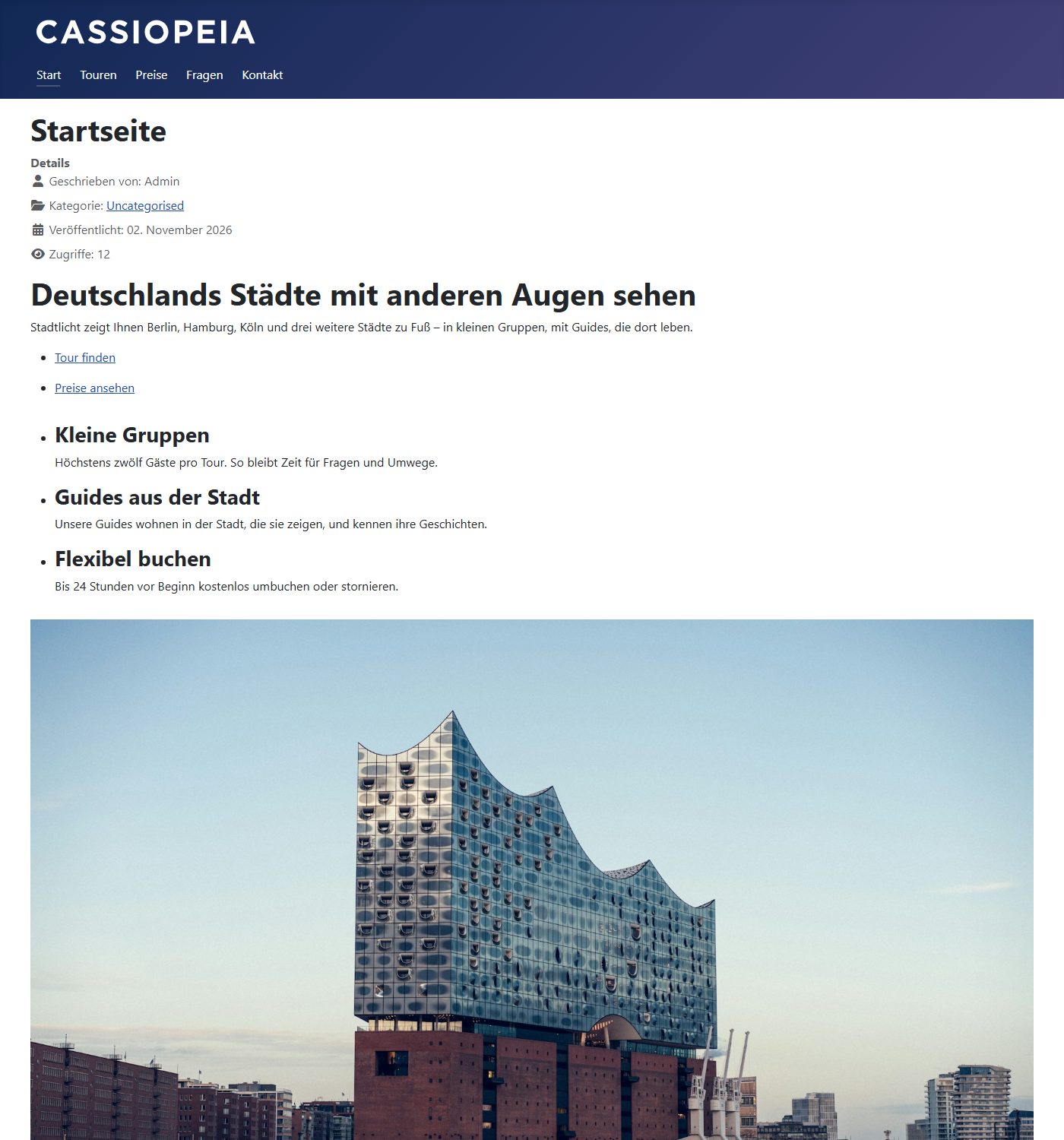
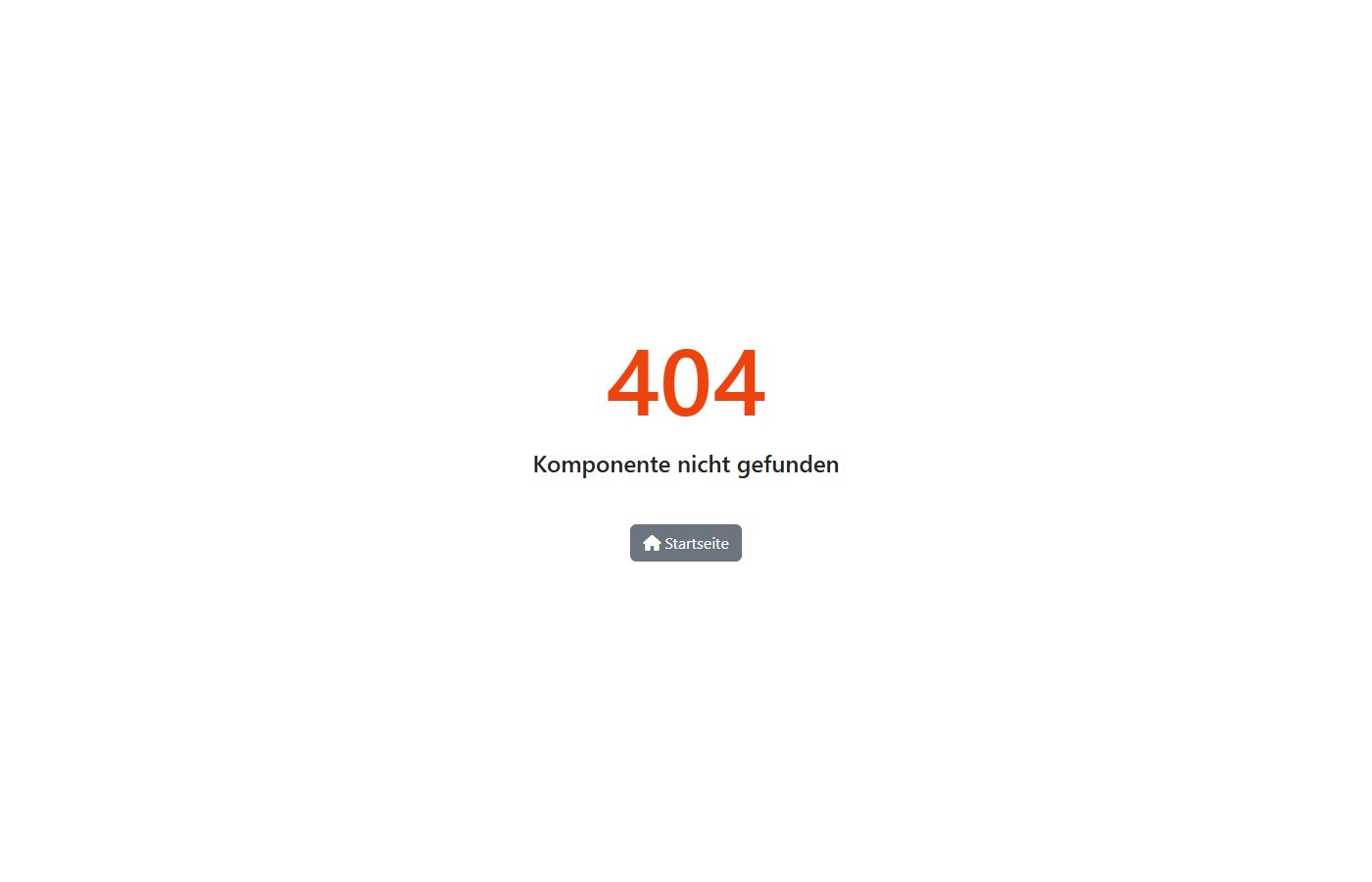
The template itself ties you in either way: whoever moves from YOOtheme or from Helix to another template rebuilds header, menu and footer.
Prices and licences
All three are licensed under the GPL. Helix Ultimate is free; for YOOtheme Pro and SP Page Builder Pro you pay yearly for updates and support. Prices according to the vendors’ websites on 2 November 2026:
| Plan | Price per year | What you get |
|---|---|---|
| YOOtheme Pro Standard | €129 plus VAT | updates for 3 websites, Joomla or WordPress, template included |
| YOOtheme Pro Developer | €329 plus VAT | updates for unlimited websites, Joomla and WordPress, image libraries |
| YOOtheme Pro Agency | €529 plus VAT | like Developer, plus priority support |
| Helix Ultimate | free | template framework, updates through JoomShaper and GitHub |
| SP Page Builder Personal | US$59 | 1 website, 1 year of support and updates |
| SP Page Builder Business | US$129 | 10 websites, 1 year of support and updates |
| SP Page Builder Agency | US$399 | unlimited websites, plus all JoomShaper templates and extensions |
YOOtheme renews the subscription automatically; after cancelling you may keep using it, only updates and support end. SP Page Builder also comes as a free Lite edition with fewer add-ons. For a single website the JoomShaper pairing is cheaper; for several websites both are in the same range.
Maintenance and support
YOOtheme ships its complete changelog in the package: 517 versions since October 2016, 56 of them in the past twelve months. SP Page Builder’s changelog lists 22 versions of the 6 series, and Helix Ultimate had 7 releases in the past twelve months. With JoomShaper these are two products with separate updates. Both vendors offer support through tickets and document in English.
Conclusion: which one suits whom
YOOtheme Pro is the better choice for new Joomla websites. Website and pages come from one tool, the pages are faster without any work on images, they remain real Joomla content with versions, workflows, search and multilingual support, and the content stays readable after a switch. You need another extension for forms.
SP Page Builder with Helix Ultimate fits when the budget for a single website is tight, when forms and many ready-made blocks matter, or when the website already runs on it. Then do three things: keep both products up to date, resize images before uploading and include Google Fonts locally. Lazy loading alone does little.
A new website with YOOtheme Pro, or moving away from SP Page Builder? We build Joomla websites with YOOtheme Pro and move existing SP Page Builder pages without losing content. The first conversation is free.
Free consultation More about our YOOtheme workHow we tested
- Two Docker environments with Joomla 6.2.0 from the official package, PHP 8.4.26 with OPcache, MariaDB 10.11 and Apache 2.4, the same PHP settings, German as language, clean URLs, otherwise Joomla’s defaults.
- YOOtheme Pro 5.0.53 with the “UIkit” style; SP Page Builder Pro 6.10.0 with Helix Ultimate 2.2.11 from JoomShaper’s GitHub page, cross-checked with Cassiopeia at full width. We noted the checksums of all packages.
- We generated the page from a shared content file and opened and saved it once in each builder’s own editor.
- Load time: Chromium via Playwright, cache off, seven runs per profile, median; the lazy loading and optimised image variants five runs. Mobile profile like Lighthouse: 412 × 823 pixels, 4× throttled CPU, 150 ms latency, 1.6 Mbit/s.
- Server: 50 requests per page after warming up, database queries from MariaDB’s log.
- Code: static analysis of the packages, accessibility with axe-core 4.13, unused code with Chrome’s coverage measurement.
- CVE counts: records from cve.org and the NVD, as of 2 November 2026.
- Everything ran locally. On real hosting the times are longer; the gaps remain.


