

 Joomla hacked?
 Joomla 6 migration
 Security update PHP & YOOtheme
 Blog
 References
 About us
 Prices
 Contact

Matomo is the best-known alternative to Google Analytics, and it can be set up to store very little about your visitors. Which settings to change in Matomo, how to add it to a Joomla 6 website and when you still need a cookie banner: we tried it out and measured it in a test environment with Joomla 6.2.0, Matomo 5.14.2 and YOOtheme Pro 5.0.53. As of 3 November 2026.
Key points
- No cookies is easy: one switch in Matomo is enough, and the tracking code sets no Matomo cookies any more.
- No cookies does not mean no banner: even without cookies the Matomo script reads details from the device, such as screen resolution, local time and browser version. For Germany, Matomo itself therefore recommends asking for consent.
- IP masking is on by default, but Matomo still uses the full IP address for geolocation. You should change that.
- In Joomla, the template is enough: the user.js file in Cassiopeia, the Scripts panel in YOOtheme Pro. There are only a few extensions for Joomla 6; we tested two.
- YOOtheme Pro 5 comes with a cookie banner that has “Reject” on the first layer. Before consent it does not even load the Matomo script.
Note: this article describes the technology and the state of the debate; it is not legal advice. Whether you need consent depends on your setup and your purpose. If in doubt, ask your data protection adviser or a lawyer.
Matomo in 2026
Matomo is free software for web analytics. It runs either on your own server (On-Premise, free of charge) or as Matomo Cloud, operated by the vendor InnoCraft. The current release is version 5.14.2 of 22 October 2026. Matomo 6 has been available as a release candidate since 30 October and requires PHP 8.1 and MySQL 8.0 or MariaDB 10.6. The data stays with you or in Matomo Cloud, and nobody uses it for advertising. That does not settle data protection, though: whether Matomo may run without consent depends on how you set it up.
Do you need a cookie banner for Matomo?
In the EU two sets of rules work together. The GDPR decides whether you may process personal data such as an IP address. The ePrivacy Directive, in Germany section 25 TDDDG (called TTDSG until May 2024), decides whether you may store anything on a visitor’s device or read anything from it at all, whether or not it is personal data. That is only allowed with consent, unless it is “strictly necessary” to provide a service the user has explicitly asked for.
Cookies are just one case. We measured what the Matomo code actually does on a Joomla page:
| Setup | Requests to Matomo | Matomo cookies | Read from the device |
|---|---|---|---|
| Standard code | one per page view | _pk_id (393 days), _pk_ses (30 minutes) | screen resolution, local time, browser and OS version |
| Without cookies | one per page view | none | screen resolution, local time, browser and OS version |
| Without cookies and browser feature detection | one per page view | none | local time, browser and OS version |
| Consent required, before consent | none | none | nothing |
| YOOtheme banner, before consent or rejected | none (matomo.js is not loaded) | none | nothing |
| After opting out | none | only mtm_consent_removed (400 days) | nothing |
“Without cookies” means disableCookies in the code or the switch in Matomo, “without browser feature detection” disableBrowserFeatureDetection, “consent required” requireConsent. Matomo reads the browser and OS version from the browser’s User-Agent Client Hints. Without cookies, Matomo links the page views of a visit on the server through a hash built from the operating system, browser, IP address and language, among other things (config_id).
This reading is the crux. In their guidance for digital services (version 1.2, November 2024, para. 24) the German supervisory authorities treat it as access to the device when a script reads properties of the device and sends them to a server. They make no general exception for audience measurement (paras. 87–90): whether it is allowed without consent can only be decided for a precisely defined setup and purpose. The European Data Protection Board’s Guidelines 2/2023 also count tracking pixels, not only cookies, as such access.
That is why Matomo itself recommends consent in Germany before the JavaScript code tracks, with or without cookies. Matomo sees only server-side analysis (log analytics or the HTTP Tracking API) as clearly outside the German law, because nothing is stored on or read from the device. Some law firms consider cookieless Matomo with masked IPs and an opt-out acceptable without a banner. That view is arguable, but not settled.
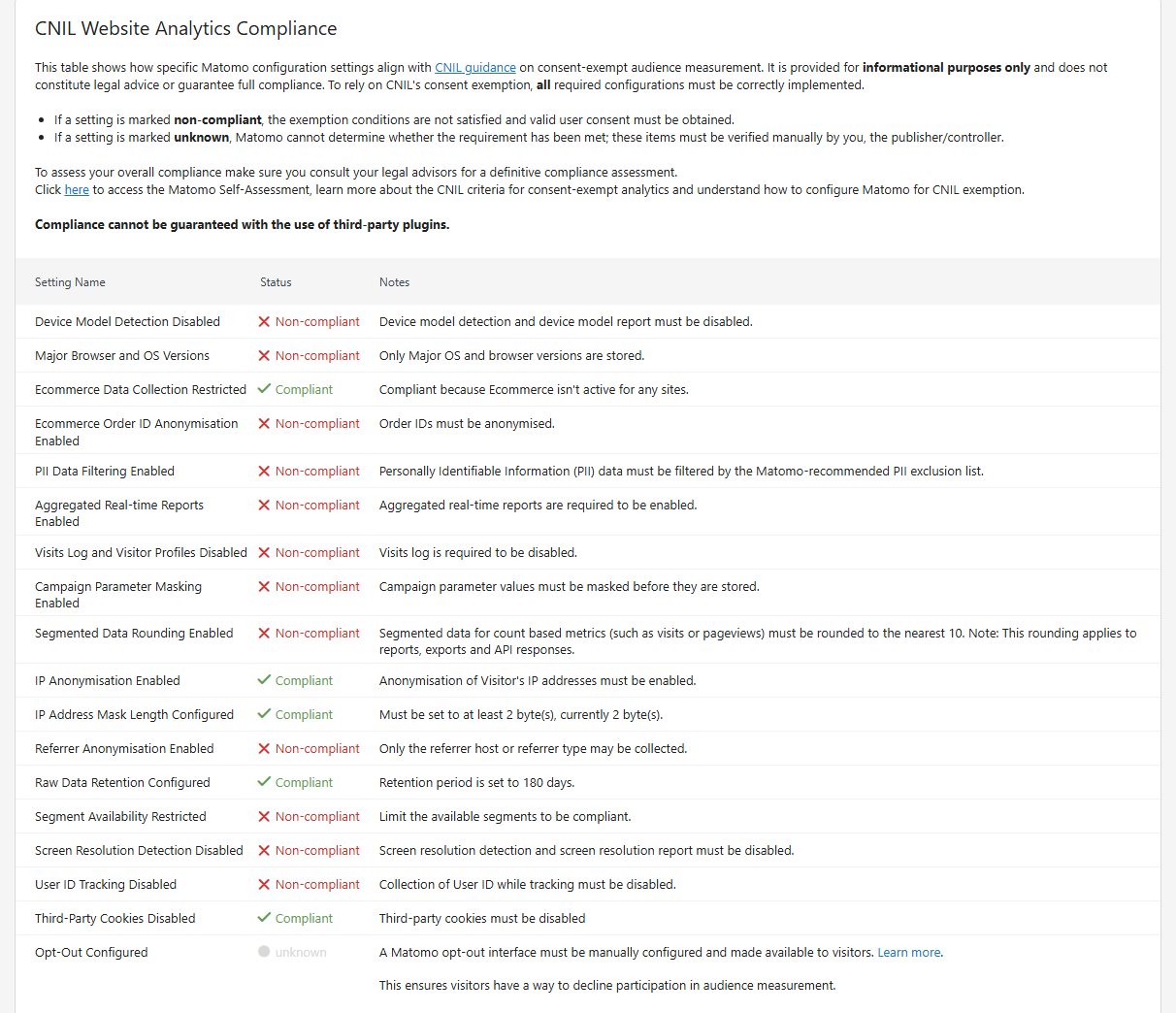
France is different: the data protection authority CNIL exempts audience measurement from consent under strict conditions. Since version 5.9.0 (April 2026) Matomo shows under Administration → Privacy → Compliance which settings are still missing for that. For websites outside France the table is a useful checklist, but it does not create an exemption.
And the EU? On 21 October 2026 the Council adopted its position on the “Digital Omnibus”, which is meant to relax the consent requirement for audience measurement. Parliament has not adopted its position yet, and the law firm Heuking expects new rules not before 2027. Until then the current rules apply.
Our recommendation
If you want to be on the safe side, let the JavaScript code track only after consent and also switch Matomo to “without cookies”. If you want to do without a banner, analyse the server logs and accept less data. Many choose the middle way, cookieless without a banner but with an opt-out. If you do, take that risk consciously and document your reasoning.
The settings in Matomo
All switches are under Administration (gear icon) → Privacy. We read the default values below in Matomo 5.14.2 after a fresh installation and checked them in the source code.
Masking IP addresses
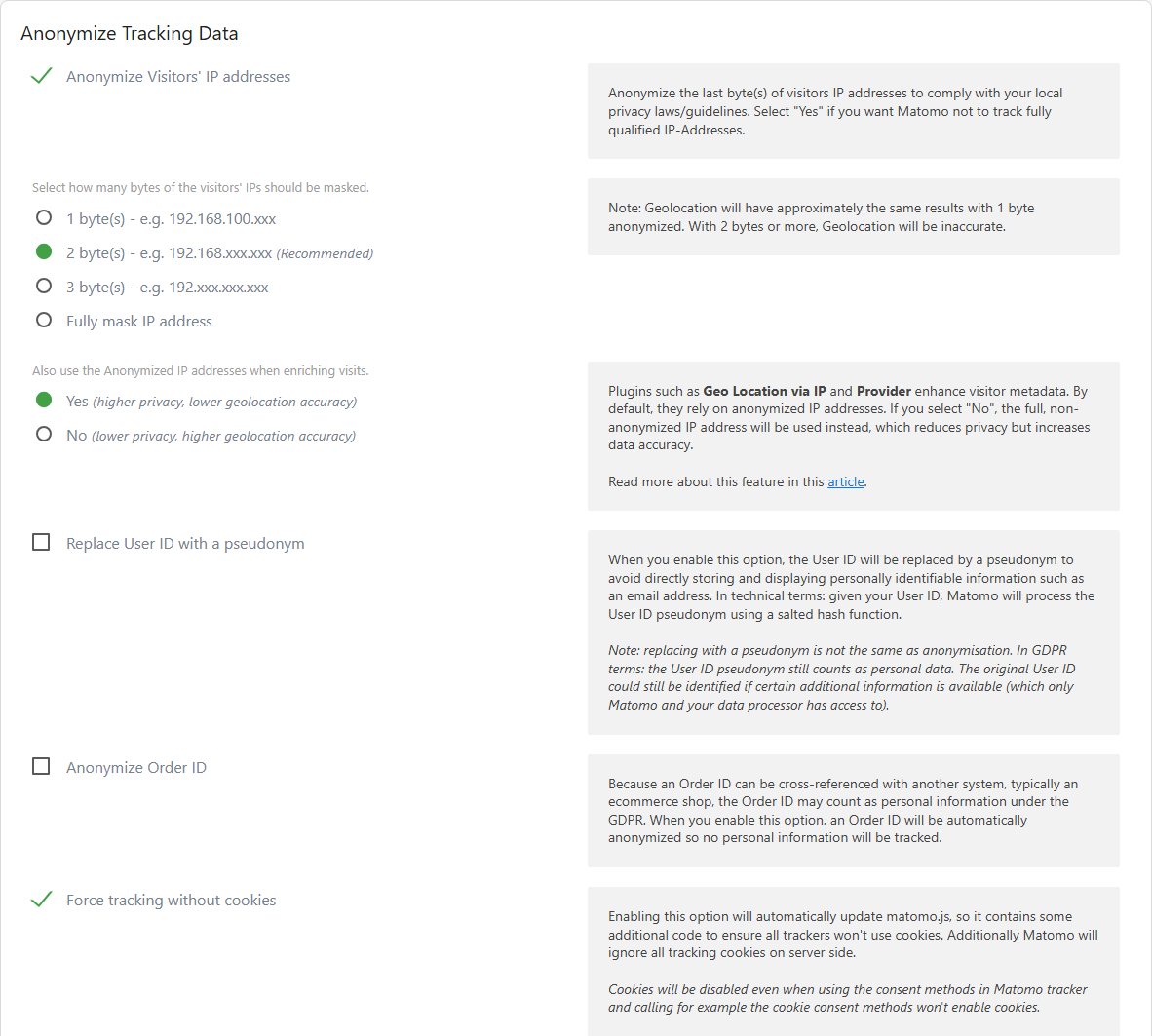
Anonymisation is on by default and masks the last two bytes: 192.168.100.123 becomes 192.168.0.0. The installer already ticks this box. One setting below it is set to “No”, though: “Also use the Anonymized IP addresses when enriching visits”. So Matomo determines the location from the full IP address. Switch it to “Yes”. The location gets less precise, but most websites need no more than the country anyway.
Tracking without cookies
“Force tracking without cookies” is on the same page and off by default. When you switch it on, Matomo changes its matomo.js so that no tracker sets cookies, and it ignores tracking cookies on the server as well. This applies to every website in that Matomo installation, including extensions whose code you cannot change. In our test, the fixed code of the Joomill Tag Manager set no Matomo cookies after that. The price: according to Matomo, unique, new and returning visitors become inaccurate, and conversions are only attributed to the visit in which they happen.
Deleting old data
“Regularly delete old raw data from the database” is off by default, so Matomo keeps raw data forever. Set a period and state it in your privacy policy. This setting does not delete the finished reports, such as page views per month; there is a separate switch for that. Beware of the Compliance page: right after installation it already reports retention as “compliant”. It only checks the period entered, 180 days, not whether deletion is switched on.
Other switches
- Anonymize referrer: by default Matomo stores the full address a visitor came from. You can keep only the domain or nothing.
- Randomize config_ID: Matomo no longer links the page views of a visit. This is the strictest level; every action then counts as a visit of its own.
- Do Not Track: support is off by default, and Matomo itself calls the feature outdated.
Visitors’ rights
Under Privacy → GDPR Tools you look up a person’s data, export it to answer an access request (Art. 15 GDPR) or delete it (Art. 17). With masked IPs, no cookies and no user ID, visits can hardly be linked to a person any more, which is the point of the settings above. For objections (Art. 21) there is the opt-out, more on that below.
Adding Matomo to Joomla 6
Matomo needs a small script on every page. Joomla has no setting of its own for that. There are four ways.
1. In the Cassiopeia template
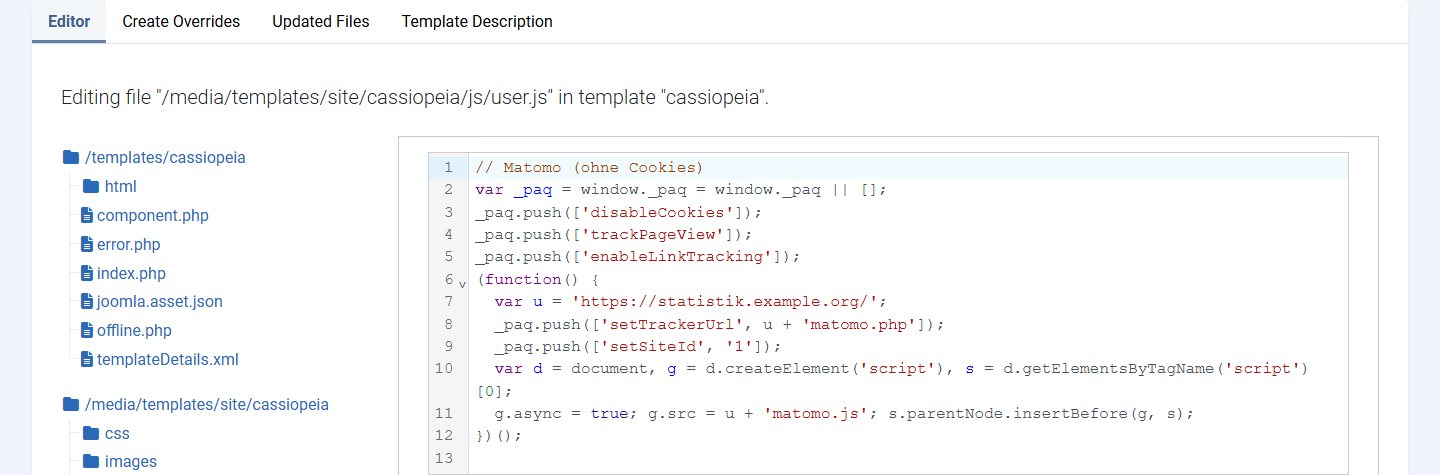
Cassiopeia, Joomla’s default template, automatically loads the file user.js if it exists. Create it under System → Site Templates → “Cassiopeia Details and Files” with “New File” in the folder media/templates/site/cassiopeia/js and paste the JavaScript part of the Matomo code without the <script> tags. The file is not part of the Joomla package. For an opt-in this is not enough on its own, because the code always runs: you then need a banner that controls it, or Matomo’s own consent lock.
2. In the YOOtheme Pro 5 template
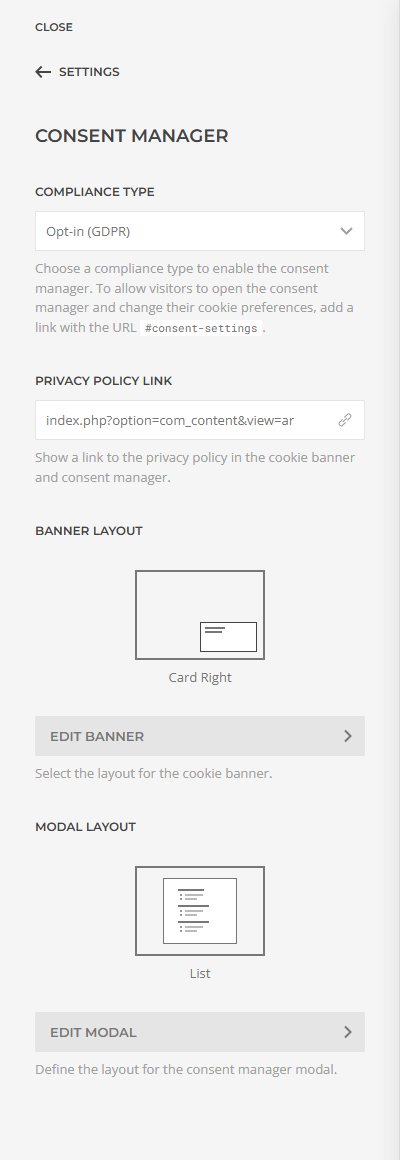
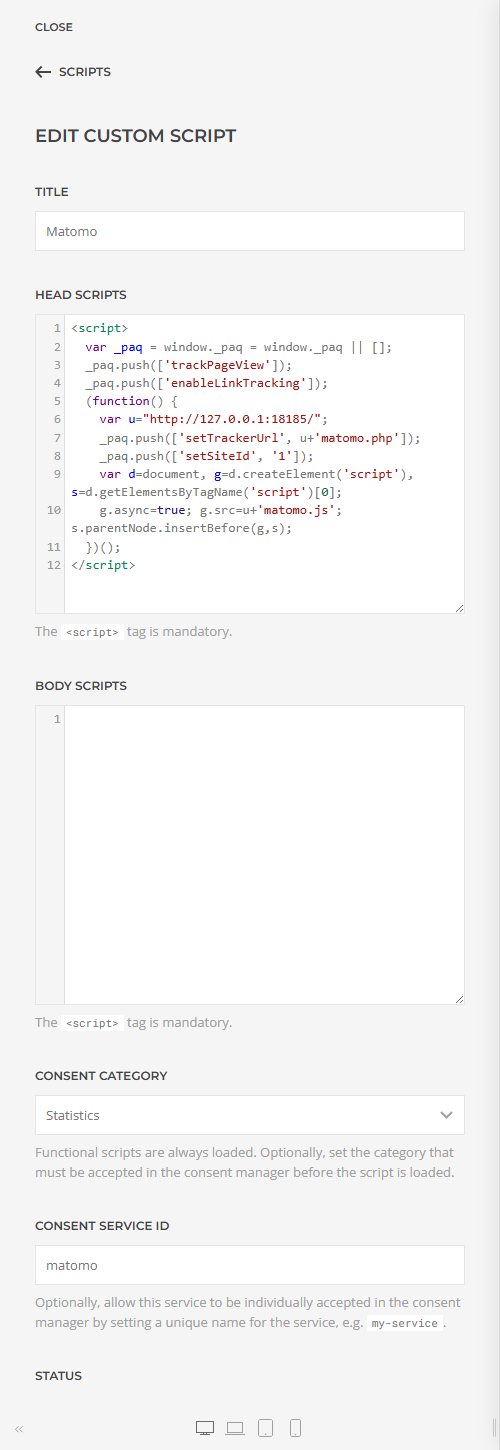
In YOOtheme Pro you add the code under Settings → Scripts → “Add Script” → “Custom Script”. Ready-made entries exist there for Google Analytics, YouTube, Vimeo, Google Maps and OpenStreetMap, not for Matomo. The key field is “Consent Category”: with “Statistics”, YOOtheme only loads the script once the visitor has agreed to that category. You switch on the banner under Settings → Consent Manager with “Opt-in (GDPR)”. There is more on YOOtheme Pro in our comparison with SP Page Builder.
3. With an extension
In the Joomla Extensions Directory a search for “Matomo” returns 17 entries (as of 3 November 2026). Only a few of them add the tracking code to Joomla 5 or 6:
| Extension | Version | Joomla (per JED) | What it does | Our test with Joomla 6.2 |
|---|---|---|---|---|
| itcs Matomo | 4.0.0, code from November 2023 | 4, 5, 6 | inserts your Matomo code before </head>, opt-out via the placeholder {matomo_opt_out} | works |
| Joomill Tag Manager | 2.5.0, October 2026 | 5, 6 | Matomo URL and site ID instead of code, link to the YOOtheme Consent Manager, exclude user groups | works, installs a second plugin |
| Lab5 Cookie Commander | 25.08.02 | 4, 5 | cookie notice with controls for Matomo and Google Analytics | not for Joomla 6 |
| Lab5 jPowerTools | 26.03.05 | 4, 5, 6 | tool collection including analytics and the Cookie Commander | not tested |
| JStats | 1.0.9 | 4, 5 | code for Matomo or Google Analytics | not for Joomla 6 |
The other results do not track by themselves: Matomo Analytics Live Counter and netzSINN Matomo Statistics display figures from Matomo on the website, Matomo for HikaShop tracks shop events, 4Analytics and StatJolt are analytics solutions of their own.
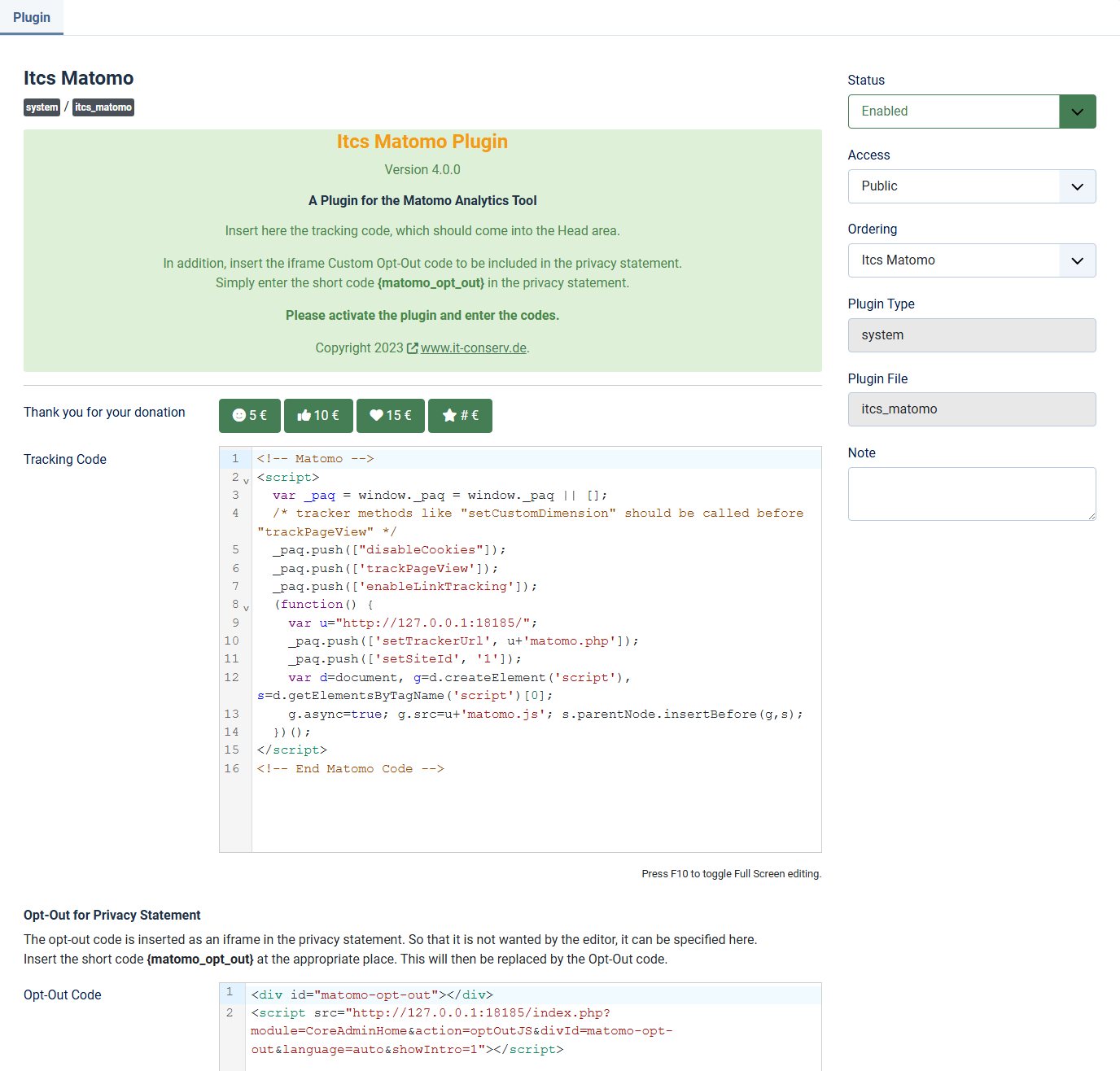
itcs Matomo is the simplest solution. You copy the code from Matomo into a field and the plugin inserts it on every page. Everything you choose in Matomo’s tracking code generator therefore applies, for example “Disable all tracking cookies”. The opt-out code goes into a second field and appears wherever you write {matomo_opt_out} in an article. The JED lists the plugin for Joomla 6; the code on GitHub dates from November 2023. In our test it still ran on Joomla 6.2 without errors, even without the compatibility plugin.
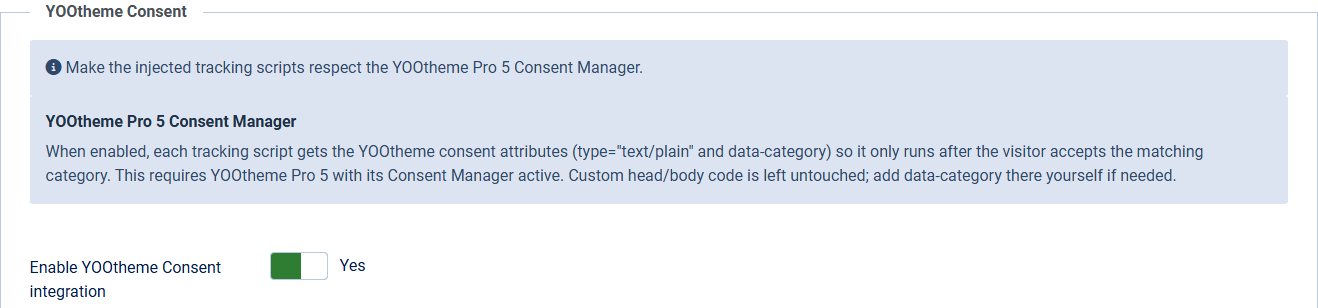
The Joomill Tag Manager only asks for the Matomo URL and site ID and generates the standard code from them. You cannot turn off cookies there; use the “Force tracking without cookies” switch in Matomo instead. Its strength is the link to YOOtheme: in the “YOOtheme Consent” tab the plugin assigns Matomo to the “Statistics” category, and YOOtheme holds the code back until consent is given. During installation the package sets up a second plugin without asking, enabled straight away: “Joomill – Update Logging”. When you download Joomill updates it sends your domain and your Joomla, PHP and database versions to the vendor. Visitor data is not affected. If you do not want this, disable it under System → Plugins.
4. With Matomo Tag Manager
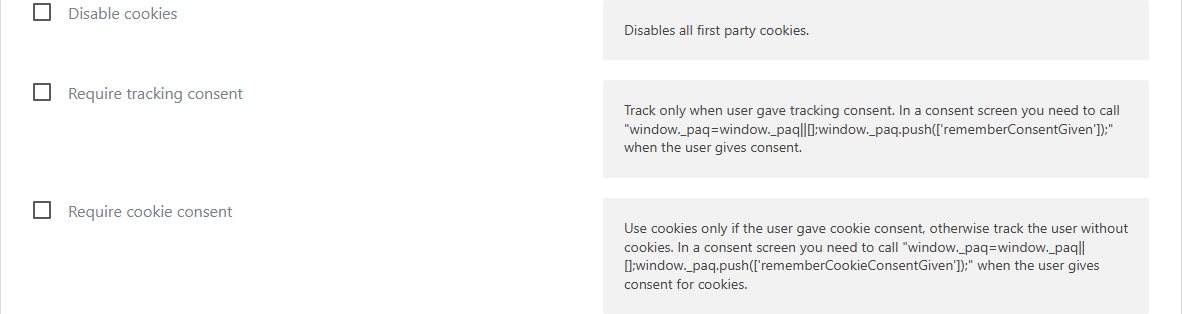
Matomo comes with its own tag manager. You then add a container instead of the tracking code, in one of the ways above, and configure everything else in Matomo. The “Matomo Configuration” variable has the same switches as the code: disable cookies, require tracking consent, require cookie consent and disable browser feature detection. This pays off if you manage several scripts or events such as downloads, forms and clicks without touching Joomla every time. The container is a script in the browser too, and the same rules apply.
Consent: the cookie banner in YOOtheme Pro 5
For an opt-in you need a banner that loads Matomo only after consent. YOOtheme Pro 5 includes one. In our test the browser did not even load matomo.js before consent or after “Reject”; only after “Accept” did the script and the tracking request follow. YOOtheme stores the choice for 30 days in the yootheme_consent cookie. “Accept” and “Reject” are equal on the first layer, as a German court has required. A link to #consent-settings, for example in the footer, reopens the settings so that visitors can change their choice.
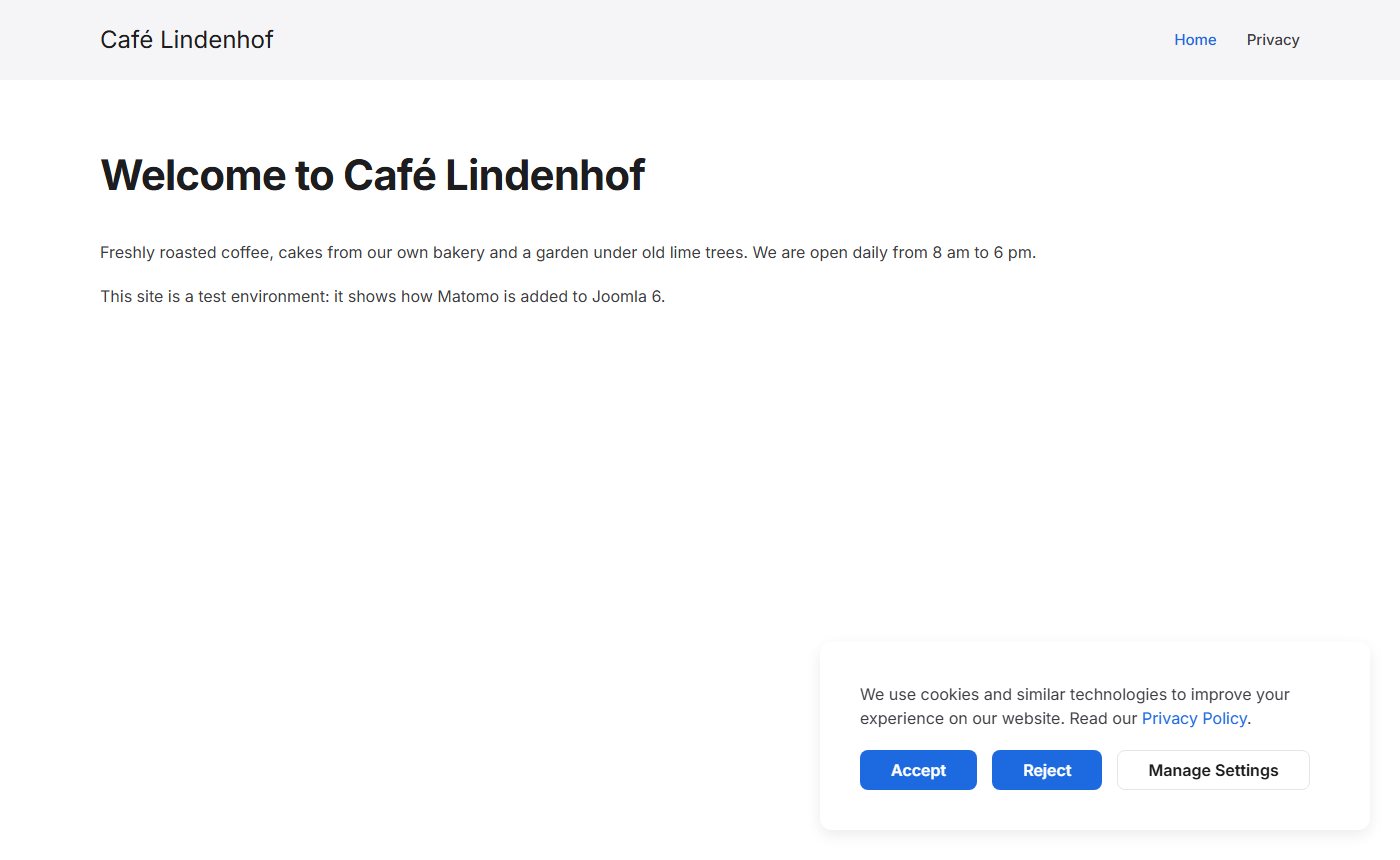
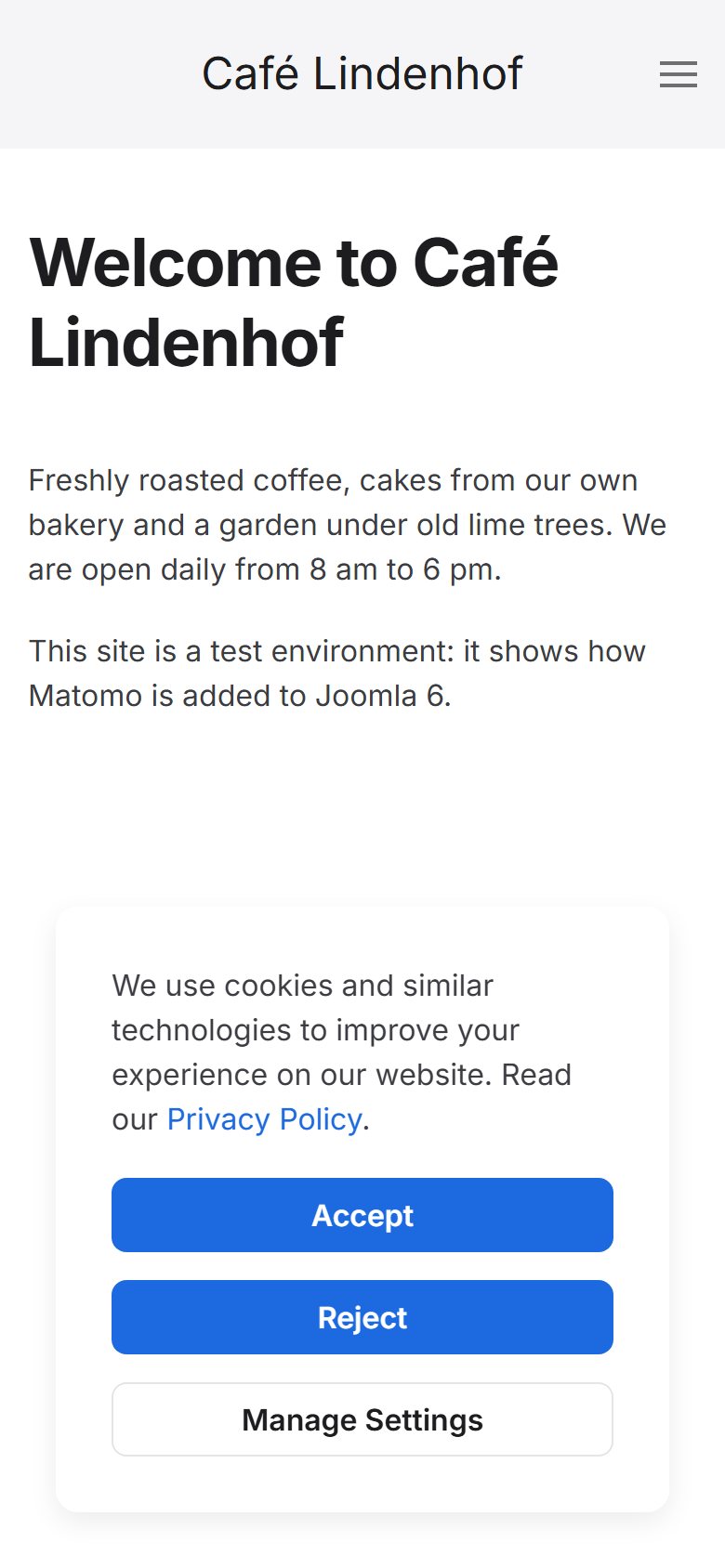
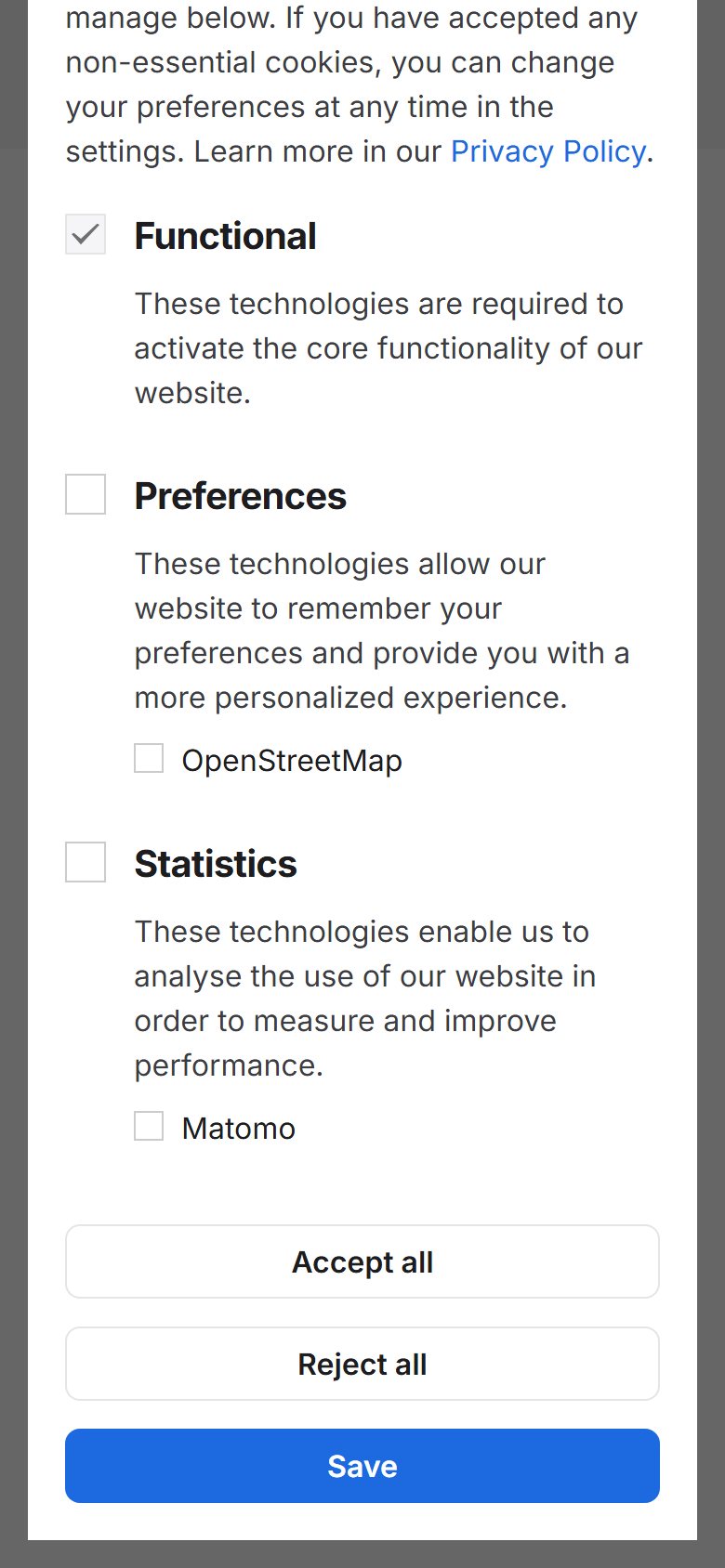
Without YOOtheme you can use a consent tool that blocks scripts, or Matomo’s own lock: _paq.push(['requireConsent']); before trackPageView. Matomo then sends nothing until your banner calls rememberConsentGiven; Matomo remembers the consent in the mtm_consent cookie (400 days in our test). With requireCookieConsent, by contrast, Matomo tracks straight away without cookies and only sets them after consent. That does not change the reading from the device.
Objection: the opt-out
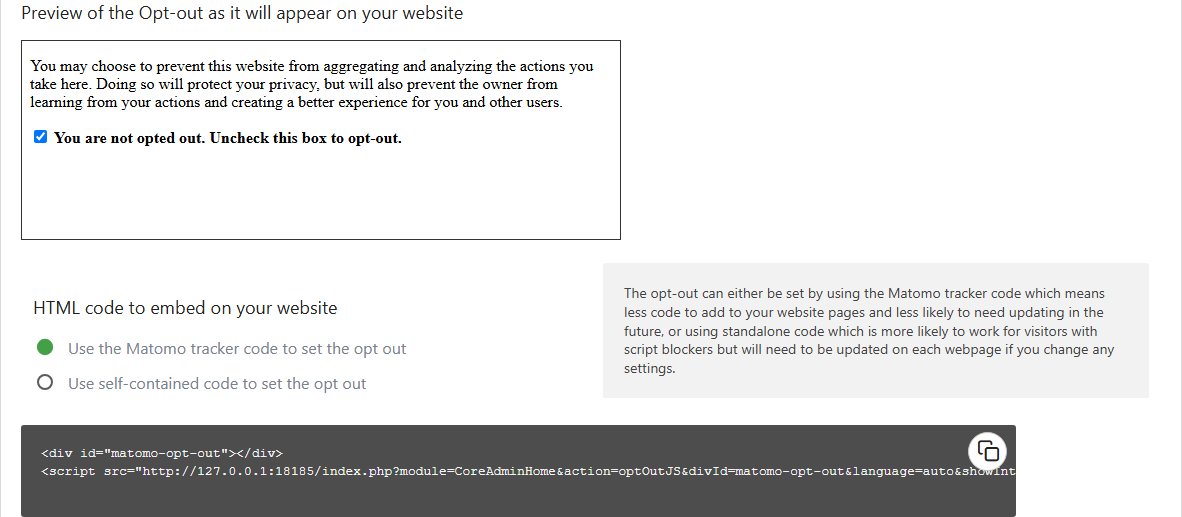
If you track without consent, visitors need a simple way to object. Matomo generates the code under Privacy → Users opt-out; in version 5.14.2 it is no longer an iframe but a div with a script. It belongs in your privacy policy. If you paste scripts straight into a Joomla article, the editor removes them depending on the text filter; the {matomo_opt_out} placeholder of itcs Matomo is more convenient. In our test no request went to Matomo after unticking the box; the only thing stored was the mtm_consent_removed cookie (400 days). Matomo points out that some browsers delete such cookies if the website is not visited for a while, Safari for example after seven days.
Self-hosted or Matomo Cloud?
| Self-hosted (On-Premise) | Matomo Cloud | |
|---|---|---|
| Cost | software free of charge, you pay for server and upkeep | from €22 a month excl. VAT for 50,000 hits |
| Data | on your server, in a location of your choice | in Frankfurt, Germany (according to Matomo) |
| Updates | your job; in 2026 a new version came out about every month | handled by the vendor |
| Contract | data processing agreement only with your host | data processing agreement with InnoCraft |
| Features | core free, premium plugins cost extra | all features included |
For your own server, Matomo recommends 2 CPUs, 2 GB RAM and 50 GB SSD for up to 100,000 page views a month. Upkeep matters more than hardware: in 2026, 5.12 came out in July, 5.13 in August, 5.14 in September and two fixes in October. A Matomo nobody updates is an attack surface just like an outdated Joomla. The cloud is priced by traffic:
For a typical Joomla website with a few thousand visits a month the smallest cloud plan is enough. If you already look after a server, On-Premise is cheaper, as long as someone installs the updates.
Checklist
- Keep IP anonymisation (2 bytes) switched on, set “Also use the Anonymized IP addresses when enriching visits” to “Yes”.
- Switch on “Force tracking without cookies”.
- Have old raw data deleted regularly and state the period in your privacy policy.
- Decide: consent through a banner, or tracking without consent with an opt-out. Write down your reasoning.
- Add the code: user.js in Cassiopeia, Scripts with the “Statistics” category in YOOtheme Pro, or an extension.
- Put the opt-out code or a link to
#consent-settingsin your privacy policy. - Update your privacy policy: Matomo, purpose, legal basis, retention period, and for the cloud InnoCraft as processor.
- Check: in the browser’s developer tools (“Network” tab) there must be no request to matomo.php before consent.
- Keep Matomo up to date.
Want Matomo set up for your Joomla website? We configure Matomo with privacy in mind, add it to Joomla and check the banner and opt-out in the browser. The first conversation is free.
Free consultation More on GDPR and JoomlaHow we tested
- Docker on 127.0.0.1: Joomla 6.2.0 from the official package (German, PHP 8.4, MariaDB 10.11), Matomo 5.14.2 from the official Docker image (PHP 8.4.27), YOOtheme Pro 5.0.53, itcs Matomo 4.0.0 from GitHub, Joomill Tag Manager 2.5.0 from the vendor’s website.
- Measurements with Chromium 141 via Playwright, a fresh browser and two page views per variant. We recorded the requests to matomo.js and matomo.php with their parameters, the cookies and localStorage; the latter stayed empty in every variant.
- Default values from Matomo’s interface after installation and from the source code (plugins/PrivacyManager/Config.php).
- The test site ran without HTTPS, which is why the opt-out shows a notice there. It does not change the measurements.
- JED search for “matomo” and the prices on matomo.org on 3 November 2026.
Sources
- Section 25 TDDDG (German)
- German Data Protection Conference: guidance for providers of digital services, version 1.2 (PDF, German)
- EDPB: Guidelines 2/2023 on the technical scope of Art. 5(3) of the ePrivacy Directive
- Matomo: Configure Matomo Analytics for TDDDG compliance
- Matomo: How do I enforce tracking without cookies? and the effect on accuracy
- Matomo releases: 5.14.2, 6.0.0 RC, 5.9.0; requirements, pricing, Cloud DPA
- Heuking: Cookie consent under the Digital Omnibus (23 Oct 2026)
- JED: itcs Matomo, Joomill Tag Manager
This article was first published in August 2018 and completely rewritten on 3 November 2026. It is for information only and is not legal advice.


