

 Joomla hacked?
 Joomla 6 migration
 Security update PHP & YOOtheme
 Blog
 References
 About us
 Prices
 Contact

With Dynamic Content, YOOtheme Pro takes the content of a page from Joomla instead of you typing it into the builder: the title, text and custom fields of an article, the description of a category, the name of the author. You design a layout once, and every page fills it with its own data. We show this with a small example site of six city tours, built with Joomla 6.2.0 and YOOtheme Pro 5.0.53 – with the settings we needed and with the places where Dynamic Content reaches its limits. As of 3 November 2026.
The short version
- Sources: builder elements show data from Joomla – from articles, categories, custom fields, users, tags, menu items, contacts and files.
- Templates: with templates you design Joomla's own views, such as all articles or all categories of a section, without building each page.
- Lists: custom queries filter by category, tag, author and date, including a custom calendar field, and sort by custom fields.
- Images: YOOtheme resizes images from fields automatically and delivers them as WebP. In our example 4.2 MB of original photos became 310 KB.
- Limits: no filter by the value of a field, no pagination for custom queries, no filters for visitors, and renamed fields go empty without a warning.
What Dynamic Content is
A page in YOOtheme Pro is made of elements: headline, text, image, grid and so on. Usually you type in their content. With Dynamic Content you choose a source instead, and the element shows what is stored there. When someone changes the article in Joomla, the page changes too, without anyone opening the builder.
This pays off wherever many pages share the same structure: services, references, events, products, team members, blog posts. Design and content are then separate. The layout is built once in the builder, and editors maintain the content in the familiar Joomla form. Dynamic Content is part of YOOtheme Pro itself and included in every licence; the smallest costs 129 euros a year for updates on three websites (YOOtheme pricing).
The example: six city tours
For this post we built a made-up website, “Stadtlicht Tours”: six city tours in a category “Tours”, three guides as Joomla users and a field group “Tour details” with Joomla's own custom fields:
| Field and Joomla field type | In the example |
|---|---|
| Image | photo of the city with alt text |
| City, Duration, Price, Meeting point | “Hamburg”, “2.5 hours”, “24”, “Baumwall underground station, harbour exit” |
| Next date | 7 November 2026, 5:00 pm |
| Level | Easy, Medium or Demanding |
| Stops | four stops per tour, each with a name and one sentence |
| About me, Languages | for every guide |
| Note | one sentence below the category description |
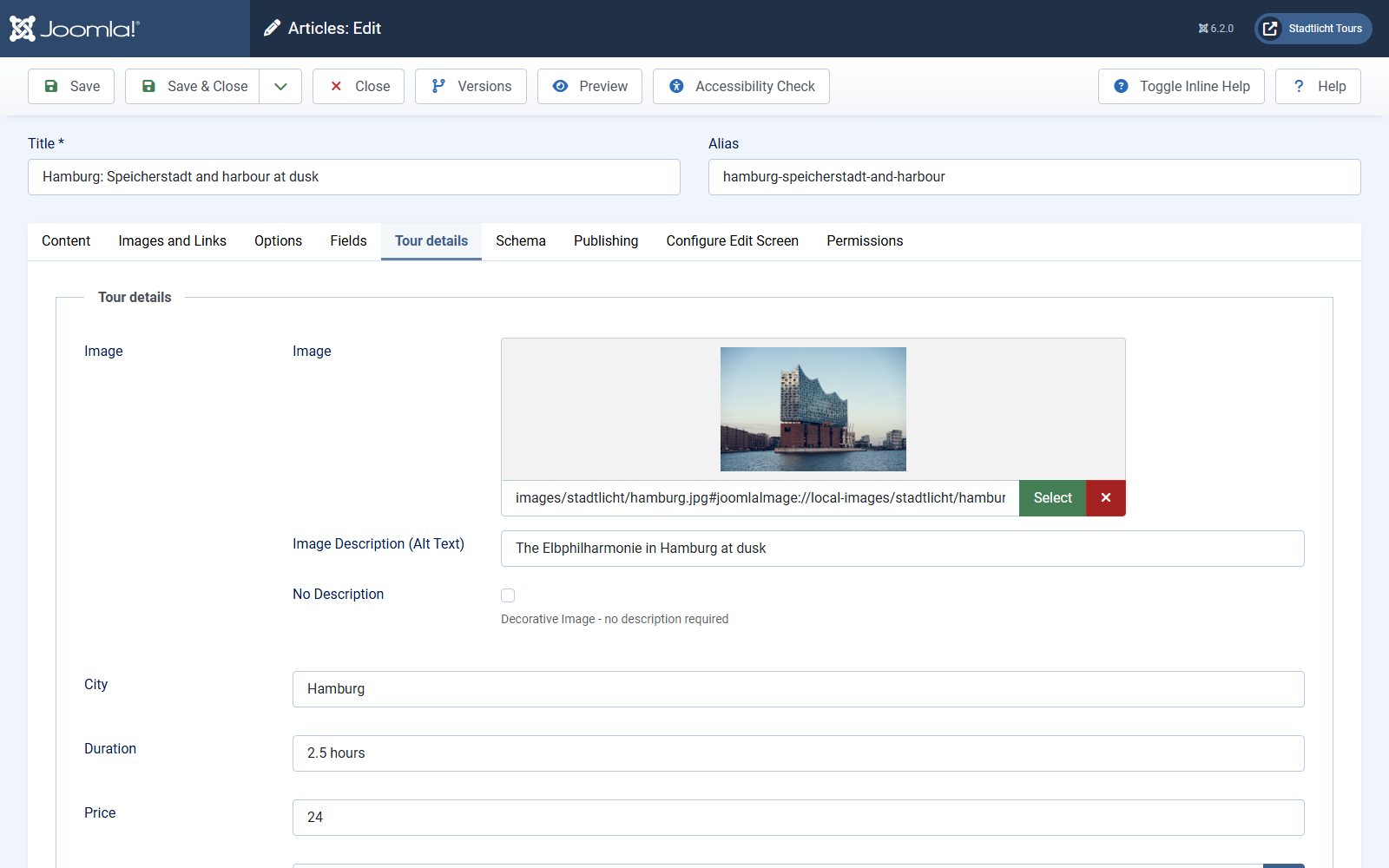
The guides are users in a group of their own, “Guides”, below “Author”, and each is the author of their two tours. How to create custom fields and which field types Joomla offers is explained in our post on custom fields in Joomla.
Templates for articles and categories
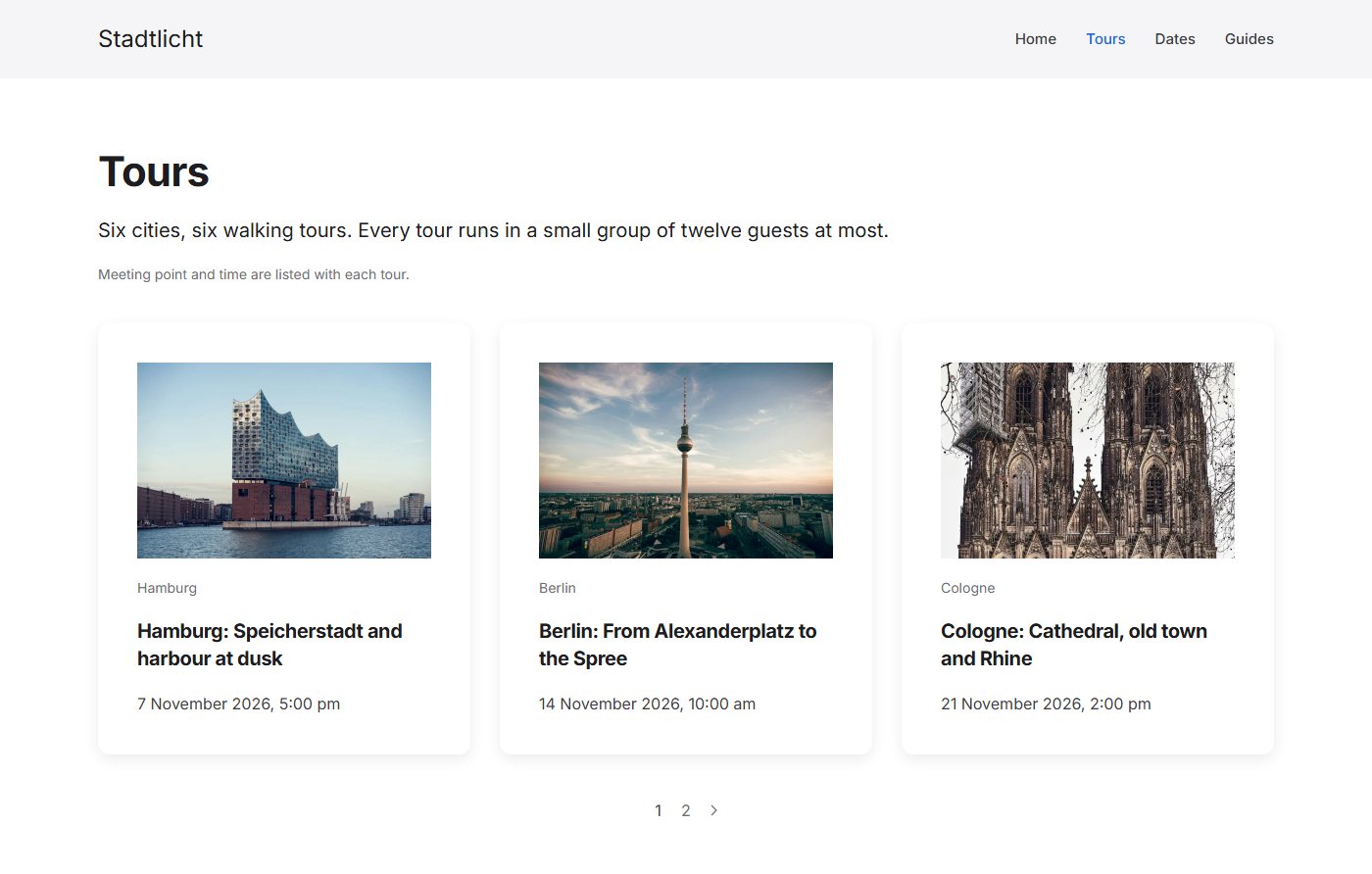
Templates save the most work. In the customizer under “Templates” you decide which layout a Joomla view gets. There are templates for single articles, category blogs, featured articles, tags, contacts, Smart Search results, live search and the 404 error page. A template can be assigned by category, tag and language, a category blog also by page number, for example for a separate first page. Our template “Tour” applies to all articles in the category “Tours”, the template “Tours” to the category blog.
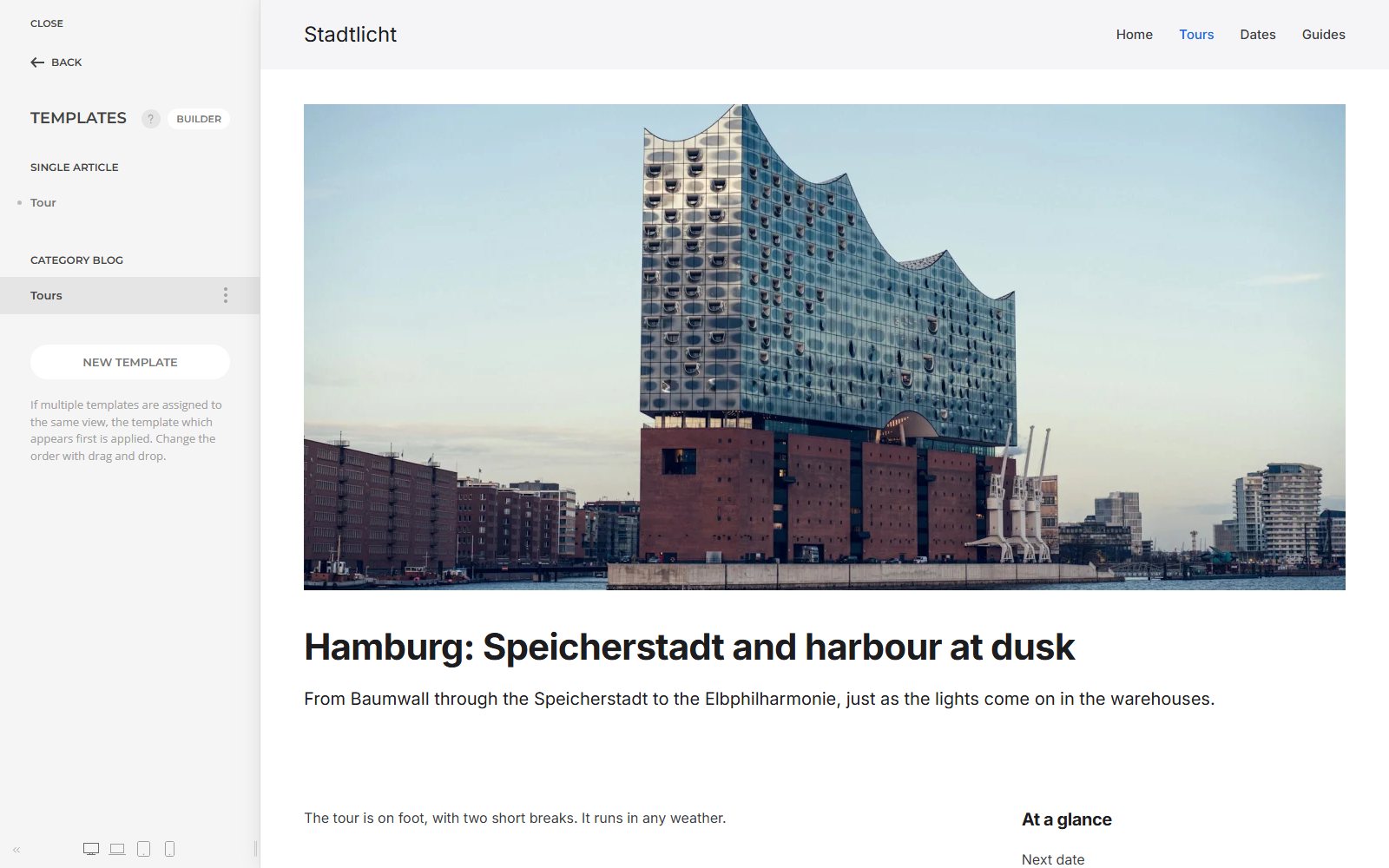
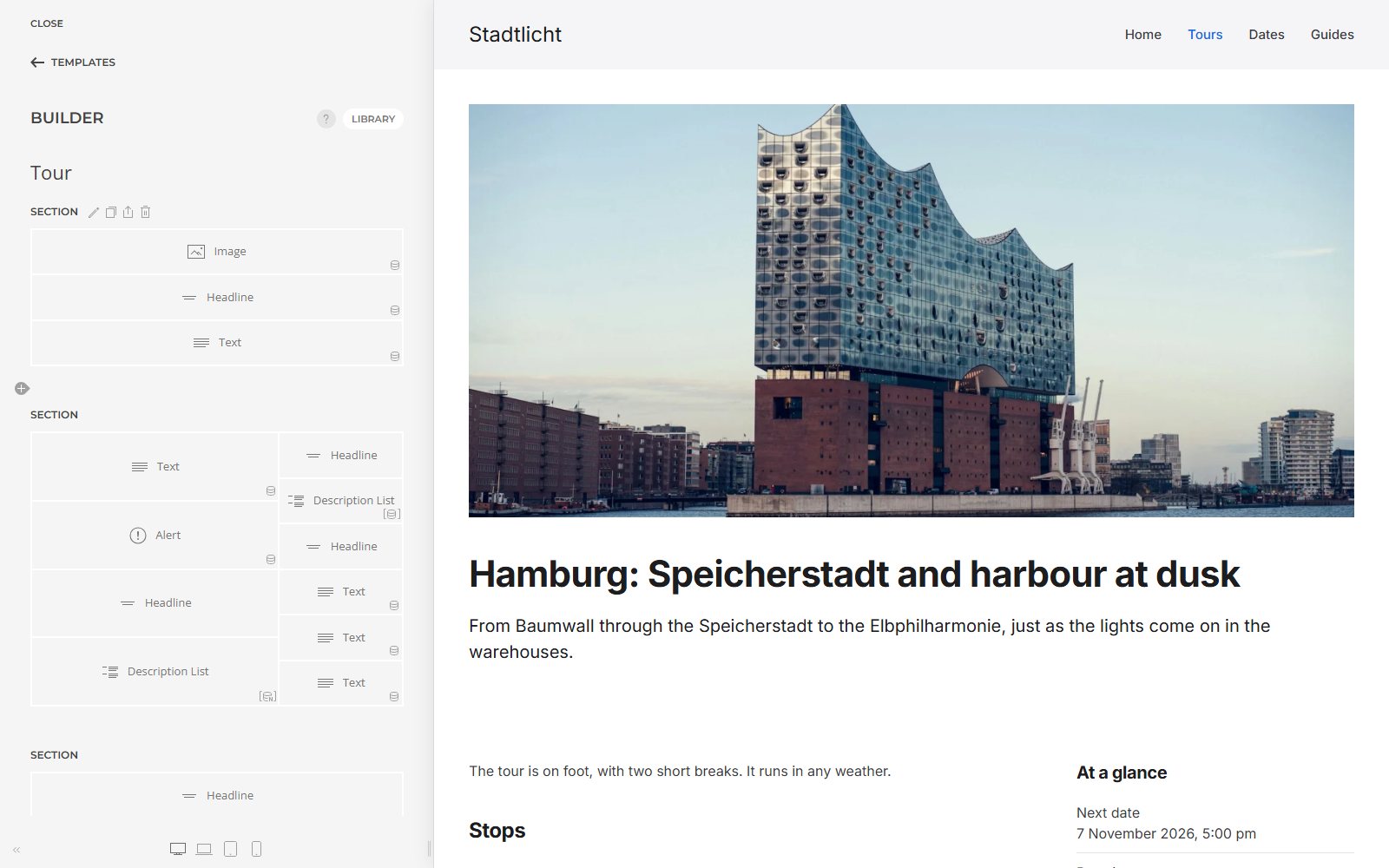
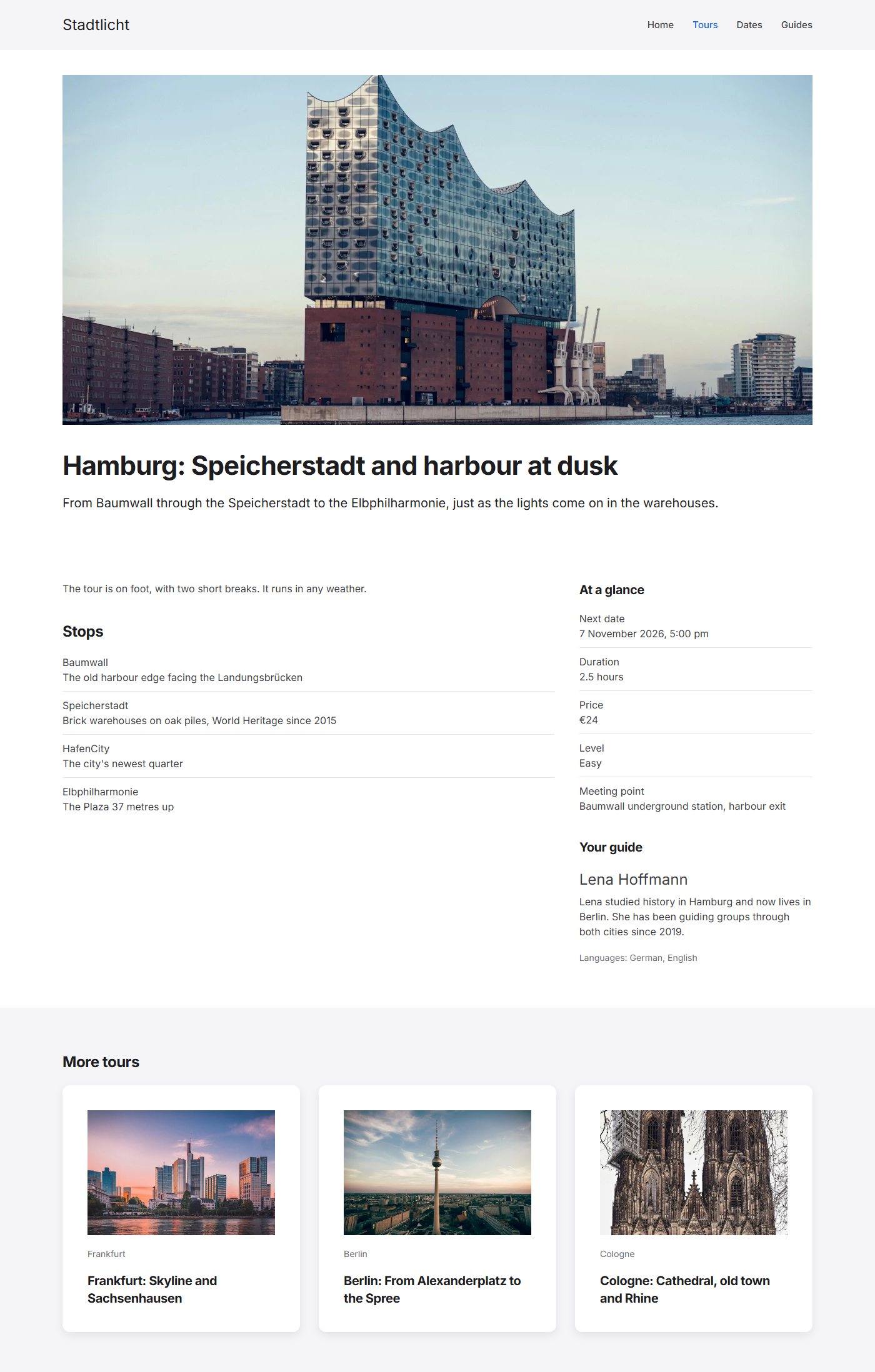
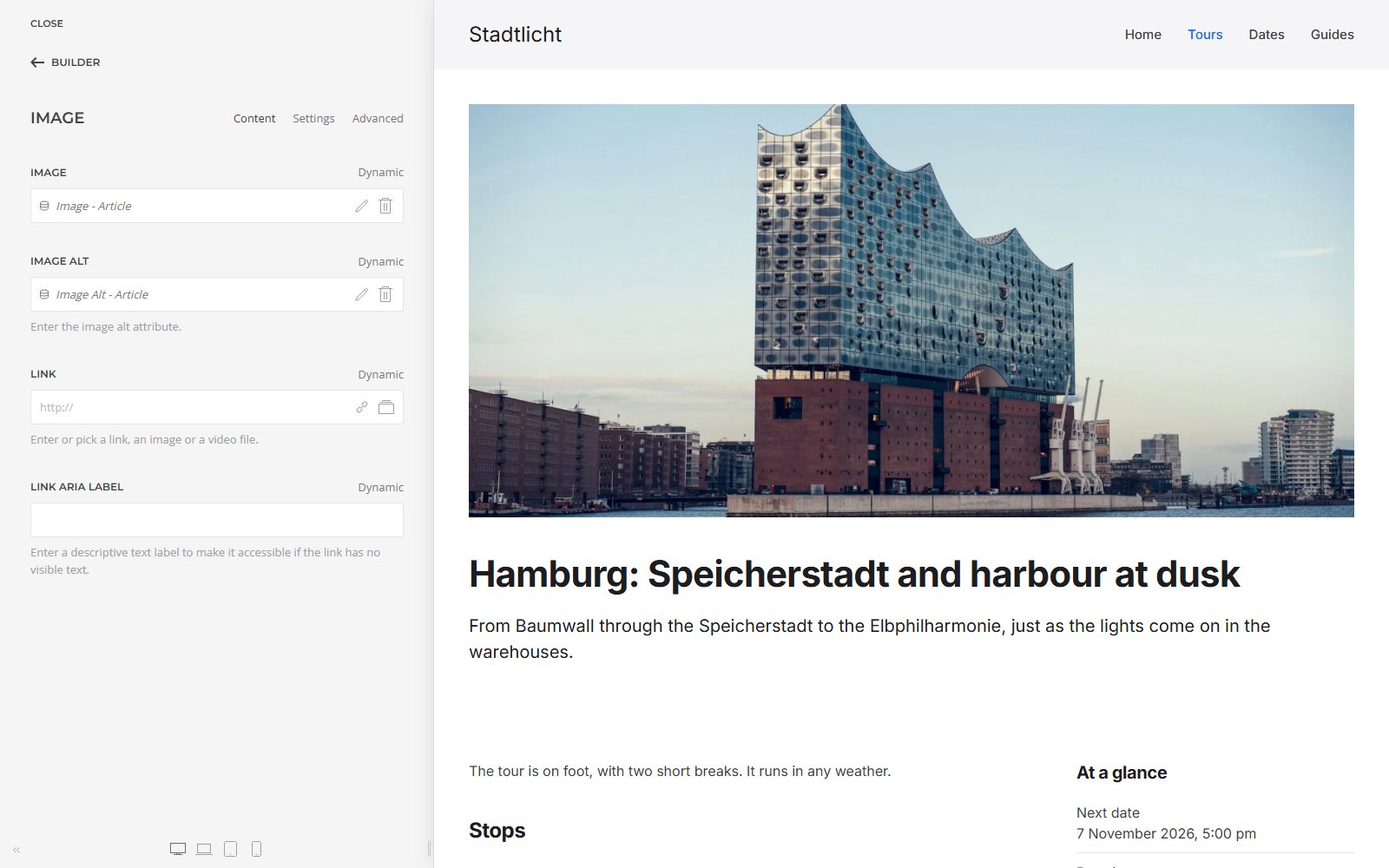
The result is an ordinary Joomla article page that fills the template's layout with its own data. At the top is the image from the field “Image”, below it the title and intro of the article. On the right the facts from the custom fields and the guide: name, “About me” and “Languages” come from the author of the article, that is, from Joomla's user management. The stops on the left come from the repeatable subform field, each row becomes an item of the list. “More tours” shows related articles from the same category, sorted by the next date.
The category template shows the title, description and the category field “Note”, followed by the category's articles as cards. How many articles appear per page and in which order is still set in the Joomla menu item; the element “Pagination” outputs Joomla's page numbers.
Mapping sources and fields
Every element has the setting “Dynamic Content” on its “Advanced” tab. In an article template it says “Article”, meaning the article Joomla is currently showing. On the “Content” tab each field of the element then gets its source: the image element takes the image and the alt text from the media field. The pencil next to it lets you adjust values, such as a date format or text before and after, which turns “24” into “€24”.
The sources YOOtheme Pro 5 offers on Joomla:
| Source and typical use | What it provides |
|---|---|
| Article | title, text, intro, images, dates, author, category, tags, custom fields, related articles, previous and next article |
| Category | title, description, image, custom fields, articles, child categories |
| User | name, email, registration date, groups, custom fields, link to the contact |
| Custom articles, categories, tags, menu items, users | single or as a list, with filters and ordering |
| File, Files | images or documents from a folder |
| Site | site name, page title, language, logged-in user |
Lists: filters and ordering
For lists outside templates there are the custom sources. Our page “Dates” shows the next three tours in the coming 30 days. For this, the grid item has the source “Custom Articles” with these settings:
- Category: Tours
- Filter by date: field “Next date”, in the next 30 days, starting today
- Quantity: 3
- Order: “Next date”, ascending
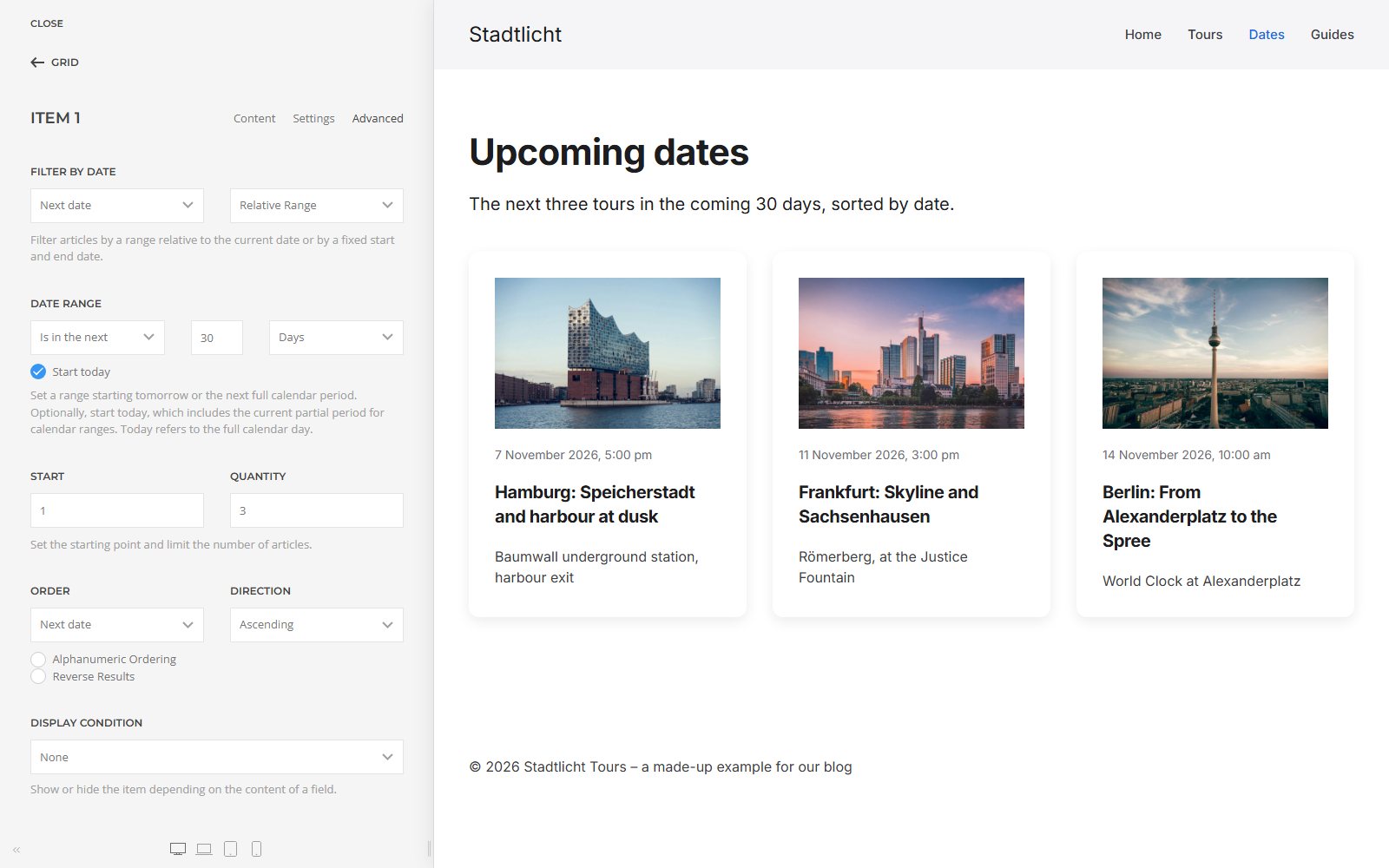
You can filter by categories (with or without child categories), tags, authors, featured articles and date. For the date, YOOtheme offers every custom calendar field besides the created, modified and published dates; you set the range relative to today, with a fixed start and end, or with PHP date formats. This date filter has existed since YOOtheme Pro 5.0.0 of 13 January 2026.
You can order by date, title, hits, Joomla's ordering, random and by every custom field that holds a single value. Joomla stores field values as text, so without further settings “10” comes before “9”; for numbers, switch on “Alphanumeric Ordering”.
Users as a source
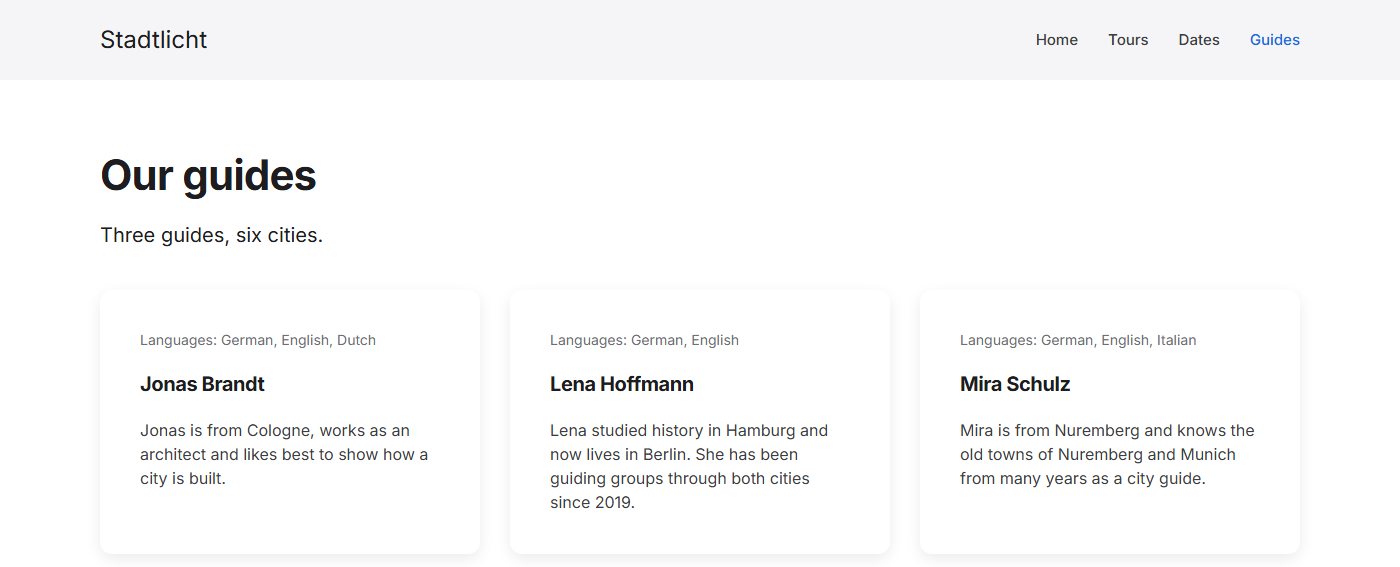
Guides, authors, contact persons: people are best kept in Joomla as users with custom fields. In the tour template the guide comes from the author of the article. The page “Guides” lists all members of the group “Guides” with the source “Custom Users”; there you can only filter by user groups and order by name, registration and last visit.
Two things we noticed: “Filter by Authors” only lists users from groups that may create articles. Our guides only appeared there once their group sat below “Author” instead of “Registered”. And there is no way back: from a user you cannot get to their articles. “All tours by Lena” needs its own query with a fixed author filter.
Conditions: show elements only when needed
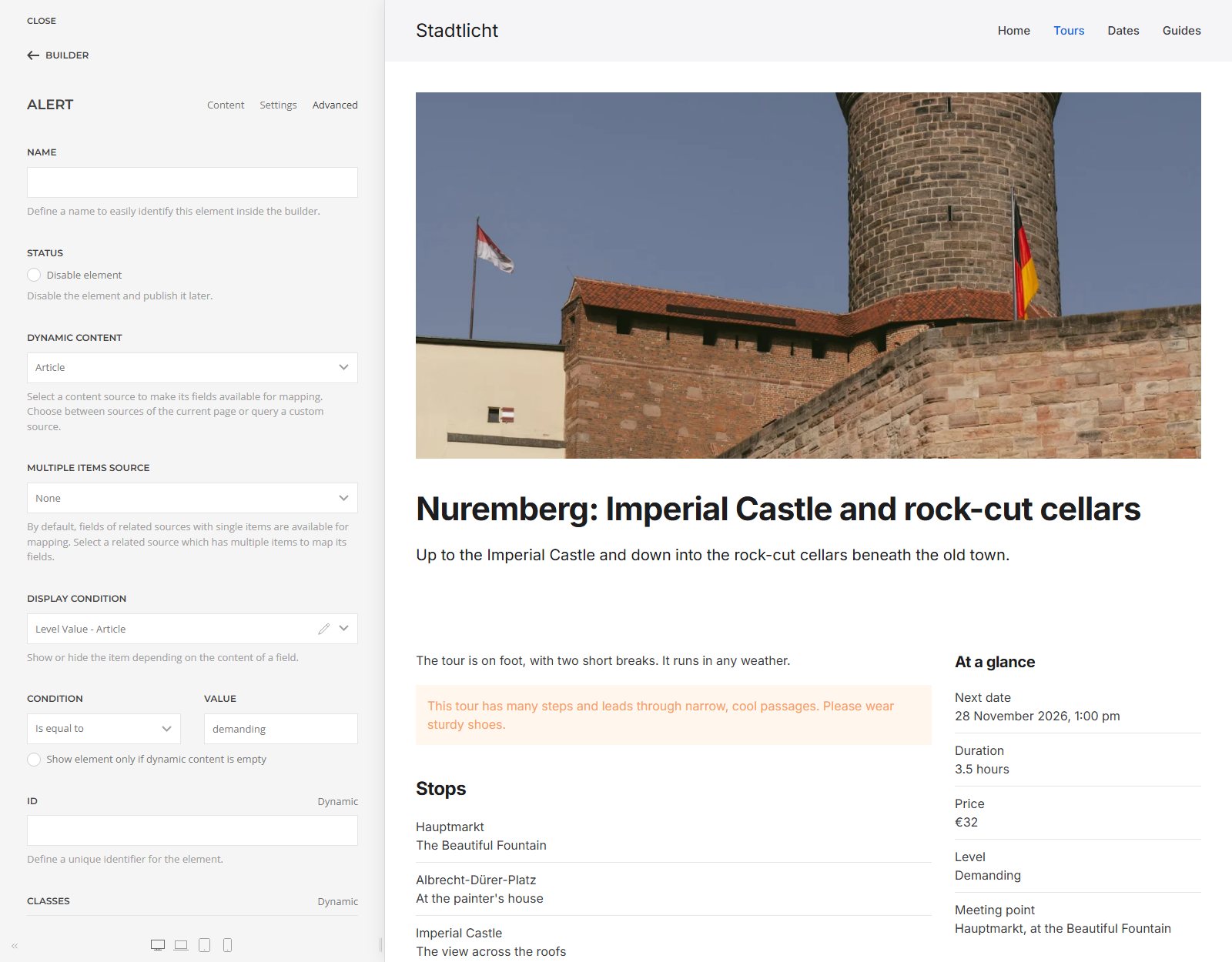
The display condition shows or hides an element depending on the content of a field. Our tour template contains a warning that only appears when the field “Level” has the value “demanding”. It stays one template, and the warning only shows on the Nuremberg tour. The options include “is empty”, “is equal to”, “contains”, “less than” and “greater than”.
Images from fields and the image cache
YOOtheme treats images from a media field like images you pick in the builder: it crops them to the size you set, renders several widths for different screens and delivers them as WebP, with a JPG for older browsers. For our cards of 600 × 400 pixels it creates versions 600, 768, 1024 and 1200 pixels wide, and the browser loads the one that fits.
The files are stored in media/yootheme/cache and are created on the first request. Until then the page points to an address through which YOOtheme creates the image (/component/ajax?p=cache…), afterwards straight to the finished file. Detailed motifs stay heavier: Cologne Cathedral is 100 KB even as a card, the Elbphilharmonie 34 KB.
The vulnerability CVE-2026-102785, which YOOtheme Pro 5.0.53 closed on 21 October 2026, went through this image handler. So keep YOOtheme up to date; what site owners should check is in our post on the YOOtheme Pro 5 vulnerability.
Limits
- No filter by field value. “Custom Articles” does not filter by the content of a custom field, such as “easy tours only”. The display condition helps only in part, because it applies after the query: with quantity 3 and the condition “easy”, two tours were left in our test, although three easy tours fell within the 30 days. Categories or tags suit such groupings better.
- No pagination for custom queries. The element “Pagination” only works with Joomla's own lists such as the category blog. Custom sources show a fixed quantity.
- No filters for visitors. You set the queries while building. Visitors cannot filter a list by city or date themselves; that takes a filter extension or custom development.
- Joomla data only. Sources are Joomla's content, users, contacts, tags, menus and files, plus extensions that bring their own sources. Data from other systems, such as spreadsheets or other websites, needs an additional extension.
- Renamed fields go quietly empty. The mapping depends on the field's name. When we renamed the field “Meeting point”, the meeting point was missing on the Dates page, without an error message and without an entry in the error log.
- Fields with several values. Multi-select list fields and repeatable fields can be displayed, but not used for ordering.
New in YOOtheme Pro 5
Since version 5.0.0 of 13 January 2026, Dynamic Content on Joomla has gained, among other things (YOOtheme changelog):
- Date filter and “Reverse Results” for custom and related articles (5.0.0)
- Field options in the display condition and text transform for field values (5.0.0)
- Style options of sections and columns as well as CSS can be mapped to fields (5.0.0)
- Audio, document and video fields of Joomla 6.1 as sources (5.0.30, 29 April 2026)
- Child categories as a source in the category blog, with ordering (5.0.43, 26 August 2026)
Conclusion
Dynamic Content splits the work cleanly: Joomla manages the data, YOOtheme designs it. For websites with many pages of the same structure, this saves time with every new entry and keeps the design consistent. Plan the fields before the first layout, choose field names you will not change later, and expect extra work for visitor filters and pagination of custom lists. How YOOtheme Pro compares with another builder is covered in our comparison YOOtheme Pro or SP Page Builder?
Fields and templates for your Joomla website? We plan custom fields and YOOtheme templates so that your editors only need to enter content. The first conversation is free.
Free consultation More about our YOOtheme workHow we tested
- Docker environment with Joomla 6.2.0 from the official package, PHP 8.4 and MariaDB 10.11, YOOtheme Pro 5.0.53 with the Inter font.
- All content created by script through Joomla's own models: one category, 13 custom fields in three groups, one user group, three users, six articles, two builder pages and two templates. The six city photos come from Unsplash.
- All screenshots from this installation, as of 3 November 2026; the dates are relative to that day.
- File sizes taken directly from
media/yootheme/cacheafter every image version had been requested once. - Filters, ordering, field types, templates and conditions also checked in the source code of YOOtheme Pro 5.0.53.


